

Computer Wake Up
Cory Borg Utilities iPhoneiPadiPod touchMacApple Watch
Computer Wake Up is a free Utilities app for iPhone and iPad by Cory Borg. Rated 5.0/5 from 1 ratings. Requires iOS 26.2. Updated October 15, 2026.
- Rating
- 5.0
- 1 ratings
- Price
- Free
- on the App Store
- Size
- 5 MB
- Age 4+
- Updated
- Oct 15
- 2026 · v1.3.0
Screenshots


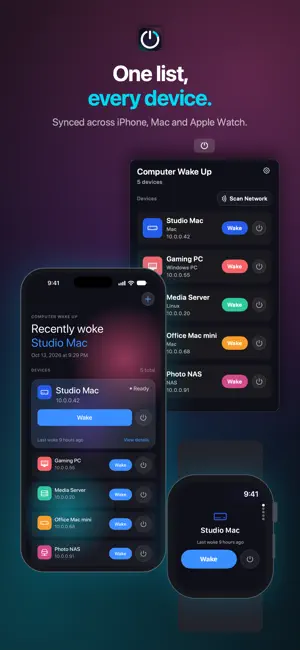

About Computer Wake Up
Computer Wake Up! This app gives you a fast, calm way to wake and sleep your computers from across your Apple devices. Save multiple computers, servers, NAS boxes, and Macs Send Wake-on-LAN and Sleep-on-LAN magic packets from Watch, iPhone, and iPad Customize each computer with names, icons, colors, notes, ports, and addresses Wake computers from Home Screen widgets, Control Center, Siri, Shortcuts, and Apple Watch Use the Mac menu bar companion to scan your network, import discovered computers, edit saved devices, reorder them, and sync them through iCloud Keep saved computers in sync across iPhone, widgets, Watch, and Mac companion Schedule wake reminders and trigger wake actions from notifications Enjoy a focused, card-based interface built for quick everyday use Thank you for trying the first version of Computer Wake Up! I built it to make waking my own machines less fiddly, and I hope it earns a useful little spot in your setup too.
What’s new
Version 1.3.0 · Updated October 15, 2026
Computer Wake Up is ready for iOS 27, with a fresh look and better support for larger text and bigger screens. - New app icon - Text throughout the app now follows your Dynamic Type setting, including the largest accessibility sizes - Layouts adapt to larger screens, keeping your computers at a comfortable reading width - Opens straight to your computers, without a splash screen
App privacy
The developer, Cory Borg, reported these privacy practices to Apple.
Data Linked to You
The following data, which may be collected and linked to your identity, may be used for the following purposes:
- Identifiers: Device ID
Used for: App Functionality