

DocumentHub: File Manager
Penghui Zhao Productivity iPhoneiPadiPod touch
DocumentHub: File Manager is a free Productivity app for iPhone and iPad by Penghui Zhao. Rated 5.0/5 from 1 ratings. Requires iOS 16.0.
- Rating
- 5.0
- 1 ratings
- Price
- Free
- on the App Store
- Size
- 164 MB
- Age 17+
- Updated
- Sep 27
- 2026 · v1.3
Screenshots

About DocumentHub: File Manager
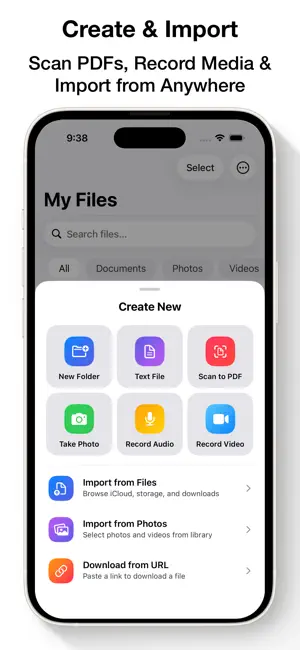
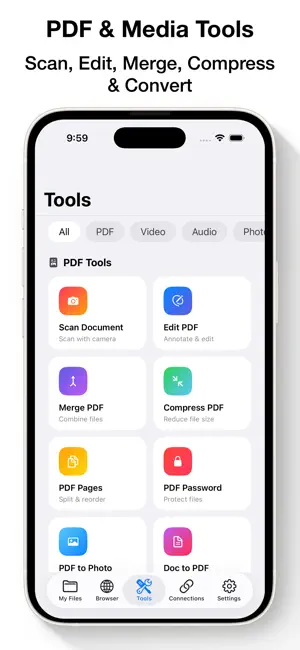
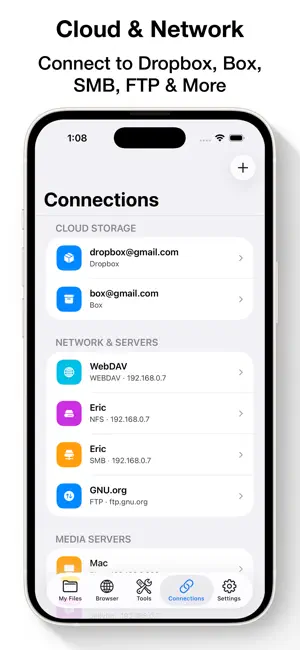
DocumentHub is the all-in-one file manager that turns your iPhone and iPad into a true workstation — browse, view, edit, convert, and stream every file you own. ALL YOUR FILES IN ONE PLACE • Browse local files with folders, color tags, and instant search • Multi-select to move, copy, compress, or share in bulk • Deleted files stay in Trash for 30 days — restore with one tap • Extract ZIP, RAR, and 7z archives; create ZIP archives VIEW & EDIT ANYTHING • PDF, Word, Excel, PowerPoint, Pages, Numbers, Keynote • Full EPUB reader with themes, bookmarks, highlights, and read-aloud • Plain text and Markdown editor • Photo viewer and editor with markup and crop PDF POWER TOOLS • Scan paper documents straight to PDF with your camera • Merge PDFs; reorder, rotate, and delete pages • Compress PDFs; add or remove password protection • Convert photos and Office documents to PDF — and PDF pages to images PLAY EVERY VIDEO & SONG • Built-in player for MP4, MOV, MKV, AVI, WEBM, FLV, and more — no conversion needed • Music player with playlists • Stream your library from Plex, Emby, and Jellyfin media servers CONVERT & CREATE • Video converter and compressor — H.264/HEVC, custom bitrate, resolution, frame rate • Trim, cut, split, and reverse videos • Extract MP3 from any video; convert between 15+ audio formats • Make custom iPhone ringtones with fade-in/out and volume normalization • Turn videos and photo bursts into GIFs • Transcribe audio to text with on-device AI — export as SRT subtitles • Edit MP3 tags: artist, album, cover art • Record voice memos and video clips CONNECT TO EVERYTHING • Cloud drives: Google Drive, Dropbox, OneDrive, Box • Network servers: SMB, WebDAV, FTP, SFTP — your NAS at your fingertips • Wi-Fi Transfer: move files between computer and device using any web browser, no cable needed • Built-in web browser with download manager, tabs, bookmarks, and history PRIVATE & SECURE • Lock the app with Face ID or a passcode • Your files stay on your device — no account required Download DocumentHub and carry your office, media center, and toolbox in your pocket. SUBSCRIPTION: Payment will be charged to iTunes Account at confirmation of purchase. Subscription automatically renews unless auto-renew is turned off at least 24 hours before the end of the current period. Account will be charged for renewal within 24 hours prior to the end of the current period at the rate of the selected plan. Subscriptions and auto-renewal may be managed by going to Account Settings after purchase. Terms of Service: https://www.fingerjoystudios.com/terms-of-service/ Privacy Policy: https://www.fingerjoystudios.com/privacy-policy/
What’s new
Version 1.3 · Updated September 27, 2026
- Add support for iPad.
App privacy
The developer, Penghui Zhao, reported these privacy practices to Apple.
Data Not Collected
The developer does not collect any data from this app.
Alternatives to DocumentHub: File Manager
Looking for apps like DocumentHub: File Manager? Here are 6 similar apps on the App Store. The highest rated is FileZen - File Manager (5.0/5), and all 6 are free to download.
-
 FileZen - File Manager
5.0
-
 File Manager: Files & Vault
4.8
-
 FTP Client - Files location
4.5
-
 Torrent File Saver
2.8
-
 MobiDrive Cloud Storage & Sync
4.7
-
 Owlfiles - File Manager
4.6
| App | Rating | Price | Last updated | Compare |
|---|---|---|---|---|
| DocumentHub: File Manager | 5.0 / 5 (1 rating) | Free | September 27, 2026 | |
| FileZen - File Manager | 5.0 / 5 (2) | Free | Oct 11, 2026 | Compare |
| File Manager: Files & Vault | 4.8 / 5 (10) | Free | Sep 24, 2026 | Compare |
| FTP Client - Files location | 4.5 / 5 (37) | Free | Oct 21, 2026 | Compare |
| Torrent File Saver | 2.8 / 5 (9) | Free | Jun 24, 2026 | Compare |
| MobiDrive Cloud Storage & Sync | 4.7 / 5 (566) | Free | Sep 17, 2026 | Compare |
| Owlfiles - File Manager | 4.6 / 5 (7,237) | Free | Oct 21, 2026 | Compare |