

FrameBox: Carousel & No Crop
Andrej Sazdovski Photo & Video iPhoneiPadiPod touch
FrameBox: Carousel & No Crop is a free Photo & Video app for iPhone and iPad by Andrej Sazdovski. Requires iOS 15.1. Updated October 17, 2026.
- Price
- Free
- on the App Store
- Size
- 75 MB
- Age 4+
- Updated
- Oct 17
- 2026 · v1.2.0
Screenshots



About FrameBox: Carousel & No Crop
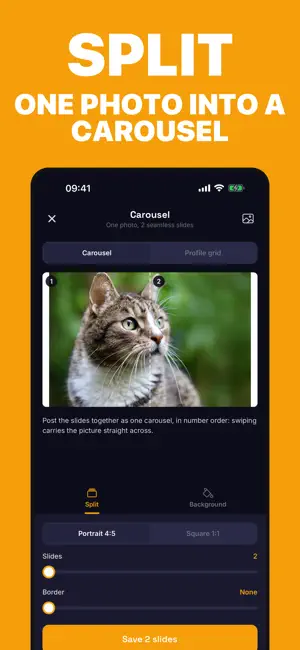
Post the whole photo. FrameBox fits any photo or video into the exact size you post at, with a border, blur or colour around it instead of a crop. EXACT SIZES, NO CROP Pick where it's going: portrait post, square, Story / Reel, 4×6 print and more. The export is exactly that ratio, border included, so Instagram has nothing left to crop. MOVE IT WITH YOUR FINGERS Drag, pinch, twist and double-tap the photo. Straighten, rotate, flip or fit it. Snapping and a 1 px nudge pad put it exactly where you want it, and undo takes back any step. TEXT ANYWHERE Add several captions in six fonts, then drag, pinch and rotate them on the picture. Captions are saved into the exported image. ONE PHOTO, MANY POSTS Split a panorama into a seamless carousel, or a photo into a profile grid (3 wide, up to 5 rows), numbered and saved in posting order. BACKGROUNDS AND FRAMES Solid colour, blur or gradient backgrounds, rounded corners, shadow and an instant-photo frame. Save a style as a look and reuse it in one tap. VIDEO TOO Frame videos for Reels and Stories with the same tools. Sound is kept. BATCH Frame up to 20 photos with the same settings at once. PRIVATE BY DESIGN Your photos are edited on your device and are never uploaded. No account. FrameBox only asks to add to your library when you save. FREE AND PRO Free: framing, borders, solid colours, text, sizes and 3 saves or shares a day. FrameBox Pro adds unlimited exports, blur and gradient backgrounds, video framing, carousels and profile grids, and batch framing. Pro is an auto-renewing subscription (weekly or yearly); a free trial is shown only to eligible users. Payment is charged to your Apple ID and renews unless cancelled at least 24 hours before the end of the period. Manage or cancel in your Apple ID settings. Terms of Use (EULA): https://www.apple.com/legal/internet-services/itunes/dev/stdeula/ Terms: https://frame-box-pi.vercel.app/terms Privacy Policy: https://frame-box-pi.vercel.app/privacy Support: https://frame-box-pi.vercel.app/
What’s new
Version 1.2.0 · Updated October 17, 2026
A rebuilt FrameBox. Move, zoom and rotate your photo and drop text anywhere with a finger, then nudge it to the pixel; undo anything. Split one photo into a seamless carousel or a profile grid. Save your favourite frame as a look. Also new: Exports now match the ratio you pick exactly, even with a border, and captions are saved into the picture. New blur and gradient backgrounds, instant-photo frames, rounded corners, video framing for Reels and Stories, a carousel splitter for panoramas, and batch framing for up to 20 photos.
App privacy
The developer, Andrej Sazdovski, reported these privacy practices to Apple.
Data Linked to You
The following data, which may be collected and linked to your identity, may be used for the following purposes:
- Purchases: Purchase History
Used for: App Functionality
Data Not Linked to You
The following data, which may be collected but is not linked to your identity, may be used for the following purposes:
- Identifiers: User ID
- Usage Data: Product Interaction
Used for: Analytics, App Functionality
Alternatives to FrameBox: Carousel & No Crop
Looking for apps like FrameBox: Carousel & No Crop? Here are 6 similar apps on the App Store. The highest rated is Daguerre — Photo Frame Studio (5.0/5), and 5 of the 6 are free to download.
-
 LensMate Pro - Photo Planner
-
 Daguerre — Photo Frame Studio
5.0
Daguerre — Photo Frame Studio
5.0
-
 Immersive Border
5.0
Immersive Border
5.0
-
 Moodpic
-
 Bordure
-
 Marginalia Photo Border NoCrop
| App | Rating | Price | Last updated | Compare |
|---|---|---|---|---|
| FrameBox: Carousel & No Crop | – | Free | October 17, 2026 | |
| LensMate Pro - Photo Planner | – | Free | Mar 27, 2026 | Compare |
| Daguerre — Photo Frame Studio | 5.0 / 5 (1) | Free | Oct 25, 2026 | Compare |
| Immersive Border | 5.0 / 5 (2) | Free | Oct 13, 2026 | Compare |
| Moodpic | – | Free | Aug 12, 2026 | Compare |
| Bordure | – | 0.99 USD | Jul 25, 2026 | Compare |
| Marginalia Photo Border NoCrop | – | Free | May 17, 2026 | Compare |