

Signature Creator: eSign AI
Umut Bozdag Productivity iPhoneiPadiPod touch
Signature Creator: eSign AI is a free Productivity app for iPhone and iPad by Umut Bozdag. Rated 4.8/5 from 5 ratings. Requires iOS 17.0.
- Rating
- 4.8
- 5 ratings
- Price
- Free
- on the App Store
- Size
- 18 MB
- Age 4+
- Updated
- Apr 6
- 2026 · v1.0
Screenshots
About Signature Creator: eSign AI
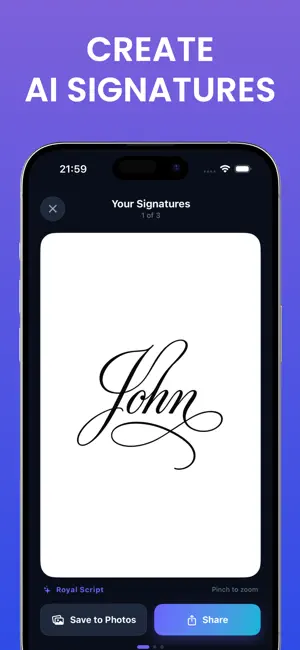
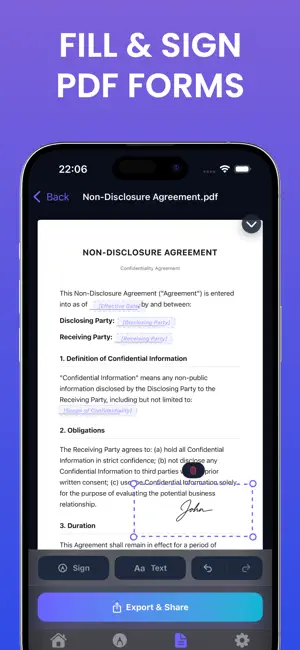
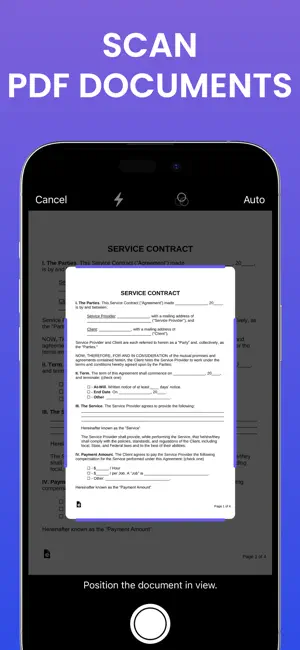
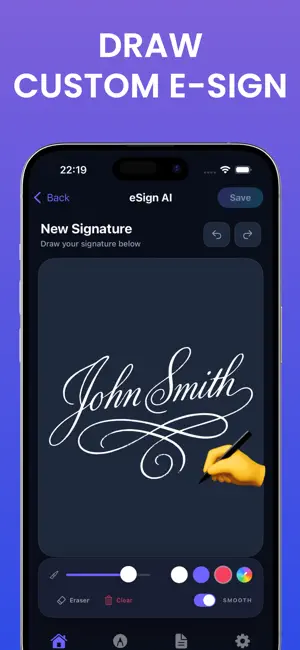
Turn your name into a stunning signature with the power of AI. Whether you need a professional signature for business contracts, an elegant autograph for personal use, or a creative design to stand out — Signature Creator does it all. GENERATE SIGNATURES WITH AI Simply type your name and choose from 16 distinctive styles — Cursive, Calligraphy, Modern, Handwritten, Artistic, Professional, Elegant, Vintage, Gothic, Brush, Graffiti, Royal, Monogram, Geometric, Japanese, and Copperplate. AI generates multiple unique signature options in seconds, so you can find the perfect one. DRAW YOUR OWN SIGNATURE Prefer a personal touch? Use the built-in drawing canvas with customizable pen colors, stroke width, and smoothing to create your signature by hand. Save it to your library and reuse it anytime. SIGN ANY DOCUMENT Import PDFs or images and place your signature exactly where you need it. Drag, resize, and rotate with precision. Add text fields for dates, names, and notes. Multi-page PDF support lets you navigate and sign every page. Export your signed documents as PDF, PNG, or JPEG. SCAN & SIGN Use the built-in document scanner to capture paper documents with your camera. Scanned pages are automatically converted into editable documents ready for your signature. BATCH SIGNING Need to sign multiple documents at once? Select your documents, choose a signature, position it once, and apply it across all files in a single action. Save hours of repetitive work. DOCUMENT TEMPLATES Skip starting from scratch. Choose from ready-made templates for contracts, agreements, business forms, and personal documents. Fill in the fields, add your signature, and you're done. SIGNATURE LIBRARY Save unlimited signatures to your personal library. Switch between AI-generated and hand-drawn signatures anytime. Every signature is stored locally on your device for privacy. KEY FEATURES • AI signature generation with 16 styles • Hand-drawing canvas with pen customization • PDF & image document signing • Built-in document scanner • Batch signing for multiple documents • Ready-made document templates • Text overlay with font customization • Multi-page PDF navigation • Export as PDF, PNG, or JPEG • Undo/redo support • Auto-save • Works offline Terms of Use: https://www.apple.com/legal/internet-services/terms/site.html
Ratings & reviews
4.8
5 ratings
App privacy
The developer, Umut Bozdag, reported these privacy practices to Apple.
Data Not Collected
The developer does not collect any data from this app.
Alternatives to Signature Creator: eSign AI
Looking for apps like Signature Creator: eSign AI? Here are 6 similar apps on the App Store. The highest rated is Signature Creator - SignCraft (5.0/5), and all 6 are free to download.
-
 Signature Creator - SignCraft
5.0
Signature Creator - SignCraft
5.0
-
 Signlyus — Fill & Sign Docs
-
 AI Signature Maker - Esign Now
-
 Unpile: EPUB & Read Later
-
 Holdback: App Blocker & Steps
5.0
Holdback: App Blocker & Steps
5.0
-
 Againly: Track Recurring Tasks
5.0
Againly: Track Recurring Tasks
5.0
| App | Rating | Price | Last updated | Compare |
|---|---|---|---|---|
| Signature Creator: eSign AI | 4.8 / 5 (5 ratings) | Free | April 6, 2026 | |
| Signature Creator - SignCraft | 5.0 / 5 (1) | Free | Jul 10, 2026 | Compare |
| Signlyus — Fill & Sign Docs | – | Free | Jun 2, 2026 | Compare |
| AI Signature Maker - Esign Now | – | Free | Oct 2, 2026 | Compare |
| Unpile: EPUB & Read Later | – | Free | Oct 10, 2026 | Compare |
| Holdback: App Blocker & Steps | 5.0 / 5 (1) | Free | Sep 7, 2026 | Compare |
| Againly: Track Recurring Tasks | 5.0 / 5 (1) | Free | Mar 30, 2026 | Compare |