

PDF Converter - Edit, Sign PDF
QUANTUM4U LAB PRIVATE LIMITED Business iPhoneiPadiPod touch
PDF Converter - Edit, Sign PDF is a free Business app for iPhone and iPad by QUANTUM4U LAB PRIVATE LIMITED. Requires iOS 17.0. Updated August 11, 2026.
- Price
- Free
- on the App Store
- Size
- 123 MB
- Age 4+
- Updated
- Aug 11
- 2026 · v2.0
Screenshots

About PDF Converter - Edit, Sign PDF
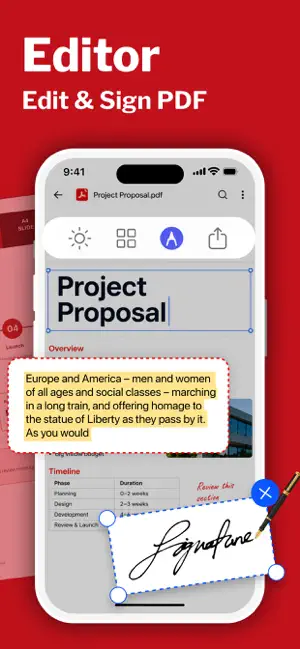
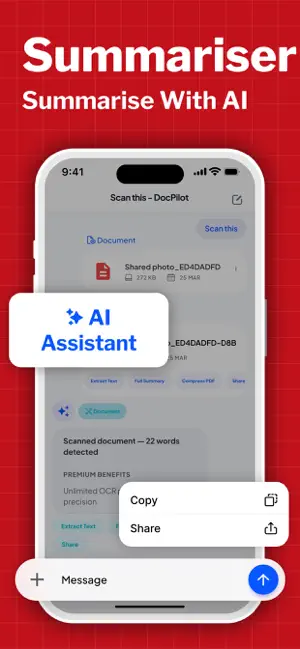
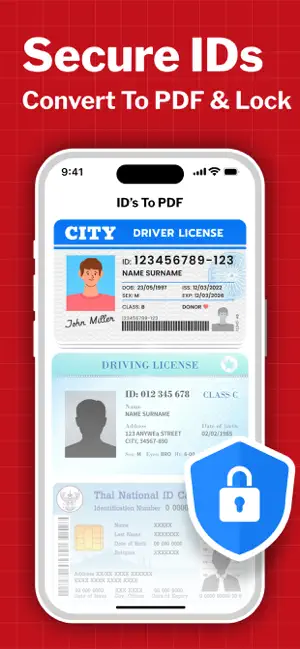
Need Help in Business Work? Effortlessly convert, edit, sign, manage PDFs , ask & summarize PDF anytime, anywhere. Whether you're importing files from your photo library, iCloud, camera, or from anywhere. What do you want to do: - Word to PDF ? - Photo to PDF ? - Sign PDF ? - Edit PDF ? - Summarise PDF ? - Translate PDF ? - Ask PDF ? Having a doubt in the PDF or Docs? Just upload your PDF & ask anything about the PDF Whether you're managing study material, office files, or everyday paperwork, it Ask AI Doc Manager brings everything together in one clean, simple space. Built for speed and clarity, it combines smart AI assistance with powerful file handling tools, so you spend less time searching and more time getting things done. Your Smart Document Companion Turn your phone into a reliable notebook for all your files. From quick notes to full-length reports, PDF Converter helps you read, organise, and interact with every document effortlessly. Open and manage all major file formats, including pdf, doc, ppt, and XLS—without switching between apps. Ask AI, Get Instant Answers Stuck reading a long file? Just ask. - With built-in LLM-powered intelligence, you can: - Ask questions directly from any doc - Get quick explanations from complex content - Understand key points without scrolling endlessly It’s like having a personal assistant inside your notebook, ready whenever you need it. Smart Summaries for Faster Reading Don’t have time to read everything? PDFPilot4u can summarise any document in seconds. Whether it's a classroom file, a business report, or an untitled draft, get clear summaries that help you focus on what matters most. PDFPilot4u isn’t just a viewer—it’s a full pdf tools hub designed to simplify your workflow: - Scan Doc / PDF with Doc Scanner - Summarise PDF instantly - Ask questions from any pdf - Merge pdf files into one - Split large files into smaller parts - Compress files to save storage - Lock & unlock sensitive documents - Extract or reorder pages - Add watermark on docs - Rotate or crop pages easily - Batch process multiple files - OCR text from scanned images - Compare pdf versions quickly - Sign documents digitally - Redact sensitive information - Convert image to pdf or doc to pdf - Export pdf to image or text - Add handwritten inputs - Use ready templates - Share via email or QR Everything you expect from professional pdf tools, now in your pocket. Scan, Store & Stay Organised Use the built-in doc scanner to quickly scan doc files, receipts, notes, or assignments. Turn physical papers into clean digital copies in seconds. - High-quality scanning - Auto edge detection - Instant conversion to pdf -Easy storage and access - Keep your files organised, searchable, and always within reach. Some of the data we collect Device-specific information such as device model, OS version being used. This provides knowledge of how our application is being used so we can improve the user experience and the app itself. We collect anonymized data such as statistics, analytics, insights about your activity in order to provide you a reliable and high-quality experience. Payment data & an optional Email (if using paid Services) Premium plans Length & Price Monthly - $6.99 Yearly - $24.99 Subscription Info: The user can cancel their subscription at any time by going into iTunes and App Store Apple ID Settings. All prices include applicable local sales taxes. Payment will be charged to your iTunes Account after confirmation of purchase. Subscription automatically renews at least 24-hours before the end of the current period. The user's account will be charged for renewal within 24-hours before the end of the current period. Privacy Policy: https://quantum4u.in/web/docmanager/privacy-policy Terms of use: https://quantum4u.in/web/docmanager/tandc EULA:https://quantum4u.in/web/docmanager/eula
What’s new
Version 2.0 · Updated August 11, 2026
Converting PDF is now faster along with PDF Editing
App privacy
The developer, QUANTUM4U LAB PRIVATE LIMITED, reported these privacy practices to Apple.
Data Used to Track You
The following data may be used to track you across apps and websites owned by other companies:
- Identifiers: Device ID
Data Not Linked to You
The following data, which may be collected but is not linked to your identity, may be used for the following purposes:
- Identifiers: Device ID
- Diagnostics: Crash Data, Performance Data
Used for: Third-Party Advertising, Analytics
Alternatives to PDF Converter - Edit, Sign PDF
Looking for apps like PDF Converter - Edit, Sign PDF? Here are 6 similar apps on the App Store.
-
 JobLin AI: Career & Job Search
-
 Pedidos Omega
-
 AI Note Taking: Voice to Text
-
 PDF Converter: PDF Editor Pro
-
 Deskcenter Files
-
 MDReader: Markdown Editor
| App | Rating | Price | Last updated | Compare |
|---|---|---|---|---|
| PDF Converter - Edit, Sign PDF | – | Free | August 11, 2026 | |
| JobLin AI: Career & Job Search | – | Free | May 28, 2026 | Compare |
| Pedidos Omega | – | Free | May 11, 2025 | Compare |
| AI Note Taking: Voice to Text | – | Free | Sep 16, 2026 | Compare |
| PDF Converter: PDF Editor Pro | – | Free | Oct 19, 2026 | Compare |
| Deskcenter Files | – | Free | Sep 19, 2025 | Compare |
| MDReader: Markdown Editor | – | Free | Aug 18, 2026 | Compare |