

Audio Selector Remote
DUKHYUN HWANG Utilities iPhoneiPadiPod touch
Audio Selector Remote is a free Utilities app for iPhone and iPad by DUKHYUN HWANG. Rated 5.0/5 from 1 ratings. Requires iOS 16.6. Updated October 23, 2026.
- Rating
- 5.0
- 1 ratings
- Price
- Free
- on the App Store
- Size
- 5 MB
- Age 4+
- Updated
- Oct 23
- 2026 · v2.7.0
Screenshots
About Audio Selector Remote
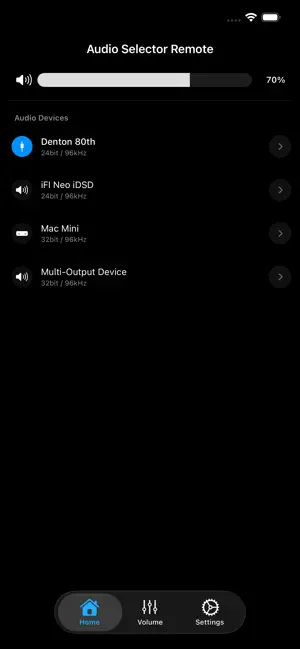
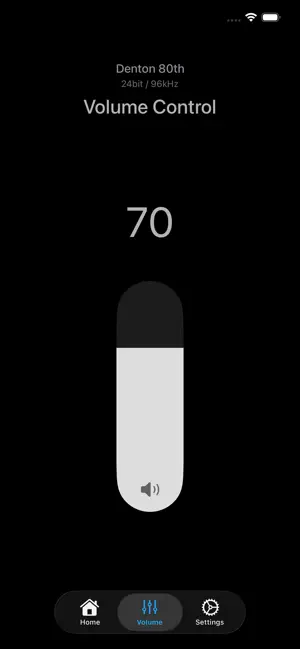
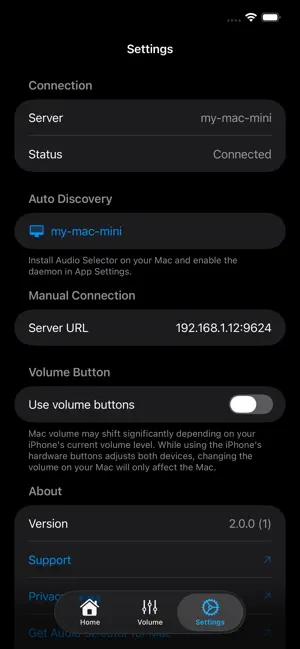
Audio Selector Remote is the official companion app for "Audio Selector" on macOS. Turn your iPhone or iPad into a powerful, wireless remote control for your Mac's audio environment. * Note: This app requires "Audio Selector" installed and running on your Mac to function. ◆ KEY FEATURES * Total Audio Control (Devices): Wirelessly switch between speakers, headphones, or DACs. You can change audio formats (e.g., 24-bit / 96kHz) and adjust individual device volumes directly from your iOS device. * Input Devices (Devices): Switch your Mac's microphone or line-in from the same list. Turn it on with 'Show input devices in menu' in the Settings tab. * Software Volume Control: When Audio Selector for Mac controls a DAC's volume in software (macOS 14.2 or later), you can adjust it from your iPhone or iPad like any other device. * Dedicated Volume Remote (Volume): Turn your device into a sleek, dedicated volume controller. You can even use your iPhone/iPad's physical volume buttons to adjust your Mac's audio level without looking at the screen! You can choose to show or hide the 'Mute' and 'Play/Pause' buttons in Settings → Volume Tab. * L/R Balance Control (Pro): Fine-tune your stereo sound remotely. Adjust the left and right audio balance for individual Mac output devices right from your screen. (Shown only for devices that support balance control). * Multichannel Output Pair (Pro): Choose which stereo pair - 1–2, 3–4, 5–6 and so on - a multichannel interface on your Mac uses for output. (Shown only for devices that expose multiple output pairs). * Seamless & Secure Connection (Settings): Connect instantly using Auto-Discovery on your local network, or use manual IP/Port configuration for advanced setups. Supports 'Require Pairing' for a secure connection. * Roon Zone Control (Devices): See your Mac's output devices that Roon is currently playing to - marked with a Roon badge - and adjust or mute Roon's zone volume in real time, even while Roon holds the device exclusively. Works with Roon's Device Volume and DSP Volume modes. (Requires Roon Volume Integration enabled in the Mac app.) * Pro Sync: If you are a Premium user of Audio Selector on your Mac, Audio Selector Remote will automatically detect it and provide an ad-free experience. ◆ REQUIREMENTS * Audio Selector Remote requires the 'Audio Selector' app on your Mac. * Your Mac and iOS device must be connected to the same local Wi-Fi network.
What’s new
Version 2.7.0 · Updated October 23, 2026
* Software Volume: The volume bar now shows when the Mac is using Software volume control. * Smoother volume slider while dragging. * More reliable connection to the Mac: the app now reconnects on its own after the connection drops or the Mac app restarts. * Settings: Shows each Mac's name with its address. * Stability improvements.
App privacy
The developer, DUKHYUN HWANG, reported these privacy practices to Apple.
Data Used to Track You
The following data may be used to track you across apps and websites owned by other companies:
- Identifiers: Device ID
- Usage Data: Product Interaction, Advertising Data
Data Not Linked to You
The following data, which may be collected but is not linked to your identity, may be used for the following purposes:
- Identifiers: Device ID
- Usage Data: Product Interaction, Advertising Data
- Diagnostics: Crash Data, Performance Data
Used for: Third-Party Advertising, Analytics, App Functionality
Alternatives to Audio Selector Remote
Looking for apps like Audio Selector Remote? Here are 6 similar apps on the App Store. The highest rated is GlassFiles (5.0/5), and all 6 are free to download.
-
 GlassFiles
5.0
GlassFiles
5.0
-
 smart audio controller
-
 Tutti Remote
-
 Primacy Mobile
-
 Protein Scanner AI
-
 BetterAudio Remote
| App | Rating | Price | Last updated | Compare |
|---|---|---|---|---|
| Audio Selector Remote | 5.0 / 5 (1 rating) | Free | October 23, 2026 | |
| GlassFiles | 5.0 / 5 (1) | Free | Apr 14, 2026 | Compare |
| smart audio controller | – | Free | Jan 22, 2026 | Compare |
| Tutti Remote | – | Free | Aug 3, 2026 | Compare |
| Primacy Mobile | – | Free | May 5, 2026 | Compare |
| Protein Scanner AI | – | Free | Jan 8, 2026 | Compare |
| BetterAudio Remote | – | Free | Feb 16, 2026 | Compare |