

Sound Clipper
Francis Rubio Utilities iPhoneiPadiPod touch
Sound Clipper is a free Utilities app for iPhone and iPad by Francis Rubio. Rated 5.0/5 from 1 ratings. Requires iOS 26.2. Updated May 19, 2026.
- Rating
- 5.0
- 1 ratings
- Price
- Free
- on the App Store
- Size
- 5 MB
- Age 4+
- Updated
- May 19
- 2026 · v1.2
Screenshots



About Sound Clipper
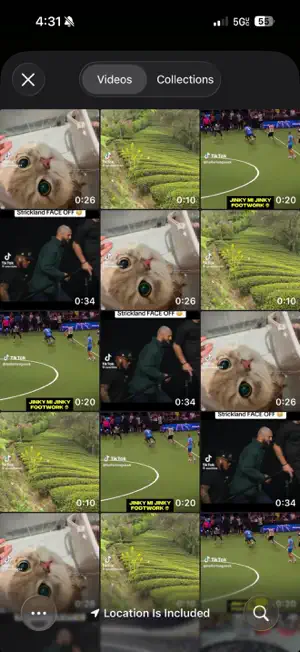
Sound Clipper Turn any video into pristine audio in seconds. Sound Clipper is the fastest, most flexible way to extract audio from videos on your iPhone and iPad. Whether you're capturing a podcast clip, saving a song, archiving a voice memo, or grabbing a sound effect, Sound Clipper gives you total control over the final file. Precision Editing Range Slider Trim: drag two handles to grab the exact moment you want. Waveform Scrubber: see the audio you're working with, scrub through it visually, and tap to play. Live Preview: hear your changes instantly before you export. Studio-Grade Controls Speed Control (0.5x to 2x) with optional Pitch Preservation: slow down without the chipmunk effect. Volume Adjustment (0 to 200%): boost quiet recordings or fine-tune levels. Mono Output: single-channel export for podcasts and voice notes. Seven Export Formats Choose the format that fits your workflow: M4A (AAC): universal, compact. M4A (HE-AAC / HE-AAC v2): efficient compression for streaming. Apple Lossless: studio-quality, smaller than WAV. WAV: uncompressed PCM. AIFF: pro audio standard. CAF: Apple's flexible Core Audio Format. Plus adjustable bitrate quality (64 to 320 kbps) for AAC formats. Easy Sharing Share directly to Messages, Mail, AirDrop, or any app. Save to the Files app, iCloud Drive, or external storage. Custom filenames or automatic timestamps. Free to Use Every new user starts with a free conversion. Need more? Watch a short rewarded video to earn additional conversion tokens. No subscription, no purchase required. Perfect for: Podcasters extracting clips. Musicians sampling sounds. Students saving lecture audio. Content creators ripping audio from footage. Anyone learning a language at their own pace. Sound Clipper does one thing, and does it beautifully. Download now and pull crystal-clear audio from any video in your library.
What’s new
Version 1.2 · Updated May 19, 2026
Sound Clipper 1.2 — What's New More formats. More control. More flexibility. This update brings powerful new audio editing tools and expanded export options to help you get the perfect sound clip every time. New Audio Formats Export to four new formats alongside M4A, WAV, and AIFF: • Apple Lossless — studio-quality, compressed • HE-AAC & HE-AAC v2 — ultra-efficient for streaming and voice • CAF — Apple's flexible Core Audio Format Speed & Tempo Control Adjust playback speed from 0.5x to 2x. Toggle Preserve Pitch to slow down or speed up audio without the chipmunk effect — perfect for podcasts, language learning, or music practice. Mono Output One-tap toggle to convert to mono — ideal for voice recordings, podcasts, and saving space. Free Conversions, Powered by Ads Earn conversion tokens by watching a quick rewarded video. Every new user starts with a free token, with more available anytime.
App privacy
The developer, Francis Rubio, reported these privacy practices to Apple.
Data Used to Track You
The following data may be used to track you across apps and websites owned by other companies:
- Identifiers: Device ID
Data Not Linked to You
The following data, which may be collected but is not linked to your identity, may be used for the following purposes:
- Identifiers: Device ID
Used for: Third-Party Advertising
Alternatives to Sound Clipper
Looking for apps like Sound Clipper? Here are 6 similar apps on the App Store. The highest rated is radioCREEP (5.0/5), and all 6 are free to download.
-
 radioCREEP
5.0
-
 Simple PDF Assistant
-
 EG Track
-
 Simple Banner
-
 Nuale Driver
-
 SoundSlice - No Ads Audio Trim
| App | Rating | Price | Last updated | Compare |
|---|---|---|---|---|
| Sound Clipper | 5.0 / 5 (1 rating) | Free | May 19, 2026 | |
| radioCREEP | 5.0 / 5 (1) | Free | Jun 29, 2026 | Compare |
| Simple PDF Assistant | – | Free | Jul 1, 2026 | Compare |
| EG Track | – | Free | Oct 16, 2024 | Compare |
| Simple Banner | – | Free | Feb 9, 2024 | Compare |
| Nuale Driver | – | Free | Oct 17, 2026 | Compare |
| SoundSlice - No Ads Audio Trim | – | Free | Aug 18, 2026 | Compare |
Compare Sound Clipper with the top alternatives: ratings, updates, ASO score and keyword gaps →