

Boardsesh
Marco de Jongh Health & Fitness iPhoneiPadiPod touch
Boardsesh is a free Health & Fitness app for iPhone and iPad by Marco de Jongh. Rated 4.6/5 from 28 ratings. Requires iOS 16.4. Updated October 15, 2026.
- Rating
- 4.6
- 28 ratings
- Price
- Free
- on the App Store
- Size
- 94 MB
- Age 4+
- Updated
- Oct 15
- 2026 · v2.6.0
Screenshots



About Boardsesh
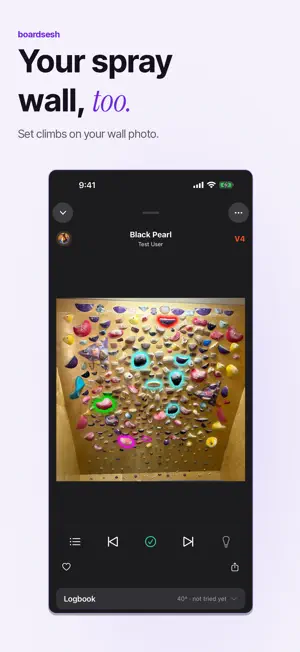
Climb on Kilter, Tension, MoonBoard and more, plus your spray wall. Keep your climbs, shared queue and logbook in one app. YOUR BOARDS. ONE APP. Boardsesh works with Kilter, Tension, MoonBoard, Woods, Decoy, Touchstone, Grasshopper and So iLL. Switch between supported boards and keep your climbing history together. YOUR SPRAY WALL, TOO A home wall, or a spray wall at your gym? Photograph it and Boardsesh suggests holds from the photo. Fix what it missed, then set climbs, queue them and log sends in the same logbook as your other boards. No LEDs needed: the holds are highlighted on your photo. Share the wall by link and your crew can set on it too. Stripped the wall? Reset it with a new photo, and the old wall is archived with its climbs and sends. Swap a single hold and any climb that used it is flagged. BOARD HISTORY Share a board and you lose track of the last climb fast, and someone always wipes it by accident. See climbs lit through Boardsesh on that board: the climb name, who lit it, who set it, grade and angle, and recent sends. SESSIONS WITH YOUR CREW Start a session and you and your crew can share one queue everyone can drive. Anyone can light the next climb on the wall. When you're done you get a recap and tracking: sends and attempts, grade spread, your hardest send, and progress over time. CONTROL FROM YOUR LOCK SCREEN (iOS 17+) iOS Live Activities tell you what climb is on from your lock screen, and allow you to change it without leaving your lock screen. BUILD A WORKOUT Pick Volume, Pyramid, Ladder or Grade Focus, set a target grade and warm-up, preview the climbs, then push them to the wall one at a time. TRACK YOUR CLIMBING Record sends, flashes and attempts, get a recap with duration, grade spread and your hardest send, and watch your sends and grades climb on the Progress tab. BRING YOUR HISTORY WITH YOU Save your session to Apple Health, and import your past Kilter and Tension logbook from Aurora Climbing. FIND MORE TO CLIMB Follow your crew and setters, search climbers, and pin playlists from Discover. Supported boards: Kilter, Tension, MoonBoard (2010, 2016, 2024, Masters 2017, Masters 2019), Woods (12x12, 8x10), Decoy, Touchstone, Grasshopper and So iLL. Plus spray walls: any wall you can photograph. Boardsesh is a community effort that works with these boards and is not affiliated with or endorsed by any board manufacturer.
Ratings & reviews
4.6
28 ratings
What’s new
Version 2.6.0 · Updated October 15, 2026
SPRAY WALLS: YOUR WALL IN BOARDSESH Add a photo of your home wall or your gym's spray wall, review the detected holds, and start setting boulders. Queue climbs, save them to playlists and log your sends. No LEDs needed. Keep a wall private or share it with your crew by link or QR code. Reset your wall while keeping its old climbs and sends archived. Download a wall to keep its photo, holds and climbs available with no signal. On iPad, use Apple Pencil to mark holds. YOUR CREW AND YOUR NEXT GO Find your crew's live sessions on Home. Open a climb to see logs from people you follow alongside your own, and follow setters to see their new climbs in your crew feed. Set a rest interval after each logged climb, or climb on a fixed timer. Turn on automatic queue advance and keep Boardsesh open between goes. Use Play next to put a climb straight after the one on the wall, or add a playlist without clearing your queue. MORE WAYS TO MAKE IT YOURS - Choose which sections appear below a climb, including beta videos, logs and similar climbs. - Turn on Use my grades to browse, sort and filter by your own grades. - Similar climbs and the hold heatmap work on your downloaded board with no signal. - Switch to another board at your gym from the wall panel. - Export your climbing history, playlists and climbs from Settings. FIXES FOR YOUR NEXT SESSION - MoonBoard grades now use MoonBoard's V scale. Logbook imports also accept exports with reordered columns or climb names instead of IDs. - On Woods, turn on Other angles to include climbs set at different angles. The setter filter follows your angle choice. - Sends logged on a flaky connection wait for signal and retry syncing. - Swiping through climbs stays on the list you picked, even when a new log reorders it. - Fixed an iOS launch crash and unwanted Safari tabs when opening the app. Free, no ads, open source.
App privacy
The developer, Marco de Jongh, reported these privacy practices to Apple.
Data Linked to You
The following data, which may be collected and linked to your identity, may be used for the following purposes:
- Health & Fitness: Fitness
- Contact Info: Email Address, Name
Used for: App Functionality
Data Not Linked to You
The following data, which may be collected but is not linked to your identity, may be used for the following purposes:
- Location: Precise Location
Used for: App Functionality
Alternatives to Boardsesh
Looking for apps like Boardsesh? Here are 6 similar apps on the App Store. The highest rated is Climb with Crux (5.0/5), and all 6 are free to download.
-
 Kilter Board™ Climbing App
1.9
Kilter Board™ Climbing App
1.9
-
 Climb with Crux
5.0
Climb with Crux
5.0
-
 Decoy Board
5.0
Decoy Board
5.0
-
 Tension Board 2
3.6
Tension Board 2
3.6
-
 Stōkt Climbing
4.8
Stōkt Climbing
4.8
-
 Woods Board
2.0
Woods Board
2.0
| App | Rating | Price | Last updated | Compare |
|---|---|---|---|---|
| Boardsesh | 4.6 / 5 (28 ratings) | Free | October 15, 2026 | |
| Kilter Board™ Climbing App | 1.9 / 5 (17) | Free | Oct 9, 2026 | Compare |
| Climb with Crux | 5.0 / 5 (17) | Free | Mar 30, 2024 | Compare |
| Decoy Board | 5.0 / 5 (6) | Free | Feb 10, 2026 | Compare |
| Tension Board 2 | 3.6 / 5 (63) | Free | Feb 14, 2026 | Compare |
| Stōkt Climbing | 4.8 / 5 (972) | Free | Oct 8, 2026 | Compare |
| Woods Board | 2.0 / 5 (1) | Free | Apr 11, 2026 | Compare |
Compare Boardsesh with the top alternatives: ratings, updates, ASO score and keyword gaps →