

CHRO: Chromatic Aberration
Alexander Willcox Photo & Video iPhoneiPadiPod touchMac
CHRO: Chromatic Aberration is a paid Photo & Video app for iPhone and iPad by Alexander Willcox. Requires iOS 26.2. Updated October 30, 2026.
- Price
- 0.99 USD
- on the App Store
- Size
- 6 MB
- Age 4+
- Updated
- Oct 30
- 2026 · v2.4
Screenshots

About CHRO: Chromatic Aberration
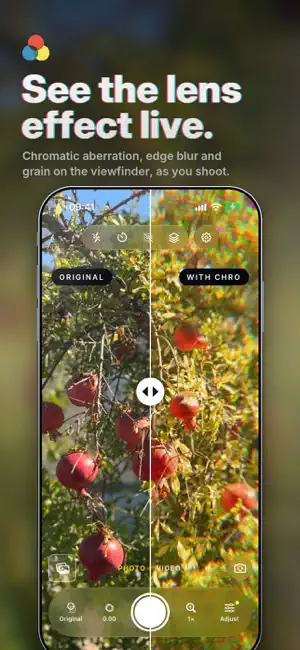
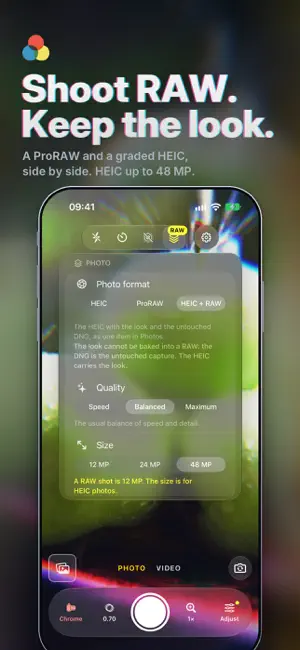
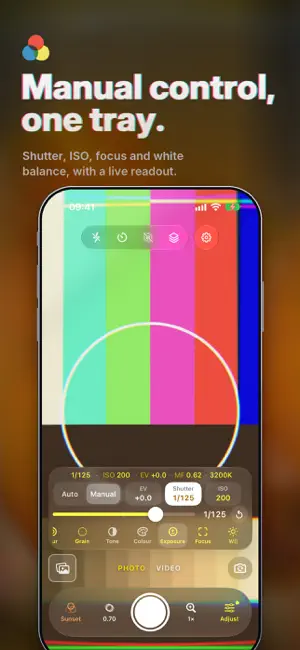
CHRO is a camera for chromatic aberration: the red, green and blue fringes a lens throws off at bright edges, giving a photo or video a dreamy, filmic look. You see it live in the viewfinder, before you press the shutter. MADE FOR IPHONE DUO Folded shut, the controls move into a bar beside the picture on the outer screen. Open it flat and every look runs live in a column beside the camera. Half open like a laptop, the picture sits above the fold and every control below it. Open, the outer screen shows your subject the shot with its look. ONE GLASS STRIP, ONE TRAY OF TOOLS The strip under your thumb holds Look, Character, the shutter, Zoom and Adjust. Swipe the picture to change look; tap Character for the effect. Adjust opens one tray above the strip: Presets, Look, Character, Lens, Blur, Grain, Tone, Colour, Exposure, Focus and White balance. PHOTO AND VIDEO Switch between PHOTO and VIDEO under the picture. In Photo, tap the shutter for a photo, or touch and hold it for a quarter of a second to record a short clip. In Video, the red shutter starts a clip with a tap and stops it with another. MANUAL CONTROLS, WITH A LIVE READOUT Set shutter speed and ISO by hand, focus by hand, and white balance from four kinds of light or a colour temperature and tint; lock any of them where it is. A live readout shows each, in yellow where you set them. RAW, QUALITY AND VIDEO FORMATS Take Apple ProRAW (or RAW), or a HEIC with your look together with the RAW. Choose the processing, and up to 48 megapixels where offered. Record video at 24, 25, 30 or 60 frames a second, as HEVC or H.264, at full size or 1080p, with stabilisation where offered. LIVE PHOTOS Turn on Live and each photo keeps about three seconds of motion and sound, saved to Photos as a Live Photo with your look on both. Open one from your library to put a look on the photo and its motion together. 22 LOOKS, AND YOUR OWN Film: fourteen looks inspired by classic film stocks. Filters: eight colour grades. Add looks of your own from a .cube file; rename, hide or reorder any look in Settings. All are live and baked into what you save. CHARACTER, GRAIN, EDGES AND TONE Character sets the lens aberration, the soft edges and the film grain together: slide up and all three grow, down to zero and they are gone. Grain comes in four patterns, Fine to Heavy. Soft edges melt the picture toward the corners. Three lens styles: Classic, Scope and Vintage. Highlights, Shadows, Sharpness, Saturation and Contrast shape the picture. PRESETS Save a look and its effects as a preset with one tap: three to start with, up to twelve. Share one with a friend and it joins their row. EDIT AFTER THE SHOT Open any photo or video from your library or Files and give it the same looks. Hold the eye to compare. Crop, rotate, trim a video, export a copy: your original is never touched. Select up to 50 to put a preset on all of them. ALSO ON YOUR MAC The CHRO editor runs on Apple silicon Macs, included with your purchase: the same looks and effects, batch editing and export to a file. The camera is on iPhone and iPad only. SHORTCUTS, LOCK SCREEN, IPAD Ten Shortcuts actions take photos and video, open the camera, set a look, Character, grain, blur, a preset or Live, and put a look on your photos and videos. Add CHRO's camera control to the Lock Screen or the Action button. On an iPad, and on a phone on its side, the camera and the editor fit the room they have. THE DETAILS • Camera Control on iPhones that have it: look and Character • Send a photo or video from the Share sheet; it all works offline PRIVATE BY DESIGN No account, no ads, no tracking, no analytics. CHRO has no servers and never sends your photos or videos anywhere on its own: they stay on your device unless you share them. Camera and microphone are used only to show and record what you point it at, including a video's or a Live Photo's sound; Photos only to save your shots and open what you pick. Questions or feedback? [email protected]
What’s new
Version 2.4 · Updated October 30, 2026
CHRO 2.4 is made for iPhone Duo. • Folded shut, the camera fills the outer screen, with PHOTO and VIDEO, Look, Character, the shutter and Adjust in a bar beside the picture • Open it flat and a column of every look runs live on the camera's picture beside it. Tap one to use it; the cross puts the column away and the grid button brings it back • Half open like a laptop, the picture sits above the fold with nothing over it, and every control waits below the fold • Shooting open with the back cameras, the outer screen shows the person you are photographing the picture with its look • The editor uses the open screen's room, with its tools beside the photo On every other iPhone and iPad, CHRO works just as before. Tell us what you think: [email protected]
App privacy
The developer, Alexander Willcox, reported these privacy practices to Apple.
Data Not Collected
The developer does not collect any data from this app.
Alternatives to CHRO: Chromatic Aberration
Looking for apps like CHRO: Chromatic Aberration? Here are 6 similar apps on the App Store. The highest rated is Newgrain: Film Photo Community (4.8/5), and all 6 are free to download.
-
 Cassini Camera
4.7
Cassini Camera
4.7
-
 Depth Map Extractor - Magma
4.2
Depth Map Extractor - Magma
4.2
-
 Newgrain: Film Photo Community
4.8
Newgrain: Film Photo Community
4.8
-
 Picble - Photo Blender Editor
4.7
Picble - Photo Blender Editor
4.7
-
 Distressed FX : Photo Editor
4.8
Distressed FX : Photo Editor
4.8
-
 Teleprompter for iPad
4.7
Teleprompter for iPad
4.7
| App | Rating | Price | Last updated | Compare |
|---|---|---|---|---|
| CHRO: Chromatic Aberration | – | 0.99 USD | October 30, 2026 | |
| Cassini Camera | 4.7 / 5 (3) | Free | Feb 24, 2026 | Compare |
| Depth Map Extractor - Magma | 4.2 / 5 (6) | Free | Oct 29, 2026 | Compare |
| Newgrain: Film Photo Community | 4.8 / 5 (122) | Free | Oct 3, 2026 | Compare |
| Picble - Photo Blender Editor | 4.7 / 5 (76) | Free | May 28, 2026 | Compare |
| Distressed FX : Photo Editor | 4.8 / 5 (5,257) | Free | Sep 16, 2026 | Compare |
| Teleprompter for iPad | 4.7 / 5 (39) | Free | Oct 18, 2026 | Compare |