

Screenshot Ninja
Seid-Puya Seid-Karbasi Utilities iPhoneiPadiPod touch
Screenshot Ninja is a free Utilities app for iPhone and iPad by Seid-Puya Seid-Karbasi. Requires iOS 17.0. Updated April 1, 2026.
- Price
- Free
- on the App Store
- Size
- 4 MB
- Age 4+
- Updated
- Apr 1
- 2026 · v1.0
Screenshots


About Screenshot Ninja
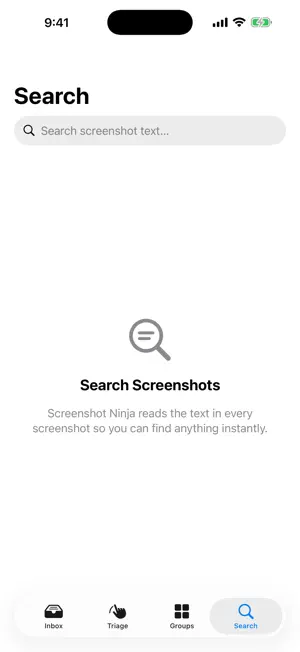
Screenshot Ninja automatically finds and organizes all the screenshots cluttering your photo library. Swipe through them one by one, batch delete the ones you don't need, and reclaim your storage — all in seconds. Everything runs entirely on your device. No cloud. No uploads. No accounts. KEY FEATURES • Triage Mode — Swipe left to delete, right to keep. A fast, fun way to clean up screenshots one at a time. • Smart Categories — Screenshots are automatically sorted into categories like text, maps, food, and more using on-device intelligence. • Text Extraction — Every screenshot is scanned for readable text so you can search, copy, and find what you need instantly. • Batch Delete — Select multiple screenshots at once and delete them in a tap. Great for clearing out old receipts, expired codes, or random captures. • Expiry Timers — Set a timer on any screenshot (1 hour to 1 month) and it will be flagged for cleanup automatically. • Storage Stats — See exactly how much space your screenshots are taking up and how much you've freed. • 100% Private — All processing happens on-device using Apple's Vision framework. Your photos never leave your phone.
App privacy
The developer, Seid-Puya Seid-Karbasi, reported these privacy practices to Apple.
Data Not Collected
The developer does not collect any data from this app.
Alternatives to Screenshot Ninja
Looking for apps like Screenshot Ninja? Here are 6 similar apps on the App Store.
-
 ShotCull : Screenshot Cleaner
-
 MyCode - 2FA
-
 SnapOrganizer Smart Screenshot
-
 History Lib
-
 Sweep: Photo Cleanup by Swipe
-
 Simple Screenshot Organizer
| App | Rating | Price | Last updated | Compare |
|---|---|---|---|---|
| Screenshot Ninja | – | Free | April 1, 2026 | |
| ShotCull : Screenshot Cleaner | – | Free | Apr 16, 2026 | Compare |
| MyCode - 2FA | – | Free | Jun 21, 2026 | Compare |
| SnapOrganizer Smart Screenshot | – | Free | Apr 6, 2026 | Compare |
| History Lib | – | Free | Aug 13, 2026 | Compare |
| Sweep: Photo Cleanup by Swipe | – | Free | Oct 24, 2026 | Compare |
| Simple Screenshot Organizer | – | Free | Jun 23, 2026 | Compare |
Compare Screenshot Ninja with the top alternatives: ratings, updates, ASO score and keyword gaps →