

Flare - Chronic Pain Tracker
Fig Studio LLC Medical iPhoneiPadiPod touch
Flare - Chronic Pain Tracker is a free Medical app for iPhone and iPad by Fig Studio LLC. Rated 4.9/5 from 20 ratings. Requires iOS 18.5.
- Rating
- 4.9
- 20 ratings
- Price
- Free
- on the App Store
- Size
- 52 MB
- Age 4+
- Updated
- Sep 29
- 2026 · v2.1.0
Screenshots

About Flare - Chronic Pain Tracker
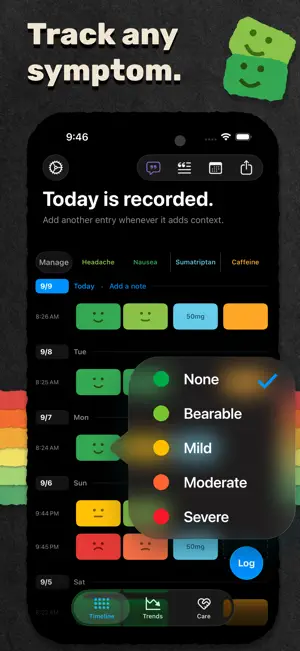
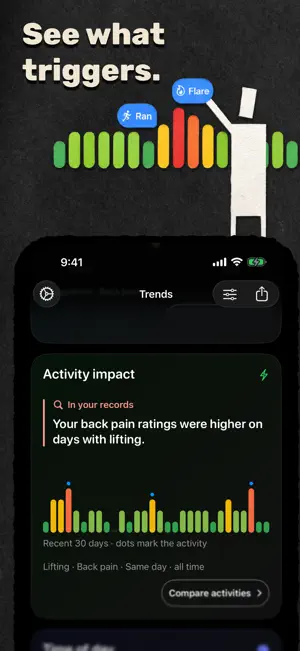
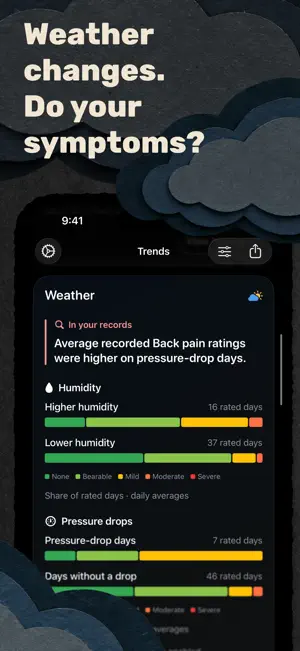
Built by someone who spent months tracking his own condition in a spreadsheet because nothing else felt right. If you've been dismissed, doubted, or told to wait it out, this app is your evidence. A quiet, structured way to document your symptoms and walk into your next appointment with real data instead of a half-remembered list. Flare works for back pain, arthritis, fibromyalgia, migraine, endometriosis, pelvic pain, sciatica, nerve pain -- and any condition you want to track. Start from a template for your condition, or build your own. WHAT YOU CAN TRACK Pain, fatigue, stiffness, brain fog, or any symptom you want to add Severity on a named five-level scale (None to Severe), never "3/10" Descriptions for how a symptom feels -- aching, burning, throbbing, or your own words Medications, dosages, and medication courses with dose changes Activities and treatments (physical therapy, injections, exercise), including your own Daily notes, typed, dictated, or added with a Quick note LOG ON YOUR TERMS Check in from the Log button: symptoms, descriptions, medications, activities, and a note in one focused flow Or tap a cell right on the timeline, no fixed schedule, no guilt Every entry is timestamped to the minute, and backdating is normal Choose what the Log button does when you tap or hold it PREPARE FOR CARE Keep questions for your next appointment in the Care tab Preview your PDF report before you share it Read guides on describing pain and what to record, plus stories from others living with chronic pain WHAT YOU CAN DO WITH IT See your history in a scrollable, color-coded timeline Spot patterns across weeks and months at a glance See whether weather seems to matter -- Flare compares your ratings with local pressure changes (optional, approximate location only) See whether sleep seems to matter -- Flare reads your sleep from Apple Health and compares it with your ratings (optional, read-only) See what changed on each medication course, and before and after it See when your symptoms peak across the day Discover which symptoms appear together Revisit your notes in Journal, with the ratings from each day Generate PDF reports formatted for appointments Export an AI-friendly file and share it with your AI of choice Export raw CSV data for your own analysis Back up and restore your data anytime MAKE IT YOURS Four color themes: Classic, Colorblind, Berry, and Soft Your own color for each medication and activity Arrange the timeline and Trends cards the way you read them Designed for iPhone and iPad FLARE PRO Monthly or annual subscription (both with a free trial for eligible accounts), or a one-time lifetime purchase. Unlocks trends and insights, weather and sleep patterns, medication course impact, suggested appointment questions, and PDF / CSV / AI exports. Logging, the timeline, and Care notes stay free. PRIVACY FIRST No account required No ads Your symptoms, notes, and history stay on your device, plus an optional backup in your own iCloud Drive Weather is optional, off by default, and uses only an approximate area -- never your precise location Sleep is optional, read-only, and never included in backups or exports MEDICAL DISCLAIMER Flare is a personal tracking tool, not a medical device. It does not provide medical advice, diagnosis, or treatment. The information and patterns shown in Flare are not a substitute for professional medical advice. Always consult your doctor or another qualified healthcare professional before making medical decisions, including changes to medications or treatment. Terms of use: https://flarelog.app/terms/
Ratings & reviews
4.9
20 ratings
What’s new
Version 2.1.0 · Updated September 29, 2026
A fuller picture. Less logging. Baselines: choose the level a symptom usually sits at, and Flare uses it wherever that symptom is left blank, including days you don't log. You choose the level for each symptom, anything you log overrides it, and it starts today. Earlier history stays as it was. Set up baselines in Settings > Behaviors > Blank cells, or from the check-in sheet. After a few days away, Flare asks how those days were. Confirm them, or sketch the days that felt different. If you always make the same choice when you tap Log, Flare offers once to make it a single tap. Care: the tab badge now appears only in the week after an appointment, and you can record whether it happened right from the Care tab. Also: every Trends card is available from the start, and courses you select for a PDF now always appear in full. Your most common level between flares is now called your usual level in Trends and the PDF. It uses only your own ratings, so a baseline always means the level you set.
App privacy
The developer, Fig Studio LLC, reported these privacy practices to Apple.
Data Not Linked to You
The following data, which may be collected but is not linked to your identity, may be used for the following purposes:
- Usage Data: Advertising Data, Product Interaction
- Identifiers: Device ID
- Purchases: Purchase History
- Location: Coarse Location
Used for: Developer’s Advertising or Marketing, Analytics, App Functionality
Alternatives to Flare - Chronic Pain Tracker
Looking for apps like Flare - Chronic Pain Tracker? Here are 6 similar apps on the App Store. The highest rated is PainPoint: Pain Tracker (4.8/5), and all 6 are free to download.
-
 Pain Journal: Symptom Tracker
4.5
Pain Journal: Symptom Tracker
4.5
-
 Pain Tracker - Palina
3.0
Pain Tracker - Palina
3.0
-
 PainPoint: Pain Tracker
4.8
PainPoint: Pain Tracker
4.8
-
 Pain Journal App
-
 Pain Tracker゜
4.7
Pain Tracker゜
4.7
-
 Pain Tracker: Nanolume Pro
4.6
Pain Tracker: Nanolume Pro
4.6
| App | Rating | Price | Last updated | Compare |
|---|---|---|---|---|
| Flare - Chronic Pain Tracker | 4.9 / 5 (20 ratings) | Free | September 29, 2026 | |
| Pain Journal: Symptom Tracker | 4.5 / 5 (6) | Free | Sep 23, 2026 | Compare |
| Pain Tracker - Palina | 3.0 / 5 (6) | Free | Jun 3, 2026 | Compare |
| PainPoint: Pain Tracker | 4.8 / 5 (8) | Free | Feb 13, 2026 | Compare |
| Pain Journal App | – | Free | Jan 15, 2026 | Compare |
| Pain Tracker゜ | 4.7 / 5 (21) | Free | Apr 30, 2025 | Compare |
| Pain Tracker: Nanolume Pro | 4.6 / 5 (11) | Free | Jun 28, 2026 | Compare |