

Lavie: Budget to Payday
Kui Liang Finance iPhoneiPadiPod touch
Lavie: Budget to Payday is a free Finance app for iPhone and iPad by Kui Liang. Requires iOS 18.0. Updated October 25, 2026.
- Price
- Free
- on the App Store
- Size
- 9 MB
- Age 4+
- Updated
- Oct 25
- 2026 · v2.0.2
Screenshots


About Lavie: Budget to Payday
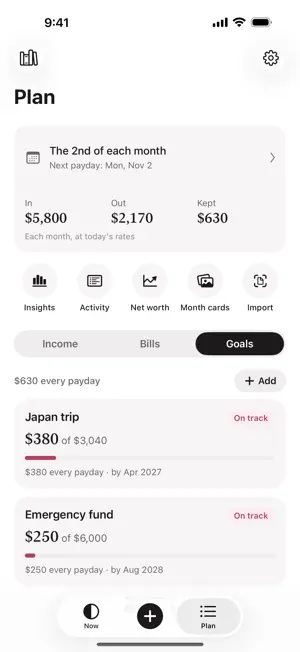
Am I okay until payday? Lavie answers with one number: Free to spend until payday. It starts from your take-home pay and takes away what you've spent so far, the bills still due before payday and what your goals set aside first. What's left is yours to spend. ONE NUMBER, NOT A SPREADSHEET • Open Lavie, see what's free, close it. • Built around your paydays, not calendar months. • Bills come off before you see the number, so rent day never catches you out. • Goals set aside a share on every payday, worked out from the target and the date. • "Can I afford it?" checks a purchase against what's free, without saving anything. LOGGING WITHOUT THE CHORE • Quick add: tap +, type the amount and a name. Lavie picks the category from what that name has been before. • AI automatic logging with Shortcuts (Lavie Plus): after you agree, the content passed by your automations is sent to DeepSeek to identify transactions. Requires an internet connection and one-time setup. • Import bank and card records: PDF, CSV, Excel, and the zip files Alipay and WeChat Pay email. An AI service finds the transactions; duplicates are skipped on your iPhone. • Check your balance now and then, and Lavie shows what wasn't logged, so you don't have to type every coffee. SEE WHERE IT GOES • Insights compare this cycle with the same stretch of the last one, category by category. • A month card on the last day of each month: what came in, what went out, what you kept. • Net worth: your cash plus your holdings, month by month. TOGETHER, IF YOU LIKE • Shared ledgers through iCloud for a household, a couple or a trip. Invite only. PRIVATE BY DEFAULT • No account, no bank login, no ads, no analytics. • Your records stay on your device, or in your own iCloud if you turn on sync. • Only the AI features send anything out, only what they need, and only after you agree. ALSO • Lock Screen and Control Center quick add, Siri and the Action button. • A reminder the evening before each bill, and a note on payday morning. • Many currencies, with daily exchange rates. • In English, 简体中文, 繁體中文, 日本語, Español, Français, Deutsch and Português (Brasil). LAVIE PLUS The free plan covers the everyday: your number, bills, one goal, quick add, balance checks and Insights for recent cycles, and lets you try statement import, AI tidy and "Can I afford it?". Lavie Plus adds Home Screen widgets, Look-ahead for your next three paydays, cycle reviews, unlimited goals and currencies, iCloud sync and shared ledgers, your full history and the year view, and unlimited imports, tidies and checks. Start with a 14-day free trial. AI automatic logging with Shortcuts is also included in Lavie Plus. Payment is charged to your Apple Account at confirmation of purchase. The subscription renews automatically unless it is cancelled at least 24 hours before the end of the current period. Manage or cancel it in Settings › Apple Account › Subscriptions. Terms of Use: https://www.apple.com/legal/internet-services/itunes/dev/stdeula/ Privacy Policy: https://lifebar.app/privacy
What’s new
Version 2.0.2 · Updated October 25, 2026
AI automatic logging and clearer ledgers: • Automatic logging now uses AI to distinguish transactions from reminders and promotions. Requires Lavie Plus (including an active trial), an internet connection and your consent. After updating, enable it again in Settings › Automatic logging. • Give each ledger its own color and icon, and choose which ledgers receive automatic purchases and Siri entries. • See the open ledger's name on Now and inspect AI results in Recent runs. Manual quick add remains available without a subscription.
App privacy
The developer, Kui Liang, reported these privacy practices to Apple.
Data Not Collected
The developer does not collect any data from this app.
Alternatives to Lavie: Budget to Payday
Looking for apps like Lavie: Budget to Payday? Here are 6 similar apps on the App Store. The highest rated is Loan Calc: Easy EMI Calculator (4.6/5), and all 6 are free to download.
-
 LoanMate
-
 Loan Emi Calculator - LoanEmi
-
 Jenfi
-
 Vapay
-
 Loan Calc: Loan EMI Calculator
-
 Loan Calc: Easy EMI Calculator
4.6
| App | Rating | Price | Last updated | Compare |
|---|---|---|---|---|
| Lavie: Budget to Payday | – | Free | October 25, 2026 | |
| LoanMate | – | Free | Aug 5, 2026 | Compare |
| Loan Emi Calculator - LoanEmi | – | Free | Jul 31, 2026 | Compare |
| Jenfi | – | Free | Oct 6, 2026 | Compare |
| Vapay | – | Free | Oct 31, 2026 | Compare |
| Loan Calc: Loan EMI Calculator | – | Free | Jun 18, 2026 | Compare |
| Loan Calc: Easy EMI Calculator | 4.6 / 5 (45) | Free | Aug 11, 2026 | Compare |