

AllMyThings:物品整理
柳健 钟 Utilities iPhoneiPadiPod touch
AllMyThings:物品整理 is a free Utilities app for iPhone and iPad by 柳健 钟. Requires iOS 17.6. Updated September 20, 2026.
- Price
- Free
- on the App Store
- Size
- 15 MB
- Age 4+
- Updated
- Sep 20
- 2026 · v1.2.1
Screenshots
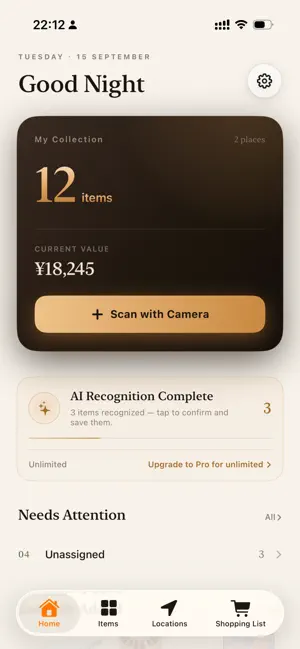

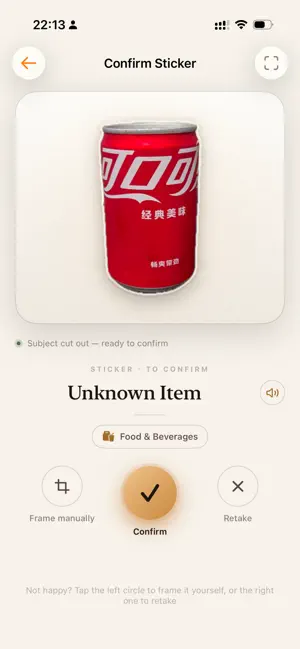

About AllMyThings:物品整理
AllMyThings · A Personal Item Ledger You've bought duplicates, lost things, and watched them expire right before your eyes. It's not that your home is too small—it's that no one is keeping track for you. AllMyThings is the ledger that remembers for you: snap a photo, put it in a location, and see it at a glance when you need it. ■ Add to inventory by photo (free, no internet required) Take a photo, and it's automatically cut out into a sticker, so it's instantly recognizable in the list. You can also pick from your photo library, or just fill it in manually. This step is done entirely on-device, so it works even on a plane. ■ Let AI fill it in for you (Pro) Don't feel like typing every field? Let AI handle it. Take one photo, and the name, category, expiration date, and price are filled in all at once. Recognition runs in the background, and progress is shown on the home page; when it's done, review it on the Tasks page and add it to inventory. Free: 15 times per month; Pro: unlimited. ■ See what you own at a glance on the home page · How many items in total, how many locations they're stored in, and their current total value · Things to watch: expired / expiring within a week / low stock / not yet assigned a location — tap through to the corresponding list · Recently added, the most valuable items, and how many items are in each category ■ Where things actually are Track them with a location tree: Home → Living Room → Second shelf of the TV cabinet. You define the hierarchy yourself, and each location can have a photo. If you move a location elsewhere, its sub-locations and items move with it, so nothing gets scattered. If you haven't decided where to put something yet, drop it into “Unassigned” and batch-assign it later. ■ Find things Keyword search; filter by expired / expiring soon / low stock / normal status / category. Select multiple items to batch-change their locations or batch-delete them. ■ Shopping list Low-stock and expired items can be added to the list with one tap. When you buy them, check them off to add them to inventory; quantities are replenished automatically, with no manual editing. ■ Define it your way There are 8 built-in major categories: Consumables, Durables, Clothing, Media, Health Products, Sports & Outdoors, Toys, and Pet Supplies. Categories, subcategories, tags, units, specification attributes, asset attributes, and icons can all be added and edited by you, so the app adapts to your categorization habits, not the other way around. ■ Yours alone No registration, no login, and no teammates required. Data is stored locally by default; when you want to sync across your own devices, turn on iCloud, and your data goes into your own private space. ■ Free and Pro The free version lets you fully manage your items and includes 15 AI recognitions per month. Pro sells only one thing: unlimited AI recognition. Subscribe monthly or yearly; cancel anytime in system settings. Auto-Renewable Subscriptions - Monthly Pro: 1 month — $2.99 per month - Yearly Pro: 1 year — $19.99 per year (Prices may vary by region; the price shown in the App Store applies.) Payment is charged to your Apple ID account at confirmation of purchase. The subscription renews automatically unless auto-renew is turned off at least 24 hours before the end of the current period. Renewal is charged within 24 hours prior to the end of the current period. You can manage or cancel your subscription anytime in Settings → your Apple ID → Subscriptions. Terms of Use (EULA): https://www.apple.com/legal/internet-services/itunes/dev/stdeula/ Privacy Policy: https://icn7vd43trul.feishu.cn/wiki/XYwPwkx7ci5IDQkov5ucKQKynqc
What’s new
Version 1.2.1 · Updated September 20, 2026
• New Expiry page — expired and expiring items on one timeline, with quick discard, mark-as-used, date fix and restock actions • New Low Stock page — see exactly how much is missing, restock in one tap, or build a shopping list • New photo replacement — shoot or pick, auto cutout into a sticker, from both detail and edit screens • Fixed a crash when swiping between items in item detail • Fixed unresponsive Edit / Camera buttons on location pages • Fixed duplicate locations appearing after multi-device sync • Removed preloaded sample items and locations, and automatically cleans up samples left by older versions • Faster launch and smoother long-list scrolling
App privacy
The developer, 柳健 钟, reported these privacy practices to Apple.
Data Not Collected
The developer does not collect any data from this app.
Alternatives to AllMyThings:物品整理
Looking for apps like AllMyThings:物品整理? Here are 6 similar apps on the App Store. The highest rated is Voice Studio: Recorder (5.0/5), and 5 of the 6 are free to download.
-
 MindAscend
-
 攒光
-
 Where'd I Put It: Item Finder
-
 Voice Studio: Recorder
5.0
-
 TidyBox+ | AI Smart Sorting
-
 时至
| App | Rating | Price | Last updated | Compare |
|---|---|---|---|---|
| AllMyThings:物品整理 | – | Free | September 20, 2026 | |
| MindAscend | – | Free | Sep 9, 2025 | Compare |
| 攒光 | – | Free | Sep 3, 2026 | Compare |
| Where'd I Put It: Item Finder | – | Free | Aug 19, 2026 | Compare |
| Voice Studio: Recorder | 5.0 / 5 (1) | Free | Aug 30, 2026 | Compare |
| TidyBox+ | AI Smart Sorting | – | Free | Aug 28, 2025 | Compare |
| 时至 | – | 2.99 USD | Apr 22, 2026 | Compare |
Compare AllMyThings:物品整理 with the top alternatives: ratings, updates, ASO score and keyword gaps →