

Plandar Plant Care Calendar
Yuto Hisada Lifestyle iPhoneiPadiPod touch
Plandar Plant Care Calendar is a free Lifestyle app for iPhone and iPad by Yuto Hisada. Requires iOS 13.0. Updated October 19, 2026.
- Price
- Free
- on the App Store
- Size
- 66 MB
- Age 17+
- Updated
- Oct 19
- 2026 · v1.4.0
Screenshots


About Plandar Plant Care Calendar
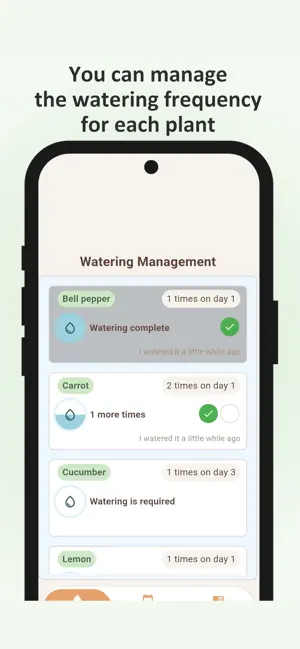
Are you properly caring for and managing the plants in your home garden or flower beds? Plandar is an app that lets you centrally manage tasks for each plant—such as fertilizing, pruning, and bud removal as well as watering, all through a calendar. You can record your annual tasks and use that information to improve your gardening the following year. <Plandar Features> ・Register and manage tasks for each plant ・Visualize watering frequency to prevent missed waterings ・Registered events are saved as annual events and displayed the following year ・Review notes from the previous year to improve cultivation accuracy ・Keep growth records with diary entries and photos <Recommended for:> ・People who grow plants, such as home gardeners, hobbyists, and farmers ・People who look up plant cultivation calendars online every year ・People who are growing more plants and finding it difficult to manage them ・People who want to keep records of watering and other tasks ・People who want to track their plants’ growth <Main Screens> ・Calendar: Register tasks for each plant ・Watering: Visually manage watering status ・Diary: Record plant growth with comments and photos ・Settings: Freely customize event details <Detailed Usage Guide> Calendar Screen Tap the “Add Plant” button in the lower-left corner to add a row. Enter the plant’s name in the left column. To create an event, tap an empty row on the right to display the event creation screen. The event creation screen offers predefined event options; selecting one allows you to quickly enter the event name, color, and icon. Of course, you can also enter details freely without selecting a preset. You can set the event’s duration and add notes. Another feature of this app is that all registered events are saved as annual events, so you can easily review your notes the following year. Watering Screen The plants you registered on the Calendar screen are displayed in a vertical list. Watering frequency can be set to either “how many times a day” or “once every X days,” and you can configure these settings from the plant name input field on the Calendar screen. Tapping a plant’s card marks it as watered; the water icon on the left fills up, and the remaining amount decreases over time according to the set frequency. Diary Screen You can create a diary entry for each plant. Each entry allows you to save a comment and up to three images, which can be added from your device’s gallery or camera. You can enlarge or delete added images by tapping them. Settings Screen You can configure various app settings here. In the Event List Editor, you can customize the list of events available for registration on the Calendar screen in advance. <Request> Please leave a review for the app. We aim to make this app as user-friendly as possible, so please feel free to share any feedback on areas that are difficult to use or features you’d like to see. Since I’m developing this as an independent developer, I’ll respond promptly to even minor requests. <Terms of Use> https://www.apple.com/legal/internet-services/itunes/dev/stdeula/
What’s new
Version 1.4.0 · Updated October 19, 2026
ver1.4.0 ・Added shortcut input for events ・Adjusted the layout of the watering screen ・Relaxed the limit on the number of registered events ・Improved startup time ・The layout of the diary screen has been updated
App privacy
The developer, Yuto Hisada, reported these privacy practices to Apple.
Data Used to Track You
The following data may be used to track you across apps and websites owned by other companies:
- Location: Precise Location, Coarse Location
Data Not Linked to You
The following data, which may be collected but is not linked to your identity, may be used for the following purposes:
- Location: Precise Location, Coarse Location
- Usage Data: Advertising Data
Used for: Third-Party Advertising, App Functionality
Alternatives to Plandar Plant Care Calendar
Looking for apps like Plandar Plant Care Calendar? Here are 6 similar apps on the App Store.
-
 まきどき
-
 やさいカレンダー 家庭菜園の植付・収穫管理
-
 畑・家庭菜園の栽培記録 うねうね
-
 マイ菜園
-
 Garden Tracker - Seed Pocket
-
 Garden Diary - Home Gardening
| App | Rating | Price | Last updated | Compare |
|---|---|---|---|---|
| Plandar Plant Care Calendar | – | Free | October 19, 2026 | |
| まきどき | – | Free | Oct 7, 2026 | Compare |
| やさいカレンダー 家庭菜園の植付・収穫管理 | – | Free | Oct 7, 2026 | Compare |
| 畑・家庭菜園の栽培記録 うねうね | – | Free | Oct 17, 2026 | Compare |
| マイ菜園 | – | Free | Apr 14, 2026 | Compare |
| Garden Tracker - Seed Pocket | – | Free | Aug 20, 2026 | Compare |
| Garden Diary - Home Gardening | – | Free | May 30, 2026 | Compare |