

Pixel Ruler Pro
MIZOU, CO., LTD. Developer Tools iPhoneiPadiPod touch
Pixel Ruler Pro is a free Developer Tools app for iPhone and iPad by MIZOU, CO., LTD. Requires iOS 18.0. Updated October 28, 2026.
- Price
- Free
- on the App Store
- Size
- 44 MB
- Age 4+
- Updated
- Oct 28
- 2026 · v1.0.10
Screenshots

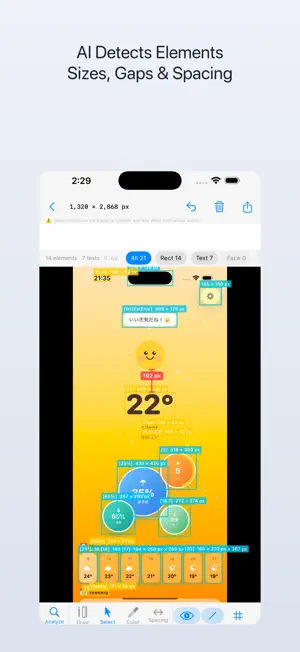
About Pixel Ruler Pro
Measure any pixel on screen with pinpoint accuracy. Detect UI elements instantly with AI. Pick colors in HEX, RGB, and HSL — all in one tool. Pixel Ruler is the essential companion for designers, developers, and anyone who cares about pixel-perfect precision. Whether you're checking spacing between elements, identifying colors, or analyzing UI layouts, Pixel Ruler streamlines your workflow. KEY FEATURES: • AI-Powered Element Detection — Automatically recognize UI components using on-device machine learning. No internet required. • Precision Pixel Measurement — Measure distances, widths, and heights down to the exact pixel. Drag rulers across any screen content. • Smart Spacing Analysis — Instantly measure gaps between detected elements. Perfect for verifying design specs and layout consistency. • Advanced Color Picker — Tap any pixel to grab its color in HEX, RGB, or HSL format. Copy values with a single tap. • On-Device Processing — All detection and measurement happens locally on your device using CoreML. Your screenshots stay private. • Clean, Focused Interface — A minimal UI that stays out of your way so you can focus on what matters: the details. BUILT FOR PROFESSIONALS: Pixel Ruler is designed for UI/UX designers reviewing mockups, front-end developers verifying implementations, QA engineers catching visual regressions, and product managers who demand visual precision. Import screenshots or capture directly from your screen, then measure, detect, and pick colors — all without leaving the app.
What’s new
Version 1.0.10 · Updated October 28, 2026
Improved usability on iPhone when unfolded (larger screen).
App privacy
The developer, MIZOU, CO., LTD., reported these privacy practices to Apple.
Data Used to Track You
The following data may be used to track you across apps and websites owned by other companies:
- Identifiers: Device ID
- Usage Data: Advertising Data
Data Not Linked to You
The following data, which may be collected but is not linked to your identity, may be used for the following purposes:
- Identifiers: Device ID
- Usage Data: Advertising Data
Used for: Third-Party Advertising
Alternatives to Pixel Ruler Pro
Looking for apps like Pixel Ruler Pro? Here are 6 similar apps on the App Store. The highest rated is HelloBlue: Bluetooth Debugger (5.0/5), and all 6 are free to download.
-
 PixelsMeasure
1.0
PixelsMeasure
1.0
-
 Karafuru: Colors & Palettes
-
 HelloBlue: Bluetooth Debugger
5.0
HelloBlue: Bluetooth Debugger
5.0
-
 Point on Image Coordinate Tool
-
 Mottie: Lottie Player
-
 Ping Tool
| App | Rating | Price | Last updated | Compare |
|---|---|---|---|---|
| Pixel Ruler Pro | – | Free | October 28, 2026 | |
| PixelsMeasure | 1.0 / 5 (2) | Free | Oct 13, 2025 | Compare |
| Karafuru: Colors & Palettes | – | Free | Sep 12, 2026 | Compare |
| HelloBlue: Bluetooth Debugger | 5.0 / 5 (2) | Free | Oct 18, 2026 | Compare |
| Point on Image Coordinate Tool | – | Free | Aug 29, 2026 | Compare |
| Mottie: Lottie Player | – | Free | Jun 24, 2026 | Compare |
| Ping Tool | – | Free | Oct 25, 2026 | Compare |
Compare Pixel Ruler Pro with the top alternatives: ratings, updates, ASO score and keyword gaps →