

Recipe Scanner C
Pai Labs LLC Food & Drink iPhoneiPadiPod touch
Recipe Scanner C is a free Food & Drink app for iPhone and iPad by Pai Labs LLC. Rated 5.0/5 from 3 ratings. Requires iOS 26.0. Updated October 20, 2026.
- Rating
- 5.0
- 3 ratings
- Price
- Free
- on the App Store
- Size
- 19 MB
- Age 4+
- Updated
- Oct 20
- 2026 · v1.2.1
Screenshots

About Recipe Scanner C
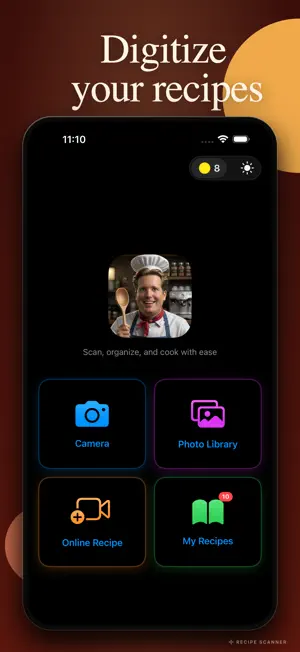
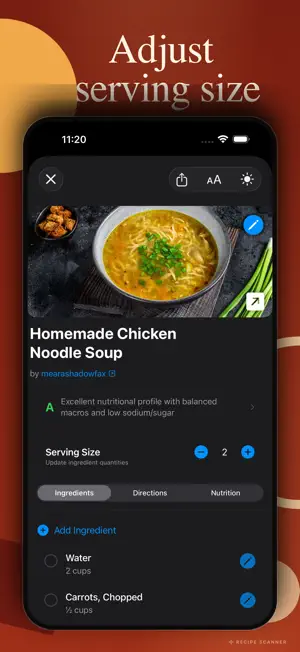
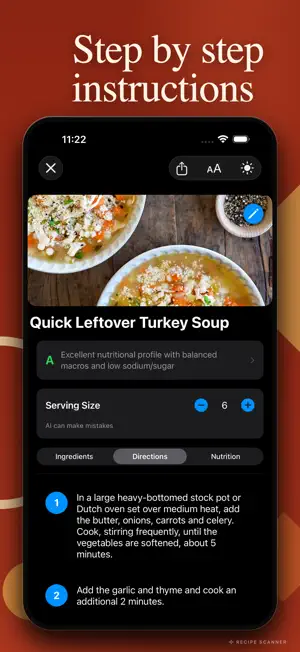
Turn any recipe into a digital collection with Recipe Scanner C! Scan cookbooks, import YouTube and Instagram videos, save recipes from any website, and get instant nutrition analysis with health grading. With on-device Apple Intelligence, all your physical recipe scanning is FREE, fast, and completely private. 3 FREE CREDITS TO GET STARTED UNLIMITED FREE SCANNING - Scan physical recipes with your camera, completely FREE - Import from Photo Library (up to 10 photos at once) - On-device Apple Intelligence extracts ingredients and directions automatically - Multi-page recipe support with automatic merging - No credits needed for camera or photo scanning - Fast, private, and accurate IMPORT FROM ANYWHERE - YouTube cooking videos (1 credit) - Instagram recipe posts and reels (1 credit) - Any recipe website URL (1 credit) - QR code scanning for instant URL import - AI extracts complete recipes from video transcripts and web pages NUTRITION ANALYSIS AND HEALTH GRADING - Per-serving nutrition facts for calories, protein, carbs, fats, fiber, sodium, and sugars - Health grade A through F on every recipe, backed by USDA Dietary Guidelines - 100-point scoring across six nutritional categories - Cooking method detection across 30+ methods (deep-fried, baked, grilled, steamed, and more) - Preparation penalty system adjusts the grade based on how the food is cooked - USDA database covering 150+ common ingredients - AI nutrition estimation fills gaps for unknown ingredients - Data source labeled on every recipe so you know where the numbers came from SMART AI PROCESSING - On-device Apple Intelligence is FREE and unlimited - Optional cloud AI enhancement for difficult recipes (1 credit, one-time per recipe) - Advanced text recognition with Vision OCR - Intelligent direction splitting and formatting - Automatic section detection for ingredients and steps ORGANIZE YOUR COLLECTION - Unlimited custom folders - Default Uncategorized folder for new recipes - Move recipes between folders with one tap - Quick search by recipe title - Visual recipe cards with thumbnails and health grades - All recipes stored locally on your device using SwiftData SMART INGREDIENT MANAGEMENT - Serving adjustment from 1 to 99 servings, ingredient quantities recalculate automatically - 18 supported measurement units across volume, weight, count, and special units - Switch between metric and imperial with one tap - Base-unit conversion math prevents rounding errors - Proper fractional display (1/2, 1/3, 1/4, 2/3, 3/4) - Per-ingredient unit conversion control COOKING MODE - Step-by-step numbered directions with checkoff - Six font size levels (14pt to 29pt) for readable text on the counter - Screen wake stays on while viewing Directions so the display does not dim - Toggle between Ingredients, Directions, and Nutrition tabs - Health grade pinned at the top while you cook THEME AND ACCESSIBILITY - Light, dark, and system theme options - VoiceOver support - Large touch targets - Adjustable font sizes PRIVACY-FIRST DESIGN - All photo scanning happens on your device with Apple Intelligence - No user accounts, no sign-up, no tracking - All recipe data stored locally on your device - Recipes do not sync to iCloud or any other device - External API calls (YouTube, Instagram, Web, Cloud AI) routed through a Cloudflare Worker proxy with rate limiting FAIR PRICING, NO SUBSCRIPTIONS - Unlimited FREE scanning with on-device AI - 3 free credits included on first launch - Credits only for premium features: - YouTube import: 1 credit - Instagram import: 1 credit - Web URL import: 1 credit - Cloud AI enhancement: 1 credit (one-time per recipe) - Automatic credit refund if a paid operation fails - Credits never expire PERFECT FOR: - Digitizing family recipe collections - Following YouTube cooking channels - Saving Instagram cooking reels - Building a personal cookbook - Tracking the nutritional impact of what you cook - Converting recipes between measurement systems
What’s new
Version 1.2.1 · Updated October 20, 2026
iPad support, EvenRealities G2 glasses export support (With companion EvenRealities hub app), iOS 27 private cloud for recipe extraction. Bug fixes and performance improvements
App privacy
The developer, Pai Labs LLC, reported these privacy practices to Apple.
Data Not Linked to You
The following data, which may be collected but is not linked to your identity, may be used for the following purposes:
- User Content: Photos or Videos
Used for: App Functionality
Alternatives to Recipe Scanner C
Looking for apps like Recipe Scanner C? Here are 6 similar apps on the App Store. The highest rated is Plato: Meal & Recipe Planner (5.0/5), and all 6 are free to download.
-
 Plato: Meal & Recipe Planner
5.0
Plato: Meal & Recipe Planner
5.0
-
 Cookiz: Recipe Scanner&Planner
-
 Thrice: Recipes & Nutrition
-
 Dish AI - Recipe Scanner
-
 Ladle: Recipe & Meal Planner
5.0
Ladle: Recipe & Meal Planner
5.0
-
 Vule: Recipe Keeper & Meals
| App | Rating | Price | Last updated | Compare |
|---|---|---|---|---|
| Recipe Scanner C | 5.0 / 5 (3 ratings) | Free | October 20, 2026 | |
| Plato: Meal & Recipe Planner | 5.0 / 5 (1) | Free | Aug 28, 2026 | Compare |
| Cookiz: Recipe Scanner&Planner | – | Free | May 29, 2026 | Compare |
| Thrice: Recipes & Nutrition | – | Free | Oct 16, 2026 | Compare |
| Dish AI - Recipe Scanner | – | Free | Jun 30, 2026 | Compare |
| Ladle: Recipe & Meal Planner | 5.0 / 5 (9) | Free | Jul 27, 2026 | Compare |
| Vule: Recipe Keeper & Meals | – | Free | Oct 22, 2026 | Compare |
Compare Recipe Scanner C with the top alternatives: ratings, updates, ASO score and keyword gaps →