

Ping-Click
Semen Luchenok Utilities iPhoneiPadiPod touch
Ping-Click is a free Utilities app for iPhone and iPad by Semen Luchenok. Requires iOS 16.0. Updated July 9, 2026.
- Price
- Free
- on the App Store
- Size
- 47 MB
- Age 12+
- Updated
- Jul 9
- 2026 · v1.0.3
Screenshots


About Ping-Click
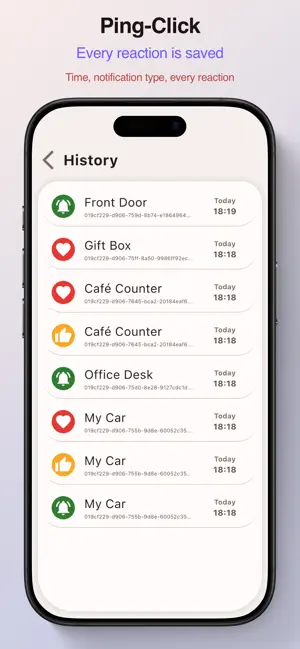
Forget everything you knew about QR codes. Just let 'em know. A notification at your fingertips. Ping-Click turns an ordinary QR code into a live communication channel. Scan — tap — the person instantly gets a notification on their phone. Three reactions — three stories: Ping — call when you're needed. A sticker on your windshield. Your car is blocking someone — they scan the code and you get a notification instantly. No phone number on a piece of paper, no notes under the wiper. You show up, move the car, drive on. Like — appreciation without personal data. A barista made the perfect coffee. A courier delivered your order safely. A teacher gave an amazing lesson. One scan — and they know their work was noticed and valued. Pure recognition. Thanks — gratitude has never been this easy. On a gift — "Thank you, I loved it!" with a single tap. At a hair salon or barbershop — great job! Instant, warm, no extra words. And that's just the start: On the fridge — your kid pings "I'm home" after school. Between friends — a sticker on a laptop: like if you miss me. At a café table — a guest pings, the waiter comes. On a business card — a client scans and says thanks for the help. Ping-Click — when a QR code becomes more than a link. Terms of Use (EULA): https://www.apple.com/legal/internet-services/itunes/dev/stdeula/ Privacy Policy: https://ping-click.com/privacy
What’s new
Version 1.0.3 · Updated July 9, 2026
Tidying up behind the glass Last time we polished the whole interface until it turned to glass, and it came out gorgeous. This time we tidied up behind that glass: everything is native and clear now. Actions and features sit exactly where you expect to find them. Nothing is hiding in surprising places. We checked, twice. History is fuller and easier to read: you can see everything that happened with your codes, and it finally makes sense at a glance. If the app suddenly feels easier to use, you are not imagining it.
App privacy
The developer, Semen Luchenok, reported these privacy practices to Apple.
Data Linked to You
The following data, which may be collected and linked to your identity, may be used for the following purposes:
- Diagnostics: Crash Data
- Surroundings: Environment Scanning
- Other Data: Other Data Types
- Contact Info: Email Address
- User Content: Emails or Text Messages
- Identifiers: User ID, Device ID
- Usage Data: Product Interaction, Other Usage Data
Used for: Analytics, Product Personalization, App Functionality, Other Purposes
Data Not Linked to You
The following data, which may be collected but is not linked to your identity, may be used for the following purposes:
- Diagnostics: Performance Data, Other Diagnostic Data
- Contact Info: Name
Used for: Analytics, App Functionality, Other Purposes
Alternatives to Ping-Click
Looking for apps like Ping-Click? Here are 6 similar apps on the App Store. The highest rated is QR Doorbell - KNOC (5.0/5), and all 6 are free to download.



| App | Rating | Price | Last updated | Compare |
|---|---|---|---|---|
| Ping-Click | – | Free | July 9, 2026 | |
| e-Garcone | – | Free | Feb 19, 2026 | Compare |
| Nook (Digital QR Door Bell) | – | Free | Jun 30, 2026 | Compare |
| QR Doorbell - KNOC | 5.0 / 5 (7) | Free | Aug 23, 2026 | Compare |
| NoBell | – | Free | Aug 1, 2024 | Compare |
| Da Buzzer | 5.0 / 5 (6) | Free | Nov 30, 2025 | Compare |
| The Counter++ | 3.0 / 5 (2) | Free | Dec 23, 2025 | Compare |
Compare Ping-Click with the top alternatives: ratings, updates, ASO score and keyword gaps →