

Plantime: Staff Scheduling
Christopher Scott Productivity iPhoneiPadiPod touch
Plantime: Staff Scheduling is a free Productivity app for iPhone and iPad by Christopher Scott. Requires iOS 15.1. Updated October 12, 2026.
- Price
- Free
- on the App Store
- Size
- 40 MB
- Age 4+
- Updated
- Oct 12
- 2026 · v1.2.1
Screenshots



About Plantime: Staff Scheduling
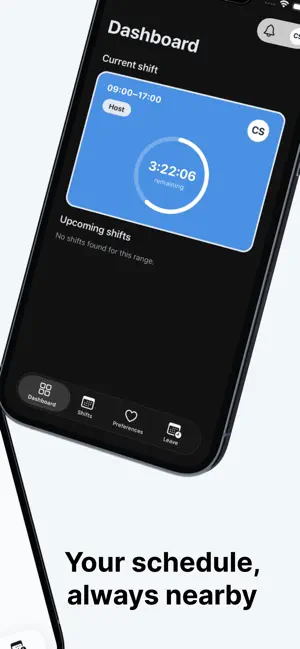
Plantime helps employees stay connected to their work schedule from their phone. View upcoming shifts, check the details of your current shift, set shift preferences, and request time off in a few taps. The app is designed as a companion for organizations that use Plantime, so employees can access the schedule and planning tools their team already relies on. With Plantime, you can: - See today’s shift and upcoming shifts - Browse your schedule in a clear calendar view - Set preferences for shifts you want or cannot take - Request leave directly from your phone - Receive notifications about schedule updates Plantime requires an existing account provided by your employer or organization.
What’s new
Version 1.2.1 · Updated October 12, 2026
- Announcements from your manager land in your inbox. Read the whole message and confirm with Got it. - Needs you: accept, decline or approve requests with one tap. - Join an organisation with a six-digit invite code and sign up right in the app. - Assistant: ask about your shifts, hours or leave, with a meter for the monthly AI budget. - Download your hours record (Stundennachweis) as a PDF from the timesheet. - Automatic break deductions are shown on your time entries, on the timesheet and in the checkout review. - Preferences: mark a whole day at once. The vacation card shows your public holidays account. - The shift checklist folds task descriptions you already know. Pull to refresh on the dashboard and shifts. - Push notifications open the right screen, sign-in recovers from an expired session, and buttons are labelled for VoiceOver with larger tap targets.
App privacy
The developer, Christopher Scott, reported these privacy practices to Apple.
Data Linked to You
The following data, which may be collected and linked to your identity, may be used for the following purposes:
- Usage Data: Product Interaction
- Diagnostics: Performance Data, Other Diagnostic Data, Crash Data
- Contact Info: Physical Address, Email Address, Name, Phone Number, Other User Contact Info
- Identifiers: User ID, Device ID
Used for: Analytics, App Functionality
Data Not Linked to You
The following data, which may be collected but is not linked to your identity, may be used for the following purposes:
- Identifiers: User ID
Used for: Analytics
Alternatives to Plantime: Staff Scheduling
Looking for apps like Plantime: Staff Scheduling? Here are 6 similar apps on the App Store. The highest rated is Target Speed Calculator (5.0/5), and all 6 are free to download.


| App | Rating | Price | Last updated | Compare |
|---|---|---|---|---|
| Plantime: Staff Scheduling | – | Free | October 12, 2026 | |
| Target Speed Calculator | 5.0 / 5 (1) | Free | Aug 27, 2025 | Compare |
| Managerr App | – | Free | May 25, 2026 | Compare |
| Fastmag Mobile Manager | – | Free | Feb 11, 2026 | Compare |
| Vulki | – | Free | Jun 6, 2026 | Compare |
| IBS Wohnen | – | Free | Mar 12, 2025 | Compare |
| RapidStock | – | Free | Oct 27, 2026 | Compare |