

SolCalc: Sun & Moon Tracker
Robert Ehrhardt Photo & Video iPhoneiPadiPod touchApple Watch
SolCalc: Sun & Moon Tracker is a free Photo & Video app for iPhone and iPad by Robert Ehrhardt. Requires iOS 18.2. Updated October 23, 2026.
- Price
- Free
- on the App Store
- Size
- 72 MB
- Age 4+
- Updated
- Oct 23
- 2026 · v3.3.0
Screenshots


About SolCalc: Sun & Moon Tracker
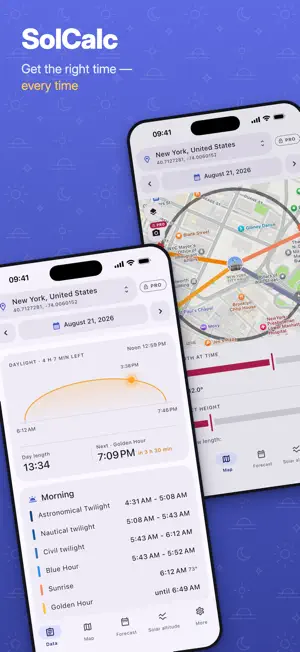
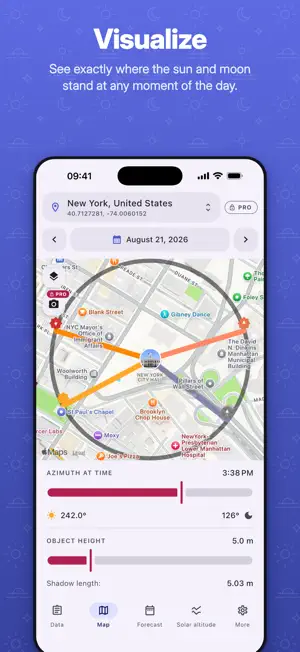
SolCalc is a sun and moon calculator that tells you when the light will be right — at any place on Earth, on any day you pick. Get sunrise, sunset and solar noon together with data of the blue hour, the golden hour and the twilight times (civil, nautical and astronomical). Calculate moonrise, moonset and moon phases (calculated data are approximations of +/- 1 day accuracy). You can also calculate and visualize the shadow length that an object will create. Point your camera at the scene and AR mode draws the sun's path straight onto the live view, with golden hour and blue hour markers, azimuth, elevation and shadow length. Widgets put the next golden hour, sunset or blue hour on your Home Screen and Lock Screen with a live countdown, and reminders tell you before the light changes — calculated on your device, without an account or a server. In this app you can view data for multiple locations. These can be defined manually or automatically by getting your GPS location. Additionally you have the opportunity to manually set timezones of the locations, which can be helpful if you are planning trips to locations with another timezone than the one where you currently are. CORE FEATURES AT A GLANCE • Calculation of sunrise, sunset and solar noon • Calculation of moonrise and moonset + moon phase • Calculation of the civil blue hour • Calculation of twilight times (civil, nautical and astronomical) • Calculation of the golden hour • Visualization of the azimuth data of sunrise, sunset, moonrise and moonset • Visualization of the azimuth data of sun and moon for a specific time • Calculation and visualization of an object's shadow (e.g. helpful for planning photovoltaics/PV alignment) • Visualization of the sun's height over a day • AR mode: follow the sun's path live through your camera • Home Screen and Lock Screen widgets with the next golden hour, sunset, blue hour or sunrise and a live countdown • Golden hour reminder, e.g. "Golden hour begins in 30 min" • Definition of multiple locations, including your current position (based on GPS) • Forecast SOLCALC FOR APPLE WATCH • A 24-hour dial shows night, twilight, golden hour and daylight around the clock, with the next sunrise, sunset or blue hour and a live countdown in the middle • Today's key times at a glance: sunrise, solar noon, golden hour, sunset and blue hour • Moon phase, moonrise and moonset, with the direction of each • Your saved places come over from your iPhone automatically, or use the watch's own GPS • Complications and Smart Stack widgets: sunrise and sunset, the next golden or blue hour, remaining daylight, and the moon PRO FEATURES • No limit in selecting a date for calculation (max. +/- 7 days in the free version) • Full monthly forecast • Unlimited AR mode • Reminders for sunrise, blue hour and full moon, with the direction the full moon rises in • Day ring widget: all of today's sun times around the clock, plus the moon • Export of forecast data to Excel tables Note: the calculated values are approximations to plan your photography trips. Additionally it depends on the weather situation how good, or whether, the blue or golden hour is visible. TERMS OF SERVICE https://passwordsafe.app/solcalc/policies/terms.html End User License Agreement (EULA): https://www.apple.com/legal/internet-services/itunes/dev/stdeula/
What’s new
Version 3.3.0 · Updated October 23, 2026
• New: widgets for your Home Screen and Lock Screen. One counts down to the next golden hour, sunset, blue hour or sunrise; with Pro, the day ring shows the whole day's light around the clock • New: reminders, as many as you like, each for its own place — daily, on the weekdays you choose or just once, right on time or up to an hour ahead. Calculated on your device, without an account • Golden hour reminders are free; with Pro also sunrise, sunset, blue hour, solar noon, moonrise, moonset and the full moon • Apple Watch: choose in the iPhone app which twilight phases the watch shows next to sunrise and sunset • Your current location now refreshes by itself whenever you return to the app • Smoother animations throughout, and SolCalc respects the Reduce Motion setting • More accurate blue hour and AR sun path when twilight runs past midnight or the clocks change • Under-the-hood updates and fixes
App privacy
The developer, Robert Ehrhardt, reported these privacy practices to Apple.
Data Linked to You
The following data, which may be collected and linked to your identity, may be used for the following purposes:
- Purchases: Purchase History
Used for: Analytics, App Functionality
Data Not Linked to You
The following data, which may be collected but is not linked to your identity, may be used for the following purposes:
- Location: Precise Location, Coarse Location
Used for: App Functionality
Alternatives to SolCalc: Sun & Moon Tracker
Looking for apps like SolCalc: Sun & Moon Tracker? Here are 6 similar apps on the App Store. The highest rated is ARK Infrared (5.0/5), and 5 of the 6 are free to download.
-
 Chase the Light
-
 Muuna
-
 ARK Infrared
5.0
-
 Depth of Field Calculator: DoF
5.0
-
 ShutterLife: Shutter Count
-
 OneReel Cam by app-inc.
| App | Rating | Price | Last updated | Compare |
|---|---|---|---|---|
| SolCalc: Sun & Moon Tracker | – | Free | October 23, 2026 | |
| Chase the Light | – | Free | Sep 30, 2026 | Compare |
| Muuna | – | Free | Jul 28, 2026 | Compare |
| ARK Infrared | 5.0 / 5 (1) | Free | Oct 20, 2026 | Compare |
| Depth of Field Calculator: DoF | 5.0 / 5 (1) | Free | Oct 20, 2026 | Compare |
| ShutterLife: Shutter Count | – | 2.99 USD | Oct 20, 2026 | Compare |
| OneReel Cam by app-inc. | – | Free | Oct 18, 2026 | Compare |