

Dreamborn.ink Companion
Dreamborn Utilities iPhoneiPadiPod touch
Dreamborn.ink Companion is a free Utilities app for iPhone and iPad by Dreamborn. Rated 4.0/5 from 5 ratings. Requires iOS 26.2. Updated October 13, 2026.
- Rating
- 4.0
- 5 ratings
- Price
- Free
- on the App Store
- Size
- 18 MB
- Age 4+
- Updated
- Oct 13
- 2026 · v1.1.1
Screenshots


About Dreamborn.ink Companion
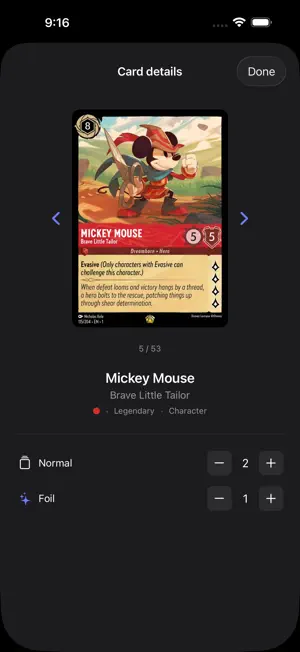
The fastest way to get your Disney Lorcana collection into dreamborn.ink -- just point your camera and scan. Dreamborn.ink Companion uses your iPhone's camera to instantly identify Lorcana cards and sync them directly to your dreamborn.ink collection. Whether you're cataloging a massive new haul or tracking down a single missing card, getting cards into your collection has never been this effortless. SCAN SEVERAL CARDS AT ONCE Lay out a few cards and capture them all with one tap -- each card is outlined as it's recognised. Prefer one at a time? Turn on auto mode and the app captures each card as you hold it up, no tapping required. Review your queue before anything reaches your collection. RECOGNIZES THE CARD, NOT JUST THE TEXT Cards are identified by their artwork using recognition that runs right on your phone -- fast, and reliable even in tricky lighting. The app reads each card's print code to pick the exact printing and the language it was printed in. If it isn't sure, it shows you the best candidates to choose from instead of guessing. EVERY LANGUAGE Scanning French, German, Italian, Spanish, Japanese, or Chinese cards? Just scan them -- each card is added in the language it's printed in. Mix languages in the same session if you like. BROWSE YOUR FULL COLLECTION View every card in the Lorcana catalog and filter by set, color, rarity, type, or franchise. See your quantities and card prices at a glance, and tap any card to update your counts directly from your phone. SEAMLESS DREAMBORN.INK SYNC Scanned cards are queued locally and uploaded to your collection in a single batch whenever you're ready. Your queue is saved automatically, even if you force-quit the app. ---------------------------------------- Requires a free dreamborn.ink account. Sign in with your existing dreamborn.ink credentials, your Google account, or Sign in with Apple.
Ratings & reviews
4.0
5 ratings
What’s new
Version 1.1.1 · Updated October 13, 2026
• New scanner: lay out several cards and capture them all with one tap • Cards are recognised by their artwork, faster and more reliably • Binders: choose which binder your scans go into, and browse, create, rename or delete binders
App privacy
The developer, Dreamborn, reported these privacy practices to Apple.
Data Linked to You
The following data, which may be collected and linked to your identity, may be used for the following purposes:
- Contact Info: Email Address
- Identifiers: User ID
Used for: App Functionality
Alternatives to Dreamborn.ink Companion
Looking for apps like Dreamborn.ink Companion? Here are 6 similar apps on the App Store. The highest rated is RiftScan - Card & Deck Tool (5.0/5), and all 6 are free to download.
-
 Glimmer Scan
4.1
-
 HoloScan: Card & Deck Tool
4.9
-
 RiftScan - Card & Deck Tool
5.0
-
 MY LITTLE PONY Card Game
2.6
-
 Highground: SWU Damage Tracker
4.9
-
 Pin Trading - Scan & Collect
4.5
| App | Rating | Price | Last updated | Compare |
|---|---|---|---|---|
| Dreamborn.ink Companion | 4.0 / 5 (5 ratings) | Free | October 13, 2026 | |
| Glimmer Scan | 4.1 / 5 (21) | Free | May 29, 2025 | Compare |
| HoloScan: Card & Deck Tool | 4.9 / 5 (47) | Free | Oct 21, 2026 | Compare |
| RiftScan - Card & Deck Tool | 5.0 / 5 (25) | Free | Oct 27, 2026 | Compare |
| MY LITTLE PONY Card Game | 2.6 / 5 (16) | Free | Sep 30, 2026 | Compare |
| Highground: SWU Damage Tracker | 4.9 / 5 (77) | Free | Mar 22, 2025 | Compare |
| Pin Trading - Scan & Collect | 4.5 / 5 (1,768) | Free | Oct 16, 2026 | Compare |