

Scanly AI: PDF Scanner & Docs
Paras Butani Productivity iPhoneiPadiPod touch
Scanly AI: PDF Scanner & Docs is a free Productivity app for iPhone and iPad by Paras Butani. Requires iOS 13.0. Updated June 27, 2026.
- Price
- Free
- on the App Store
- Size
- 49 MB
- Age 4+
- Updated
- Jun 27
- 2026 · v1.0.2
Screenshots


About Scanly AI: PDF Scanner & Docs
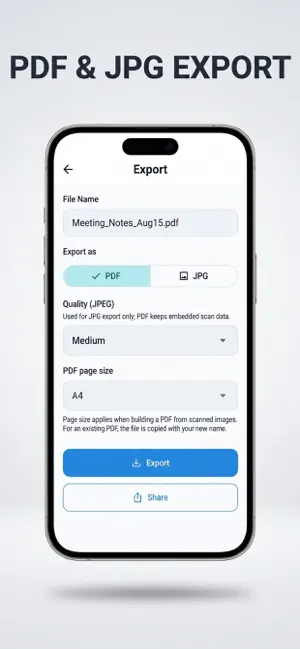
# Scanly AI: PDF Scanner & Docs Turn your iPhone into a powerful AI PDF scanner and document scanner. Scan documents, receipts, notes, books, business cards, and ID cards in seconds. Create high-quality PDF files, organize your documents, and share them anywhere. ## PDF Scanner • Scan documents instantly • Create high-quality PDF files • Multi-page document scanning • Automatic edge detection • Smart document enhancement ## ID Card Scanner • Scan front and back of ID cards • Support for passports and driver's licenses • Automatic document alignment • Clear, professional-quality scans ## Smart Document Tools • Crop and rotate documents • Adjust brightness and contrast • Apply multiple scan filters • Organize documents with ease ## Perfect For • Students • Business professionals • Office documents • Contracts • Receipts • Books • Notes • Assignments ## Easy Sharing • Export as PDF • Share documents instantly • Save and organize your files • Access scans anytime Whether you're scanning receipts, invoices, contracts, study notes, books, or ID cards, Scanly AI makes document scanning fast, accurate, and effortless. --- # Scanly AI Pro Scanly AI offers optional **Scanly AI Pro** auto-renewable subscriptions to remove ads and unlock premium features. ### Subscription Plans **Premium – 1 Month** • $4.99 per month **Premium – 6 Months** • $29.99 every 6 months **Premium – 1 Year** • $49.99 per year Payment will be charged to your Apple ID account when you confirm your purchase. Your subscription renews automatically unless auto-renew is turned off at least 24 hours before the end of the current billing period. Your account will be charged for renewal within 24 hours before the current subscription period ends. You can manage or cancel your subscription at any time in your Apple ID Account Settings. Privacy Policy https://prishainfoway.in/policy/fastscanner/io_fastscan.html Terms of Use (EULA) https://www.apple.com/legal/internet-services/itunes/dev/stdeula/
What’s new
Version 1.0.2 · Updated June 27, 2026
Increased free scan limit for all users Improved document scanning performance Better PDF generation quality
App privacy
The developer, Paras Butani, reported these privacy practices to Apple.
Data Used to Track You
The following data may be used to track you across apps and websites owned by other companies:
- Identifiers: Device ID
- Usage Data: Advertising Data
Data Linked to You
The following data, which may be collected and linked to your identity, may be used for the following purposes:
- Identifiers: Device ID
- Usage Data: Product Interaction, Advertising Data
- Diagnostics: Crash Data, Performance Data
- Contact Info: Email Address
Used for: Third-Party Advertising, Analytics, App Functionality
Alternatives to Scanly AI: PDF Scanner & Docs
Looking for apps like Scanly AI: PDF Scanner & Docs? Here are 6 similar apps on the App Store. The highest rated is FastScanner: PDF&OCR (5.0/5), and all 6 are free to download.
-
 FastScanner: PDF&OCR
5.0
-
 Parallax: Multi-Model AI
5.0
-
 Scan to PDF: Sign & Redact
-
 Mobile Fast Scanner Image PDF
2.3
-
 lera.mn
-
 ClassLink Events
3.7
| App | Rating | Price | Last updated | Compare |
|---|---|---|---|---|
| Scanly AI: PDF Scanner & Docs | – | Free | June 27, 2026 | |
| FastScanner: PDF&OCR | 5.0 / 5 (4) | Free | Oct 9, 2025 | Compare |
| Parallax: Multi-Model AI | 5.0 / 5 (1) | Free | Oct 26, 2026 | Compare |
| Scan to PDF: Sign & Redact | – | Free | Jul 7, 2026 | Compare |
| Mobile Fast Scanner Image PDF | 2.3 / 5 (3) | Free | Oct 6, 2026 | Compare |
| lera.mn | – | Free | Oct 29, 2026 | Compare |
| ClassLink Events | 3.7 / 5 (3) | Free | Feb 9, 2026 | Compare |