
HUD Speedometer Speed Monitor
XIAOLEI LI Navigation iPhoneiPadiPod touch
HUD Speedometer Speed Monitor is a free Navigation app for iPhone and iPad by XIAOLEI LI. Rated 5.0/5 from 4 ratings. Requires iOS 17.0.
- Rating
- 5.0
- 4 ratings
- Price
- Free
- on the App Store
- Size
- 19 MB
- Age 4+
- Updated
- Apr 8
- 2026 · v1.0.0
Screenshots



About HUD Speedometer Speed Monitor
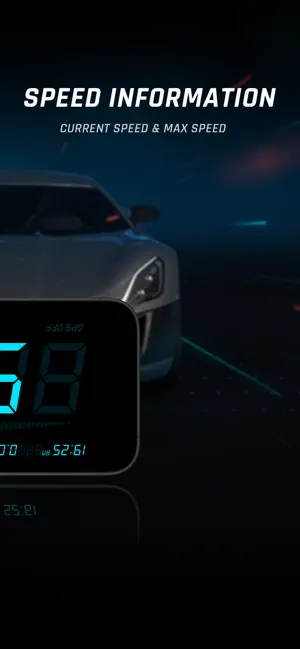
Know your speed. Track every mile. HUD Speedometer is a GPS digital speedometer with mirror HUD (head-up display) mode—built for drivers, cyclists, and anyone who wants a bold, easy-to-scan vehicle speed readout on iPhone. Think of it as a focused car dashboard on your phone: large numerals, clear hierarchy, and trip tools that feel natural next to navigation apps. Get current speed plus trip distance, max speed and average speed. Switch MPH, KMH, or KTS for regional driving and marine-style speed units when you need knots. HUD mirror mode flips the interface so you can reflect it on the windshield for quick, short glances in portrait or landscape. Why HUD Speedometer • HUD mirror mode for reflective windshield viewing—less leaning, faster glances. • Smarter trip view: distance for each journey with longer totals similar to an odometer tracker. • Speed warnings: set an upper limit and get alerted if you exceed it on unfamiliar roads. • Portrait or landscape with sensor auto-rotate—matches dash mounts, bike mounts, and phone holders. • Themes that stay readable: adjust colors for bright daytime sun or dark night driving. • Context you expect: time, battery, and GPS status right beside your speed when you need to troubleshoot a signal. • Modes for car, bike, and walking so pacing feels relevant to how you move. • History & stats: review trips over time where the feature is available in-app. Quick scan checklist Large high-contrast digits • Max and average speed for the session • Trip distance and longer-run mileage totals • Custom speed alerts • HUD mirror workflow • Automatic rotation Scenarios Daily commute: a clear digital speedometer next to navigation. Night drives: HUD mirror for shorter windshield glances (always keep your eyes on traffic). Cycling trips: pace and distance without a dedicated cycle computer. Weekend travel: compare peak vs average speed and total miles. Features (detailed) HUD mode mirrors the UI for windshield projection. Supports portrait/landscape with auto-rotate. Units: MPH, KMH, KTS. Speed alerts with a user-set ceiling. Color themes for readability. Shows current, max, and average speed plus time, battery, and GPS status. Tracks trip distance and extended totals. Activity presets for car, bike, and walking. Trip history and statistics where provided. GPS accuracy varies with sky view, device hardware, weather, and environment. Follow all traffic laws; never use your phone in a distracting way behind the wheel. This app is an aid and does not replace certified vehicle instrumentation where legally required. Subscription Information : HUD Speedometer offers an auto-renewing yearly subscription at $19.99 USD/year, and an auto-renewing weekly subscription at $6.99 USD/week to provide you with unlimited access to all premium features while you maintain an active subscription. Payment will be charged to the payment method connected to your iTunes Account when you confirm the initial subscription purchase. Subscriptions automatically renew unless auto-renew is turned off at least 24-hours before the end of the current subscription period. Your account will be charged for renewal within 24-hours prior to the end of the current period. You may manage your subscription and auto-renewal may be turned off by going to your Account Settings after purchase. Terms of service: http://bambooswift.info/digital_hud_terms_of_use.html Privacy policy: http://www.bambooswift.info
App privacy
The developer, XIAOLEI LI, reported these privacy practices to Apple.
Data Used to Track You
The following data may be used to track you across apps and websites owned by other companies:
- Identifiers: Device ID
- Usage Data: Advertising Data
Data Not Linked to You
The following data, which may be collected but is not linked to your identity, may be used for the following purposes:
- Identifiers: Device ID
- Usage Data: Product Interaction, Advertising Data
- Diagnostics: Crash Data
- Location: Precise Location, Coarse Location
Used for: Third-Party Advertising, Analytics, App Functionality
Alternatives to HUD Speedometer Speed Monitor
Looking for apps like HUD Speedometer Speed Monitor? Here are 6 similar apps on the App Store. The highest rated is GPS Speedometer MPH - Tracker (4.9/5), and all 6 are free to download.
-
 Simple Speedometer: Car HUD
4.7
-
 NeoMeter - GPS Speedometer HUD
-
 Head-Up Display - Speedometer
-
 Speedometer ⁺
4.3
-
 Speedometer GPS : MPH Tracker
4.5
-
 GPS Speedometer MPH - Tracker
4.9
| App | Rating | Price | Last updated | Compare |
|---|---|---|---|---|
| HUD Speedometer Speed Monitor | 5.0 / 5 (4 ratings) | Free | April 8, 2026 | |
| Simple Speedometer: Car HUD | 4.7 / 5 (3) | Free | Sep 25, 2026 | Compare |
| NeoMeter - GPS Speedometer HUD | – | Free | Apr 1, 2026 | Compare |
| Head-Up Display - Speedometer | – | Free | Jul 4, 2026 | Compare |
| Speedometer ⁺ | 4.3 / 5 (2,049) | Free | May 13, 2026 | Compare |
| Speedometer GPS : MPH Tracker | 4.5 / 5 (163) | Free | Aug 13, 2026 | Compare |
| GPS Speedometer MPH - Tracker | 4.9 / 5 (20) | Free | Aug 28, 2026 | Compare |