

Photo Cleaner: Swipe & Vault
Alexander Simons Photo & Video iPhoneiPadiPod touch
Photo Cleaner: Swipe & Vault is a free Photo & Video app for iPhone and iPad by Alexander Simons. Rated 4.5/5 from 2 ratings. Requires iOS 17.0.
- Rating
- 4.5
- 2 ratings
- Price
- Free
- on the App Store
- Size
- 14 MB
- Age 4+
- Updated
- Oct 24
- 2026 · v1.0.11
Screenshots
Save to Pinterest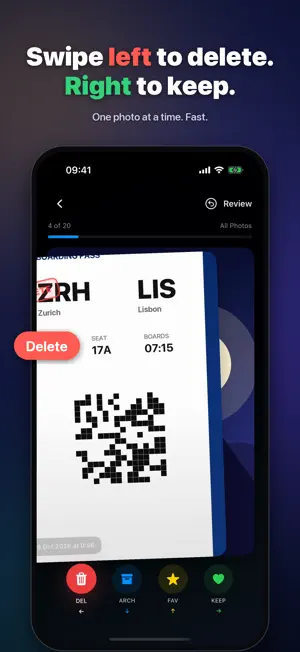


About Photo Cleaner: Swipe & Vault
Photo Cleaner helps you tidy your camera roll with quick swipe decisions. Review photos, videos, screenshots, similar shots, and albums, then confirm before anything changes. A starting point, not an autopilot Help Me Choose uses on-device Apple Intelligence to recommend an existing review mode from your cleanup goal. Your photos are not sent to the model. It does not search your images or decide what to delete. Requires iOS 26 or later and available Apple Intelligence on a compatible iPhone. Standard cleanup modes work without Apple Intelligence. Focused cleanup modes - All Photos: review photos and videos in one flow. - Videos: give your clips a second look. - Similar Photos: compare similar shots and choose what to keep. - Screenshots: review old captures, tickets, and receipts. - Albums: focus on a collection you choose. Your private Vault, locked with Face ID Keep private photos, videos and files away from Apple Photos, in separate Photos, Videos and Files sections. The Vault opens with Face ID (or your passcode) and locks again when you leave the app. Preview, share, organize photos into albums and files into folders, or export back to Apple Photos. After copying from Photos, you choose whether to keep or delete the originals. Free iCloud backup Your Vault is backed up to your own iCloud for free, so it survives deleting the app, resetting your iPhone or moving to a new one. Restore it with one tap. It's kept in Photo Cleaner's own area of your iCloud, protected by your Apple Account, and you can turn it off any time. Review first. Confirm second. Swipe to keep, mark for deletion, favorite, or archive. Review your decisions before applying changes through Apple's Photos flow. Archive and Vault remain separate features. Photos deletions go to Recently Deleted; storage figures describe media size, not a guarantee of immediately freed device space. Private by design No account required. No analytics or tracking. Photo analysis and optional goal recommendations run on-device. Your photos are never uploaded to us; Vault backups go to your own iCloud. Location labels may use Apple's geocoding service. Simple pricing Clean up 50 items a day for free, or get Photo Cleaner Pro for unlimited cleanups and files in your Vault. Pick yearly, with 2 weeks free for new subscribers, or Lifetime, one payment and yours for good. No weekly plans, ever. Pro works for your whole family with Family Sharing. Files you add stay yours if Pro ends. Everyone who bought the earlier one-time unlock keeps full access. Terms of Use: https://www.apple.com/legal/internet-services/itunes/dev/stdeula/ Privacy Policy: https://docs.google.com/document/d/13TtjEOxwYIiag-eI3maV0TohQlB9N8yNp8bVMn7S6Vk/view
What’s new
Version 1.0.11 · Updated October 24, 2026
Albums in your Vault now show a cover photo, so you can spot the one you want at a glance.
App privacy
The developer, Alexander Simons, reported these privacy practices to Apple.
Data Not Collected
The developer does not collect any data from this app.
Alternatives to Photo Cleaner: Swipe & Vault
Looking for apps like Photo Cleaner: Swipe & Vault? Here are 6 similar apps on the App Store. The highest rated is Swipe Photo Cleaner : piclean (4.5/5), and all 6 are free to download.
-
 KeepShot: Swipe to Sort Photos
-
 Photo Cleaner: Clean Videos
-
 Photo Cleaner: SwipePurge
-
 PhotoSlimmer: Photo Cleaner
-
 PureVault: Private Photo Vault
4.3
-
 Swipe Photo Cleaner : piclean
4.5
| App | Rating | Price | Last updated | Compare |
|---|---|---|---|---|
| Photo Cleaner: Swipe & Vault | 4.5 / 5 (2 ratings) | Free | October 24, 2026 | |
| KeepShot: Swipe to Sort Photos | – | Free | Jul 15, 2026 | Compare |
| Photo Cleaner: Clean Videos | – | Free | Mar 21, 2026 | Compare |
| Photo Cleaner: SwipePurge | – | Free | Feb 13, 2026 | Compare |
| PhotoSlimmer: Photo Cleaner | – | Free | Nov 11, 2026 | Compare |
| PureVault: Private Photo Vault | 4.3 / 5 (6) | Free | Nov 3, 2026 | Compare |
| Swipe Photo Cleaner : piclean | 4.5 / 5 (4) | Free | Oct 21, 2026 | Compare |