

RoomSnap - Room Planner
skybringup Utilities iPhoneiPadiPod touch
RoomSnap - Room Planner is a free Utilities app for iPhone and iPad by skybringup. Requires iOS 15.0. Updated October 27, 2026.
- Price
- Free
- on the App Store
- Size
- 35 MB
- Age 4+
- Updated
- Oct 27
- 2026 · v1.5.0
Screenshots



About RoomSnap - Room Planner
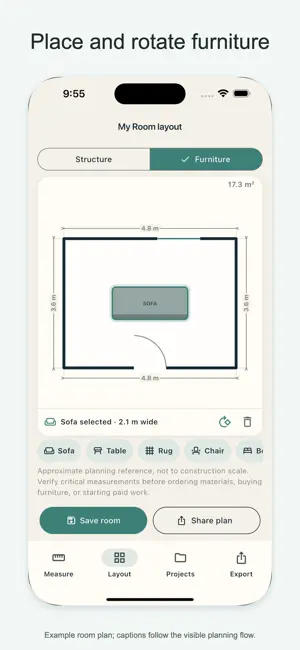
Plan a room from measurements you enter yourself. Type the width and depth from your tape measure and RoomSnap draws an editable floor plan — no scanning, no guessing. LAYOUT • Pinch to zoom the plan, drag to pan • Add doors and windows from the tray, slide them along any wall, set their width • Place sofas, tables, rugs, chairs, beds and plants, drag them into position, rotate them 90° • Adjust each wall length with a slider; the area updates as you go EXPORT • Share a watermarked PNG for free • Premium: clean PNG without watermark, and a PDF with dimension tables for walls, openings and furniture plus a scale bar — a sheet you can read sizes from • Toggle the Dimensions, Furniture and Notes layers PROJECTS • Your first saved room is free; Premium keeps every room • Work in progress is saved automatically and restored when you return • Reopen any saved room to keep editing YOUR DATA STAYS LOCAL • No account required • All room data stays on your device; nothing is uploaded • Anonymous usage counts only, never your rooms LANGUAGES English, Deutsch, Español, Français, Italiano, Português, 日本語, 한국어, 简体中文, 繁體中文, Русский, Nederlands, Polski, Türkçe, Tiếng Việt, Українська, ไทย RoomSnap does not scan or measure the room for you. Verify critical dimensions before buying or building. This is a planning reference, not a construction document. Your first saved room and watermarked preview are free. Premium unlocks unlimited saved rooms and watermark-free PNG and PDF sharing. Weekly Premium is auto-renewable. Lifetime Premium is a one-time purchase. Prices are shown before purchase. Terms of Use: https://www.apple.com/legal/internet-services/itunes/dev/stdeula/ Privacy Policy: https://roomsnap.skybringup.com/privacy/
What’s new
Version 1.5.0 · Updated October 27, 2026
Doors and windows: add them from the tray, slide them along any wall, set their width. Rotate furniture 90° and pinch to zoom the plan. PDF export now includes dimension tables for walls, openings and furniture, plus a scale bar. Your work-in-progress plan is kept automatically and restored when you come back. Cleaner screens: fewer captions, the Create Floor Plan button is always in reach. New languages: Русский, Nederlands, Polski, Türkçe, Tiếng Việt, Українська, ไทย
App privacy
The developer, skybringup, reported these privacy practices to Apple.
Data Linked to You
The following data, which may be collected and linked to your identity, may be used for the following purposes:
- Location: Coarse Location
- Identifiers: User ID, Device ID
- Usage Data: Product Interaction
- Diagnostics: Performance Data, Other Diagnostic Data
- Purchases: Purchase History
- Contact Info: Email Address
- User Content: Customer Support
Used for: Analytics, App Functionality
Alternatives to RoomSnap - Room Planner
Looking for apps like RoomSnap - Room Planner? Here are 6 similar apps on the App Store.
-
 RoomSnap AI
-
 Korean Area Calculator: Pyeong
-
 Square Footage & Floor Area
-
 3D户型图-可视化房屋空间设计软件
-
 Nexgen Diagnostic
-
 ACL GPS
| App | Rating | Price | Last updated | Compare |
|---|---|---|---|---|
| RoomSnap - Room Planner | – | Free | October 27, 2026 | |
| RoomSnap AI | – | Free | Apr 7, 2026 | Compare |
| Korean Area Calculator: Pyeong | – | Free | Oct 24, 2026 | Compare |
| Square Footage & Floor Area | – | Free | Aug 15, 2026 | Compare |
| 3D户型图-可视化房屋空间设计软件 | – | 0.99 USD | Jul 18, 2026 | Compare |
| Nexgen Diagnostic | – | Free | Jul 1, 2026 | Compare |
| ACL GPS | – | Free | Jul 28, 2025 | Compare |