

Scanner App: Scan Docs
UMLIMITED BURST Business iPhoneiPadiPod touch
Scanner App: Scan Docs is a free Business app for iPhone and iPad by UMLIMITED BURST. Rated 4.6/5 from 8 ratings. Requires iOS 16.0.
- Rating
- 4.6
- 8 ratings
- Price
- Free
- on the App Store
- Size
- 91 MB
- Age 4+
- Updated
- Oct 30
- 2026 · v102.1.2
Screenshots
Save to Pinterest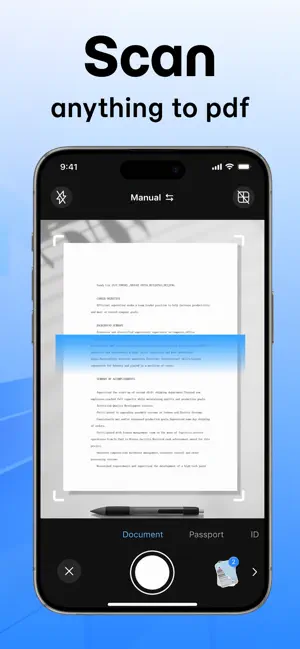


About Scanner App: Scan Docs
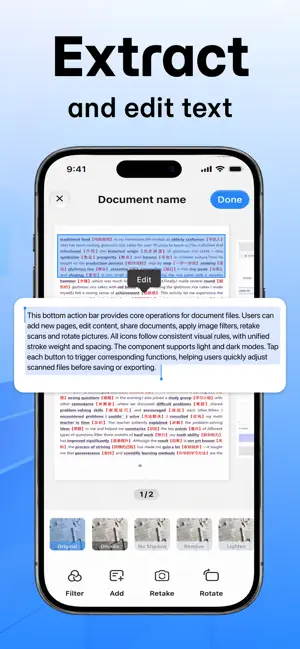
Scanner App – PDF Scanner & Image to PDF Turn paper documents into clear, organized PDFs with your iPhone. Whether you’re saving a receipt, submitting an assignment, or signing a form, Scanner App makes everyday paperwork easier to handle. Scan with your camera, convert existing photos into PDFs, and keep multiple pages together in one document. Edit, annotate, sign, and share your files—all from your phone. SCAN EVERYDAY DOCUMENTS Capture receipts, invoices, notes, IDs, contracts, and more. Save your scans as PDF or JPEG files for easy storage and sharing. TURN PHOTOS INTO PDFs Convert photos, screenshots, and images from your gallery into PDF documents. Bring the images you need together in one convenient file. SIGN DOCUMENTS ON YOUR PHONE Add your signature to forms and contracts in a few taps. Get paperwork ready to send without printing and scanning it again. ANNOTATE AND HIGHLIGHT Highlight important information, add notes, and mark up PDFs to make reviewing documents easier. CHOOSE THE LOOK YOU NEED Save scans in color, grayscale, or black and white to suit your documents. SAVE AND SHARE WITH EASE Save files to your device or share them through email and messaging apps. Send a PDF whenever you need to submit, share, or keep a digital copy. From classroom notes to work documents, Scanner App helps you turn everyday paper into files you can use. Download Scanner App and make your next scan simple. We’d love to hear your feedback: [email protected] Privacy Policy: https://dfulzgk5xtp6x.cloudfront.net/privacy-policy Terms of Use: https://www.apple.com/legal/internet-services/itunes/dev/stdeula/
Ratings & reviews
4.6
8 ratings
What’s new
Version 102.1.2 · Updated October 30, 2026
• Bug fixes and improved PDF performance. This update helps Scanner App run more smoothly when working with your documents. Have suggestions or need help? We’d love to hear from you! :) Contact us at: [email protected]
App privacy
The developer, UMLIMITED BURST, reported these privacy practices to Apple.
Data Used to Track You
The following data may be used to track you across apps and websites owned by other companies:
- Identifiers: User ID, Device ID
- Usage Data: Advertising Data
- Diagnostics: Crash Data, Performance Data, Other Diagnostic Data
- Other Data: Other Data Types
Data Not Linked to You
The following data, which may be collected but is not linked to your identity, may be used for the following purposes:
- Identifiers: User ID, Device ID
- Usage Data: Advertising Data
- Diagnostics: Crash Data, Performance Data, Other Diagnostic Data
- Other Data: Other Data Types
Used for: Third-Party Advertising, Developer’s Advertising or Marketing, Analytics, Other Purposes
Alternatives to Scanner App: Scan Docs
Looking for apps like Scanner App: Scan Docs? Here are 6 similar apps on the App Store. The highest rated is Photo Gallery - Photo Recovery (5.0/5), and all 6 are free to download.
-
 PDF Reader: Convert & Edit
4.8
-
 Cleaner Plus: Free Up Space
4.9
-
 SwipeCloud: Clean Up Storage
4.6
-
 Photo Gallery - Photo Recovery
5.0
-
 AI Cleaner · Clean Up Storage
3.8
-
 Minine PDF: Scan, Edit & AI
4.5
| App | Rating | Price | Last updated | Compare |
|---|---|---|---|---|
| Scanner App: Scan Docs | 4.6 / 5 (8 ratings) | Free | October 30, 2026 | |
| PDF Reader: Convert & Edit | 4.8 / 5 (4) | Free | Jan 5, 2026 | Compare |
| Cleaner Plus: Free Up Space | 4.9 / 5 (11) | Free | May 18, 2026 | Compare |
| SwipeCloud: Clean Up Storage | 4.6 / 5 (5) | Free | May 14, 2026 | Compare |
| Photo Gallery - Photo Recovery | 5.0 / 5 (2) | Free | Oct 16, 2026 | Compare |
| AI Cleaner · Clean Up Storage | 3.8 / 5 (71) | Free | Oct 6, 2026 | Compare |
| Minine PDF: Scan, Edit & AI | 4.5 / 5 (6) | Free | Sep 9, 2026 | Compare |