

Screen Time Control - Guardit
Guide Intelligence Limited Lifestyle iPhoneiPadiPod touch
Screen Time Control - Guardit is a free Lifestyle app for iPhone and iPad by Guide Intelligence Limited. Requires iOS 16.6. Updated May 27, 2026.
- Price
- Free
- on the App Store
- Size
- 12 MB
- Age 4+
- Updated
- May 27
- 2026 · v1.0
Screenshots


About Screen Time Control - Guardit
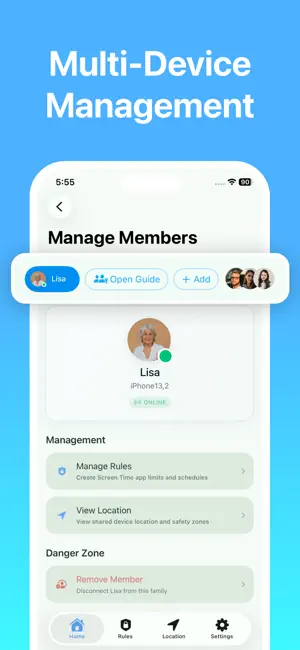
Choose Guardit to manage you and your family members' screen time efficiently and safeguard their online security. Through intelligent behavior analysis, real-time location sharing, app limits, and screen time management, we effectively help everyone in your circle establish a healthier digital lifestyle. Core Features - Smart Screen Management & Focus - Screen Time Tracking: Automatically record usage duration and frequency of apps and websites. Generate intuitive reports to make historical data clear at a glance. - App & Category Limits: Set daily usage caps for specific apps or categories. The app will be automatically locked and intercepted once the limit is exceeded. - Automated Scheduling: Pre-set personal plans such as "Family conversation time" or "Sleep Time." The system automatically locks the device during these periods, keeping only "Whitelist" apps available. - Remote Guarding & Instant Response - Real-time GPS Tracking: View everyone’s current location in your circle and movement history from the last 7 days. - SOS Emergency Button: In an emergency, members can send an SOS request containing their location information. - Multi-Device Management: One account can manage multiple iOS devices without limitation. Rules are synced automatically for seamless efficiency. - Uninstall Protection - Powered by Apple's official built-in framework, managed devices cannot bypass or uninstall the app. Whether it's for family network safety or boosting personal focus, it ensures that your digital rules stay firmly in effect. How to Use? - Download this app on both your device and the family member's iOS device. - Connect to the managed device via an invitation link or pairing code. - Link your account to the family member's device. Subscription Information Some features may require a subscription — fees will be charged through the App, third parties, or Apple directly. You can cancel your subscription at any time in your iTunes Account Settings. Download now to help everyone build a balanced digital life! Privacy Policy: https://screentime.guideyy.com/privacy Terms of Use: https://screentime.guideyy.com/terms
App privacy
The developer, Guide Intelligence Limited, reported these privacy practices to Apple.
Data Used to Track You
The following data may be used to track you across apps and websites owned by other companies:
- Identifiers: Device ID
Data Not Linked to You
The following data, which may be collected but is not linked to your identity, may be used for the following purposes:
- Identifiers: Device ID
Used for: Analytics
Alternatives to Screen Time Control - Guardit
Looking for apps like Screen Time Control - Guardit? Here are 6 similar apps on the App Store. The highest rated is Security Camera: Home Smart (1.2/5), and all 6 are free to download.
-
 Luno Family
-
 Kidoks - Parental Control App
-
 Jarvis Automation
-
 Kupola: Parental Control
-
 Kidguard - FamilyLove
-
 Security Camera: Home Smart
1.2
Security Camera: Home Smart
1.2
| App | Rating | Price | Last updated | Compare |
|---|---|---|---|---|
| Screen Time Control - Guardit | – | Free | May 27, 2026 | |
| Luno Family | – | Free | Feb 27, 2026 | Compare |
| Kidoks - Parental Control App | – | Free | Jul 30, 2026 | Compare |
| Jarvis Automation | – | Free | Aug 21, 2026 | Compare |
| Kupola: Parental Control | – | Free | Oct 14, 2026 | Compare |
| Kidguard - FamilyLove | – | Free | Sep 25, 2025 | Compare |
| Security Camera: Home Smart | 1.2 / 5 (9) | Free | Sep 1, 2026 | Compare |