

prefx: Film Screen Props
baffe, LLC Photo & Video iPhoneiPadiPod touch
prefx: Film Screen Props is a free Photo & Video app for iPhone and iPad by baffe, LLC. Rated 5.0/5 from 3 ratings. Requires iOS 17.0.
- Rating
- 5.0
- 3 ratings
- Price
- Free
- on the App Store
- Size
- 33 MB
- Age 12+
- Updated
- Oct 24
- 2026 · v1.7.3
Screenshots


About prefx: Film Screen Props
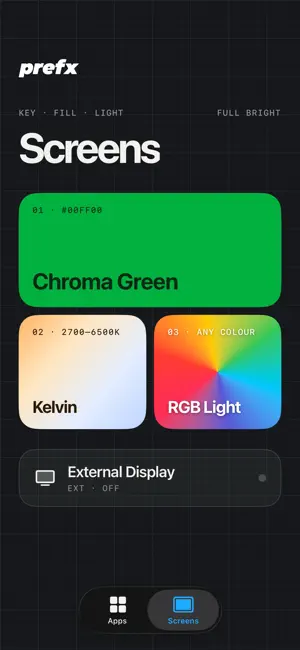
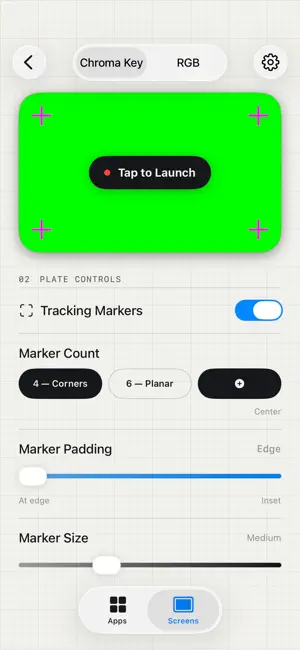
Turn your iPhone, iPad or connected display into an interactive screen prop for film and TV. Script a conversation, stage a call, scroll a social feed or put navigation on screen for a scene. prefx gives filmmakers controllable interfaces that actors can use during a take. TRY EVERY TOOL FREE Explore the entire app with a watermark, with no time limit. Set up your scenes and test the tools before you buy. One in-app purchase removes the watermark. New purchases are one-time, not subscriptions. SCREEN PROPS FOR YOUR SCENE - Operator: a simulated phone with a lock screen, home screen, calls, Messages and Contacts. - Messenger: scripted conversations, typing and multiple chat styles, including Glass, Classic, Encrypted and AI Chat with a voice mode. - Maps: simulated turn-by-turn navigation with City, Suburb and Countryside maps. Script 3 to 8 directions and set the destination, traffic and accent colour. Maps is a screen prop, not a navigation service. - Social: a scrolling feed and Activity tab. - Streamer: a streaming-style interface with Top 10, Continue Watching, New & Hot and My List. - News: a news interface with a new Modern edition. - Scrambler: Scramble any photo or video like a signal from something not of this world. (Output to External Screen) SET UP. LAUNCH. REPEAT. Save setups and return to them for another take. Hold two fingers on any prop or screen to open the Director menu, where you can restart, change settings or exit. Control the fake status bar, including an optional carrier name, and edit the photos you add with the built-in Photo Editor. VFX BACKGROUNDS AND SCREEN LIGHTING Prepare green, blue or grey chroma backgrounds and tracking markers for screen replacement in post-production. Use RGB and colour-temperature controls for screen-based practical lighting. PHONE, IPAD AND EXTERNAL DISPLAYS Use props on iPhone and iPad, with full-screen props on iPad during a take. Send supported props and screens to a compatible external display connected through USB-C/HDMI. REDESIGNED FOR THE WAY YOU WORK Find props in Apps and VFX tools in Screens. Choose Light, Dark or Match iPhone appearance. The on-screen apps have been rebuilt with iOS 26-style interfaces, and prefx is available in 11 languages. Try your next scene free. When you're ready to film without the watermark, remove it with one purchase. Use Restore Purchases to restore an existing purchase. Developed by baffe, LLC. Terms of Use: https://www.apple.com/legal/internet-services/itunes/dev/stdeula/ Privacy Policy: https://www.baffefilms.com/privacy
What’s new
Version 1.7.3 · Updated October 24, 2026
New: Scrambler Scramble any photo or video like a signal from something not of this world. Tear it, roll it, cut it into blocks, split the colours and bury it in static. Let it pulse in and out, hit on a tap, or follow the sound in the room, so it scrambles to a beat or a voice. Videos keep their sound, scrambled right along with the picture. Send it full screen to a TV over HDMI or AirPlay and run it live from your phone. Operator • Launch on the lock screen or the home screen, and line up calls, video calls, texts, emails and notifications in one Actions list. • Video calls with your live camera or a clip, contact posters, and quick text replies on incoming calls. • Open Strike Up, Live Feed, News, CineVault and Custom Stitch from the home screen, then swipe up and the app shrinks back into its icon, like a real iPhone. • Lock screen clock that runs live, with an editable date. • Guided Access status and a quick how-to in Setup, to keep takes locked on screen. News • Stories can hold a video that plays on its own once it's on screen. Messenger • New Encrypted sample conversation. • The script editor and bubble colours show Actor and the contact's name. Maps • Set your own camera angle and preview it live. Improved • True Neutral now changes the fonts and icons in every app. • Appearance is now System, Light or Dark. Fixed • Smoother swipes, readable buttons in Light mode, and many small fixes.
App privacy
The developer, baffe, LLC, reported these privacy practices to Apple.
Data Not Collected
The developer does not collect any data from this app.
Alternatives to prefx: Film Screen Props
Looking for apps like prefx: Film Screen Props? Here are 6 similar apps on the App Store. The highest rated is CineTemp (4.9/5), and 4 of the 6 are free to download.
-
 Prop Screen
4.8
-
 CineTemp
4.9
-
 CameraKit: Camera Tools
4.7
-
 Lightcraft Jetset
4.3
-
 Marker for Creators: Timecode
3.8
-
 Cadrage Director's Viewfinder
4.7
| App | Rating | Price | Last updated | Compare |
|---|---|---|---|---|
| prefx: Film Screen Props | 5.0 / 5 (3 ratings) | Free | October 24, 2026 | |
| Prop Screen | 4.8 / 5 (6) | Free | Oct 12, 2026 | Compare |
| CineTemp | 4.9 / 5 (38) | 19.99 USD | Sep 22, 2026 | Compare |
| CameraKit: Camera Tools | 4.7 / 5 (321) | Free | Sep 25, 2026 | Compare |
| Lightcraft Jetset | 4.3 / 5 (26) | Free | Oct 19, 2026 | Compare |
| Marker for Creators: Timecode | 3.8 / 5 (24) | Free | Oct 21, 2026 | Compare |
| Cadrage Director's Viewfinder | 4.7 / 5 (377) | 19.99 USD | Oct 24, 2026 | Compare |