

Zen Passwords: Secure Vault
ZenProducts Technologies Pvt. Ltd. Productivity iPhoneiPadiPod touchMac
Zen Passwords: Secure Vault is a free Productivity app for iPhone and iPad by ZenProducts Technologies Pvt. Ltd. Requires iOS 17.0. Updated October 21, 2026.
- Price
- Free
- on the App Store
- Size
- 68 MB
- Age 4+
- Updated
- Oct 21
- 2026 · v1.7.4
Screenshots


About Zen Passwords: Secure Vault
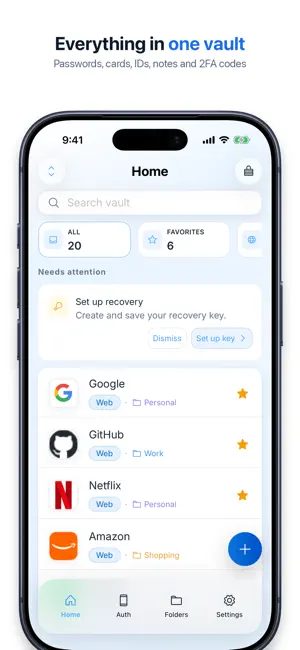
Zen Passwords is a private password manager for iPhone, iPad and Mac. Keep passwords, passkeys and verification codes in one vault, and use AutoFill to sign in. SIGN IN WITH AUTOFILL Fill passwords and one-time codes, create passkeys in Safari, and use them to sign in. After an update, open and unlock Zen Passwords once to finish AutoFill setup. A VAULT FOR MORE THAN LOGINS Store passwords, credit cards, bank details, secure notes, identities, Wi-Fi credentials and software licenses. Generate strong passwords and keep TOTP verification codes alongside your accounts. LOCAL STORAGE, OPTIONAL ICLOUD Your vault is stored on your device. If you choose to sync, it uses your personal iCloud account. We do not host your vault on our servers or use advertising or tracking. PROTECTION AND CONTROL Unlock with Face ID or Touch ID on supported devices. Auto-lock and clipboard protection help keep sensitive details private. Import from supported password managers instead of entering every login again. START WITH FIVE ITEMS The free plan stores up to five active items. Premium unlocks unlimited items and the full feature set. Review current plans and pricing in the app before purchasing. Privacy Policy: https://www.zenproducts.ai/apps/zen-passwords/privacy Terms of Use: https://www.apple.com/legal/internet-services/itunes/dev/stdeula/ Support: [email protected]
What’s new
Version 1.7.4 · Updated October 21, 2026
A fresh look for Zen Passwords on iPhone. - Home: your favourites sit on top as a card stack, followed by recent items, what needs your attention and an A to Z list. Pull down to search. - New Health tab: see how many of your logins are healthy, then open breached, reused, weak or old passwords in one tap. - Folders now show a peek of what is inside each one. - A new welcome and unlock screen. - Website icons stay after you lock the vault, stored encrypted on your device. - Switching tabs is faster.
App privacy
The developer, ZenProducts Technologies Pvt. Ltd., reported these privacy practices to Apple.
Data Not Collected
The developer does not collect any data from this app.
Alternatives to Zen Passwords: Secure Vault
Looking for apps like Zen Passwords: Secure Vault? Here are 6 similar apps on the App Store. The highest rated is xPassword app (5.0/5), and all 6 are free to download.
-
 xPassword app
5.0
-
 Shared To Do List — Veritask
5.0
-
 WatchGrid - Watch Tracker
5.0
-
 PasswordsKit-Password Manager
-
 PSWD: Password Generator
4.9
-
 Passwords Air - Lock Manager
5.0
| App | Rating | Price | Last updated | Compare |
|---|---|---|---|---|
| Zen Passwords: Secure Vault | – | Free | October 21, 2026 | |
| xPassword app | 5.0 / 5 (1) | Free | Jul 8, 2025 | Compare |
| Shared To Do List — Veritask | 5.0 / 5 (34) | Free | Oct 16, 2026 | Compare |
| WatchGrid - Watch Tracker | 5.0 / 5 (1) | Free | Oct 4, 2026 | Compare |
| PasswordsKit-Password Manager | – | Free | Oct 9, 2026 | Compare |
| PSWD: Password Generator | 4.9 / 5 (154) | Free | Oct 9, 2026 | Compare |
| Passwords Air - Lock Manager | 5.0 / 5 (2) | Free | Sep 21, 2024 | Compare |