

Netrinos
Bluefriday Inc. Utilities iPhoneiPadiPod touch
Netrinos is a free Utilities app for iPhone and iPad by Bluefriday Inc. Requires iOS 16.0. Updated October 5, 2026.
- Price
- Free
- on the App Store
- Size
- 19 MB
- Age 4+
- Updated
- Oct 5
- 2026 · v1.3.4
Screenshots
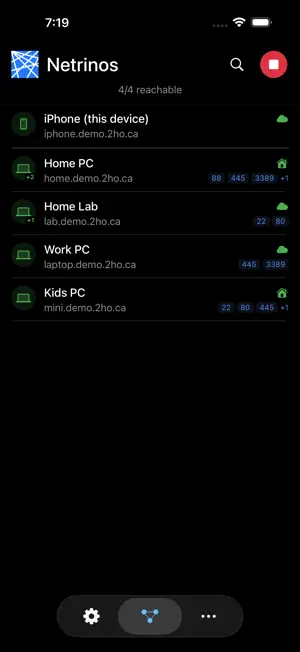


About Netrinos
Open your security cameras from a hotel room. Access your NAS from a coffee shop. Remote desktop into your work PC from the couch. Netrinos makes it work. Netrinos creates a private encrypted network between your devices using WireGuard. No port forwarding, no dynamic DNS, no firewall rules. Your devices find each other and connect automatically. HOW YOU USE IT 1. Connect with one tap 2. Find the device you need 3. Copy its name or IP address 4. Paste into your camera app, SSH client, file browser, or remote desktop app You are on the network. Everything works as if you were there. WHAT YOU SEE All your devices, online status, and connection type at a glance. Open ports discovered automatically: HTTP, SSH, RDP, VNC, SMB, RTSP. Tap any device to copy its hostname or IP. Tap a web port to open it directly. Search and filter across your entire network. HOW IT CONNECTS The app picks the fastest path automatically. Direct when both devices are reachable. Local when you are on the same LAN. Relayed through your own infrastructure when needed. You do not configure any of this. BUILT FOR iOS Connects automatically when your device starts. Zero battery drain when backgrounded. Reconnects silently on network changes. Works on iPhone and iPad. THIS IS NOT A CONSUMER VPN Netrinos does not route your internet traffic through a server in another country. It connects your own devices to each other, privately and directly, using WireGuard encryption. REQUIREMENTS A Netrinos account (netrinos.com). iOS 16.0 or later.
What’s new
Version 1.3.4 · Updated October 5, 2026
Brings the app into line with the Netrinos desktop client. - Gateway routes: send chosen sites and subnets through a gateway on your network, as on desktop. - Reconnects within seconds when you switch between Wi-Fi and mobile data. - Faster recovery after an outage, and steadier connections on mobile carriers. - Service buttons open the right app for SSH, file transfer, Remote Desktop and cameras. - Auto-connect after restart on Android and iPhone.
App privacy
The developer, Bluefriday Inc., reported these privacy practices to Apple.
Data Linked to You
The following data, which may be collected and linked to your identity, may be used for the following purposes:
- Contact Info: Email Address, Name
- Identifiers: User ID, Device ID
Used for: App Functionality
Alternatives to Netrinos
Looking for apps like Netrinos? Here are 6 similar apps on the App Store.


| App | Rating | Price | Last updated | Compare |
|---|---|---|---|---|
| Netrinos | – | Free | October 5, 2026 | |
| Border0 Client | – | Free | Feb 1, 2026 | Compare |
| Baseguard - Overlay Network | – | Free | Aug 20, 2026 | Compare |
| EAGL Safe | – | Free | Nov 30, 2023 | Compare |
| Axom VPN | – | Free | Jul 5, 2026 | Compare |
| Tycon Systems | – | Free | Jul 16, 2026 | Compare |
| Foxwell Super Starter | – | Free | Oct 17, 2026 | Compare |
Compare Netrinos with the top alternatives: ratings, updates, ASO score and keyword gaps →