

MindFort: App Blocker & Focus
Sefa Karagoz Productivity iPhoneiPadiPod touchMac
MindFort: App Blocker & Focus is a free Productivity app for iPhone and iPad by Sefa Karagoz. Requires iOS 17.0. Updated October 28, 2026.
- Price
- Free
- on the App Store
- Size
- 17 MB
- Age 4+
- Updated
- Oct 28
- 2026 · v1.1.1
Screenshots
Save to Pinterest

About MindFort: App Blocker & Focus
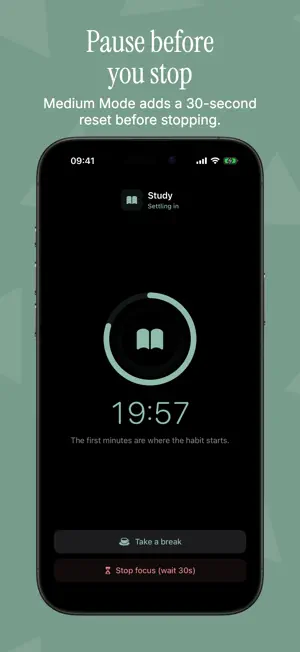
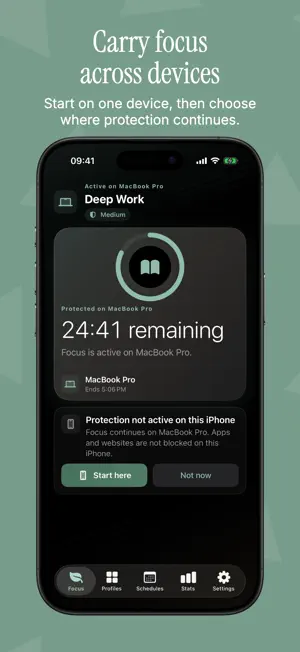
Block distracting apps and websites on iPhone, iPad, and Mac, all from one app. Set screen time limits, schedule focus blocks for work or study, and choose how strict to be. No account, no ads, no tracking. MindFort turns your best intentions into boundaries. Pick what pulls you away, such as social media, games, video, or news, then start a focus session and let MindFort hold the line. BLOCK APPS AND WEBSITES - Build reusable profiles for work, study, social media, games, and entertainment - Block apps, entire app categories, and websites - On iPhone and iPad, protection uses Apple's Screen Time frameworks - On Mac, MindFort closes selected apps and blocks selected website domains in supported browsers CHOOSE HOW STRICT TO BE - Easy: stop whenever you choose - Medium: a 30-second pause before you can stop - Hard: lock in, with 3 Emergency Passes per device each day - Easy and Medium sessions include 3 breaks a day MAKE FOCUS AUTOMATIC - Recurring schedules for work hours, study blocks, mornings, and evenings - Daily time limits, timed access on iPhone and iPad, and daily access on Mac - Timed or open-ended focus sessions STAY FOCUSED ACROSS YOUR DEVICES - Start on this device, or start here and try your other devices too - Stop on one device or on every active device - Profiles, schedules, limits, and focus history sync privately with iCloud SEE YOUR PROGRESS - Actual Screen Time for Day, Week, Month, and Year on iPhone and iPad - Focus history, streaks, trends, and profile insights - Optional weekly focus report - Widgets, Live Activities, Dynamic Island, and quick actions PRIVATE BY DESIGN No MindFort account is required. MindFort has no ads and does not track you across apps or websites. When iCloud is available, your data syncs privately through your Apple Account; MindFort does not run its own account server. GOOD TO KNOW Protection depends on the permissions and settings on each device. Daily limits are enforced and counted separately on each device. iCloud delivery is asynchronous, so focus may not start right away on a device that is offline, closed, not yet authorized, or not yet synced.
What’s new
Version 1.1.1 · Updated October 28, 2026
What's new in MindFort 1.1.1: - A full-screen focus clock on iPad - Resume or join a running focus on your Mac - A calmer menu bar and clearer breaks on Mac - Stronger Hard Mode and a simpler first setup - A cleaner Live Activity, consistent stats and many fixes
App privacy
The developer, Sefa Karagoz, reported these privacy practices to Apple.
Data Not Collected
The developer does not collect any data from this app.
Alternatives to MindFort: App Blocker & Focus
Looking for apps like MindFort: App Blocker & Focus? Here are 6 similar apps on the App Store. The highest rated is still – phone-down study timer (5.0/5), and all 6 are free to download.
-
 Stacked Routine Timer
-
 Mindful - Focus & App Blocker
-
 OneTask: Planner
-
 PHPTek Conference App
-
 Jurispy – Decision AI
-
 still – phone-down study timer
5.0
| App | Rating | Price | Last updated | Compare |
|---|---|---|---|---|
| MindFort: App Blocker & Focus | – | Free | October 28, 2026 | |
| Stacked Routine Timer | – | Free | Aug 6, 2026 | Compare |
| Mindful - Focus & App Blocker | – | Free | Oct 6, 2026 | Compare |
| OneTask: Planner | – | Free | Jun 26, 2026 | Compare |
| PHPTek Conference App | – | Free | May 19, 2026 | Compare |
| Jurispy – Decision AI | – | Free | Mar 9, 2026 | Compare |
| still – phone-down study timer | 5.0 / 5 (1) | Free | Jan 15, 2026 | Compare |