

CodePaw: Learn to Code
Christopher Vanderplank Education iPhoneiPadiPod touchMac
CodePaw: Learn to Code is a free Education app for iPhone and iPad by Christopher Vanderplank. Requires iOS 26.0. Updated October 20, 2026.
- Price
- Free
- on the App Store
- Size
- 449 MB
- Age 4+
- Updated
- Oct 20
- 2026 · v2.0.0
Screenshots

About CodePaw: Learn to Code
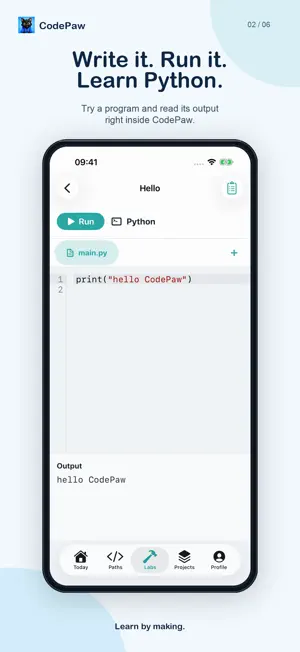
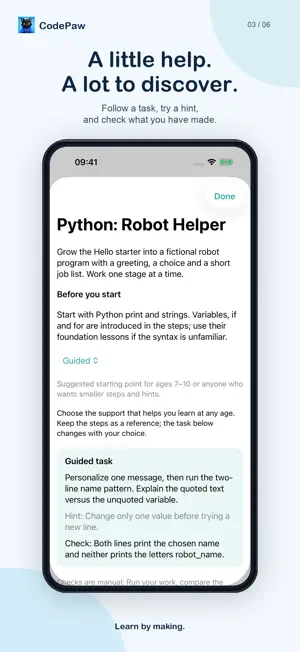
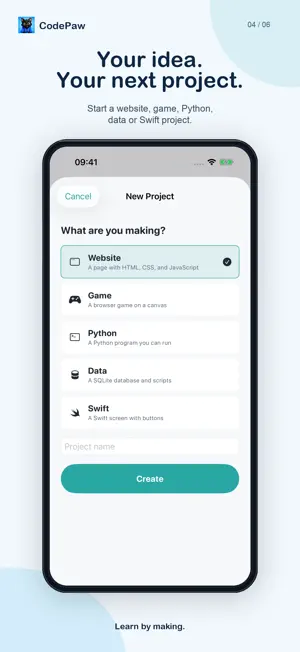
Learn to code by making things with CodePaw. Follow a coding path, try a guided lab and build projects of your own on iPhone, iPad and Mac. Every coding path, lesson, lab and project workspace is free. No subscriptions, in-app purchases, sign-up or ads. FIVE CODING PATHS Make things on the web, learn Python, build apps with Swift, work with information and learn how to build software well. Explore HTML, CSS, JavaScript, Python, Swift, SQL, algorithms, testing, Git and software design. BUILD, RUN AND EXPERIMENT Write and preview websites, run Python, try Swift with a screen preview, and query data with SQL. Guided web projects help you plan, predict, build, fix bugs and make your own design decisions. LABS AND YOUR OWN PROJECTS Start with a Website, Game, Python, Data or Swift lab. When you have an idea of your own, create a project in a blank workspace and keep developing it. A CLEAR NEXT STEP Today keeps you with the path and course you are already taking. Pick up the next lesson, see your progress and return to the projects you are building. PRACTISE AND REFLECT Use quizzes, flashcards and course notebooks to revisit what you have learned. Track completed lessons and earn private course certificates. PRIVATE BY DESIGN CodePaw needs no account. Learning data is stored on your device and can sync through your private iCloud account when available. Installed lessons and coding work without Apple Intelligence. OPTIONAL ON-DEVICE HELP On compatible devices, Apple Intelligence offers coding conversations and lesson help. AI features require an eligible age status and device support. AI responses can make mistakes, so check important information with a trusted adult or source. CodePaw 2.0 focuses entirely on coding. The previous school-subject lessons are no longer included. Privacy Policy: https://codepaw.app/privacy-policy.html Terms of Use: https://www.apple.com/legal/internet-services/itunes/dev/stdeula/
What’s new
Version 2.0.0 · Updated October 20, 2026
CodePaw is now completely free and focused on coding. - Every coding path, lesson, lab and project workspace is included, with no subscription or in-app purchases. - Follow five paths: the web, Python, Swift, information and building software well. - Start with guided Website, Game, Python, Data and Swift labs, or create a project of your own. - Today keeps you with the path and course you are already taking. - The previous maths and other school-subject lessons have been removed.
App privacy
The developer, Christopher Vanderplank, reported these privacy practices to Apple.
Data Not Collected
The developer does not collect any data from this app.
Alternatives to CodePaw: Learn to Code
Looking for apps like CodePaw: Learn to Code? Here are 6 similar apps on the App Store. The highest rated is Learn Ukrainian (Beginners) (4.8/5), and all 6 are free to download.
-
 Mindspan Training
-
 Loop by Masai
-
 Learn Ukrainian (Beginners)
4.8
Learn Ukrainian (Beginners)
4.8
-
 TryHackMe Pulse
3.9
TryHackMe Pulse
3.9
-
 Uxcel: Learn AI Skills
4.7
Uxcel: Learn AI Skills
4.7
-
 OP.TCG
4.6
OP.TCG
4.6
| App | Rating | Price | Last updated | Compare |
|---|---|---|---|---|
| CodePaw: Learn to Code | – | Free | October 20, 2026 | |
| Mindspan Training | – | Free | Jul 11, 2026 | Compare |
| Loop by Masai | – | Free | Sep 4, 2026 | Compare |
| Learn Ukrainian (Beginners) | 4.8 / 5 (62) | Free | Oct 7, 2026 | Compare |
| TryHackMe Pulse | 3.9 / 5 (14) | Free | Oct 27, 2026 | Compare |
| Uxcel: Learn AI Skills | 4.7 / 5 (131) | Free | Sep 30, 2026 | Compare |
| OP.TCG | 4.6 / 5 (160) | Free | Oct 28, 2026 | Compare |