

Cloudflow Music – NAS Player
pan yuan Music iPhoneiPadiPod touchApple Watch
Cloudflow Music – NAS Player is a free Music app for iPhone and iPad by pan yuan. Rated 3.3/5 from 6 ratings. Requires iOS 16.6. Updated October 30, 2026.
- Rating
- 3.3
- 6 ratings
- Price
- Free
- on the App Store
- Size
- 91 MB
- Age 4+
- Updated
- Oct 30
- 2026 · v1.20
Screenshots
Save to Pinterest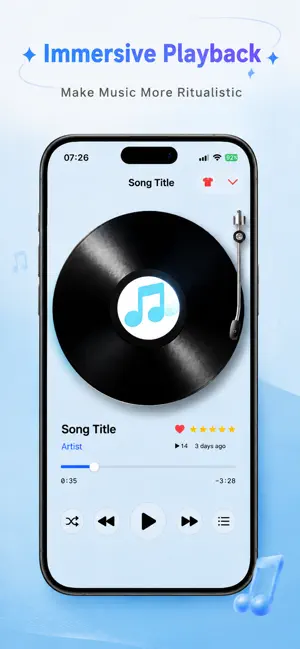
About Cloudflow Music – NAS Player
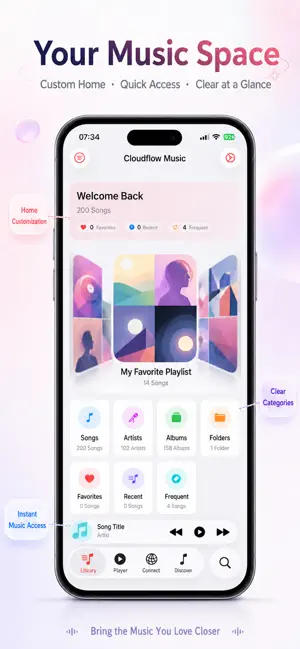
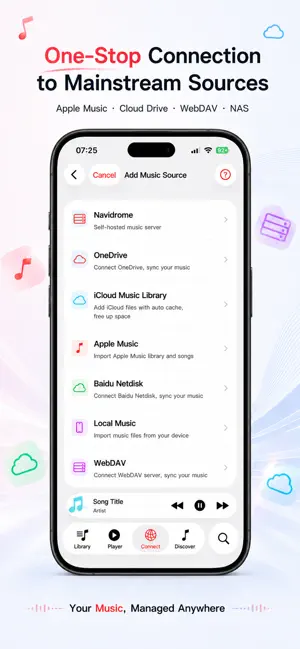
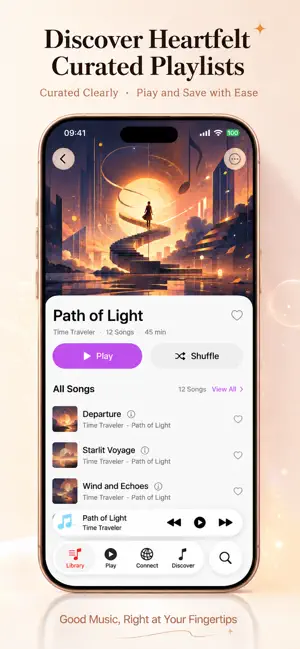
CloudFlow Music — Your Private Cloud Music Manager Bring music from your cloud drives, NAS, and personal servers into one library. Stream your collection, download it for offline listening, and organize it your way on iPhone, iPad, and Apple Watch. CONNECT YOUR MUSIC • Connect Apple Music, Baidu Cloud, OneDrive, iCloud, WebDAV, and local files. • Support for Navidrome, Subsonic, Synology Audio Station, Emby, Jellyfin, fnOS, and Songloft. • Access compatible NAS devices, Nextcloud, and cloud drives through WebDAV services or third-party gateways. • Switch between connections and manage each library separately. Some sources require an account, subscription, or configured server. Available features vary by source. BACKGROUND SYNC • Sync supported music libraries while using other apps. • Save progress and resume interrupted syncs without starting over. • Browse large libraries with improved loading and pagination. Background availability and scheduling are managed by iOS. MAKE IT YOURS • Customize your home screen layout. • Create smart lists using folders, artists, albums, tags, or keywords. • Pin favorite lists for quick access. • Browse artists, albums, folders, and playlists in list or grid view. ORGANIZE YOUR COLLECTION • Use AI-assisted tagging to organize music by genre, era, and more. • Rediscover your collection through tags and listening history. • Explore recent favorites and listening statistics. • Find collaborations more easily with improved artist grouping. ENJOY THE MUSIC • Frosted-glass interface with light and dark appearances. • Album artwork and custom artist and album covers. • Background playback, Lock Screen controls, and queue management. • Equalizer and audio effects to tailor your sound. Audio effects and some playback features vary by source and playback method. PLAYLISTS & SEARCH • Create playlists and import M3U files with library matching. • Search by song, album, artist, tag, or filename. • Filter by formats such as FLAC, MP3, and AAC. • Search songs, albums, and artists on your Subsonic server. • Browse folders and include subfolders when needed. LISTEN OFFLINE • Batch downloads and playback caching. • Manage cache storage and reduce repeated loading. • Take downloaded music on commutes and trips. Download and caching availability depends on the source and its restrictions. CARPLAY & AUTOMATION • Browse and control playback with CarPlay. • Use Siri and Shortcuts for playback automation. • Stream to compatible devices with AirPlay. APPLE WATCH & WIDGETS • View the current song, queue, and progress on Apple Watch. • Sync music to your watch for offline listening. • Control playback and mark favorites from Home Screen widgets. AUDIOBOOKS • Connect Audiobookshelf to browse and sync your audiobook library. • Background sync and resume support help keep your collection up to date. NO ADS. JUST MUSIC. Enjoy your own collection without advertising interruptions. Privacy Policy: https://docs.qq.com/doc/DUGdIb0dYSFJpWEx3 Terms of Use: https://docs.qq.com/doc/DUFFzY1hkT0pIQm15
Ratings & reviews
3.3
6 ratings
What’s new
Version 1.20 · Updated October 30, 2026
• Added support for Google Drive, Subsonic, and Synology Audio Station. • Added background syncing for more music services and Audiobookshelf, with saved progress so interrupted syncs can resume. Background availability depends on iOS. • Search songs, albums, and artists directly on your Subsonic server. • Improved loading, browsing, and searching in large music libraries. • Improved artist grouping for collaborations and the display of artists and albums. • Improved artwork loading for songs, albums, artists, and playlists. • Improved download cancellation, playback caching, and recovery from interrupted syncs. • Fixed an issue where Lock Screen information might not update for the first song when playback starts automatically through CarPlay. • Expanded translations across screens, alerts, and error messages. • Bug fixes and stability improvements.
App privacy
The developer, pan yuan, reported these privacy practices to Apple.
Data Not Linked to You
The following data, which may be collected but is not linked to your identity, may be used for the following purposes:
- User Content: Other User Content
Used for: App Functionality
Alternatives to Cloudflow Music – NAS Player
Looking for apps like Cloudflow Music – NAS Player? Here are 6 similar apps on the App Store. The highest rated is VinylVibes (5.0/5), and 5 of the 6 are free to download.
-
 XPlayer - Local Music Player
3.6
-
 VinylVibes
5.0
-
 OMusic - Offline Music Player
4.1
-
 Amcfy Music - Navidrome Client
4.6
-
 Rhymelo
4.7
-
 Piano Tuner PT1
5.0
| App | Rating | Price | Last updated | Compare |
|---|---|---|---|---|
| Cloudflow Music – NAS Player | 3.3 / 5 (6 ratings) | Free | October 30, 2026 | |
| XPlayer - Local Music Player | 3.6 / 5 (8) | Free | Nov 1, 2026 | Compare |
| VinylVibes | 5.0 / 5 (1) | Free | Sep 19, 2026 | Compare |
| OMusic - Offline Music Player | 4.1 / 5 (11) | Free | Oct 25, 2026 | Compare |
| Amcfy Music - Navidrome Client | 4.6 / 5 (22) | Free | Sep 30, 2026 | Compare |
| Rhymelo | 4.7 / 5 (7) | Free | Oct 30, 2026 | Compare |
| Piano Tuner PT1 | 5.0 / 5 (2) | 49.99 USD | Apr 14, 2026 | Compare |