

Pixomi AI: AI Photo Editor
WhaleSwing LLC Graphics & Design iPhoneiPadiPod touch
Pixomi AI: AI Photo Editor is a free Graphics & Design app for iPhone and iPad by WhaleSwing LLC. Rated 4.0/5 from 4 ratings. Requires iOS 15.0.
- Rating
- 4.0
- 4 ratings
- Price
- Free
- on the App Store
- Size
- 52 MB
- Age 9+
- Updated
- Sep 4
- 2026 · v1.0.8
Screenshots
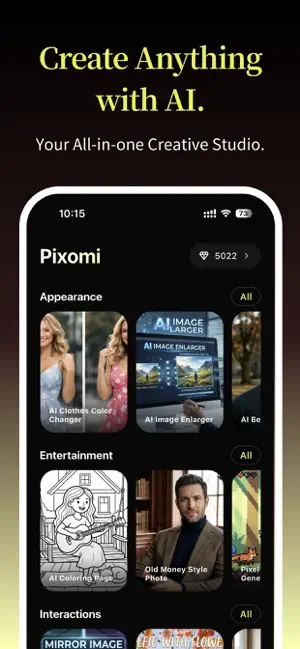


About Pixomi AI: AI Photo Editor
Pixomi AI is a professional AI tool for generating and editing images, as well as creating high-quality videos with sound. With access to multiple top-tier AI models and intuitive workflows, Pixomi AI helps you turn ideas into stunning visuals faster than ever. AI IMAGE GENERATOR - Create high-quality images from text prompts using advanced AI models - Generate realistic, anime, cinematic, and artistic visuals - Change image size, angle, refine lighting, and fine-tune details - Make viral photo for social media, product showcases, and creative artwork AI PHOTO EDITOR (Image to Image) - Edit and enhance existing photos with precise prompt - Edit images using prompts while preserving identity and structure - Change hairstyle, outfits, backgrounds, style, and more - Enhance image quality, sharpen details, and upscale resolution - Perfect for portraits, product images, and creative transformations AI VIDEO GENERATOR - Turn ideas or images into dynamic AI-generated videos with immersive audio - Convert text or images into engaging video content - Animate static images with smooth, realistic motion - Support multiple video styles and cinematic outputs - Ideal for social media, storytelling, marketing, and short-form content ALL-IN-ONE WORKFLOW EXPERIENCE - A structured AI creation environment designed for efficiency - Easily switch between image generation, editing, and video creation - Regenerate results with different models using the same prompt - Continue editing based on generated results without restarting - Seamless creative pipeline from idea to final output MULTIPLE TOP-TIER AI MODELS & 200+ TEMPLATES - Experience industry-leading AI models and create instantly with ready-made templates - Nano Banana series (including Nano Banana 2), Midjourney, Seedream, GPT, Grok Imagine for image generation, and latest Seedance and Veo for video generation - 200+ ready-to-use templates for instant creation. Start without prompts using pre-built styles and workflows - Create popular content like different hairstyle try-on, background remove, avatar generation, outfit try-on, and art style change - Turn photos into short videos, animate portraits, apply style transformations, or create before-and-after comparisons instantly USE CASES - Content Creators: Generate consistent, high-quality visuals and videos for social media - Marketers: Create ads, product photography, and promotional content quickly - Designers: Explore ideas, styles, and variations efficiently - Entrepreneurs: Build brand visuals without expensive tools - Everyday Users: Turn ideas into images and videos for fun and creativity WHY CHOOSE Pixomi AI - Generate images, edit photos, and create videos in one seamless workflow, no need to switch between multiple apps or tools. - Access industry-leading models including Nano Banana, Veo, Midjourney, GPT, Seedance, Seedream, and more. - Create, refine, regenerate, and transform your content without restarting. IMPORTANT INFORMATION - Pixomi AI offers optional premium subscriptions with monthly or yearly plans - Payment will be charged to your App Store account upon purchase confirmation - Subscriptions automatically renew unless auto-renew is turned off at least 24 hours before the end of the current billing period - You can manage or cancel your subscription at any time in your App Store account settings ACCOUNT & DATA SYNC Pixomi AI supports flexible login options based on your needs: - Use a Google account to seamlessly sync your creations across web and mobile - Use an Apple account for a standalone app experience on your device - Your data sync behavior depends on your selected sign-in method Terms of Service: https://bananaproai.com/terms-of-service/ Privacy Policy: https://bananaproai.com/privacy-policy/ Refund Policy: https://bananaproai.com/refund-policy/
What’s new
Version 1.0.8 · Updated September 4, 2026
• Improved image and video detail pages to make downloading and sharing easier • Fixed known issues to improve the overall experience
App privacy
The developer, WhaleSwing LLC, reported these privacy practices to Apple.
Data Used to Track You
The following data may be used to track you across apps and websites owned by other companies:
- Purchases: Purchase History
- Contact Info: Email Address, Name
- Identifiers: User ID, Device ID
- Usage Data: Product Interaction, Other Usage Data
Data Linked to You
The following data, which may be collected and linked to your identity, may be used for the following purposes:
- Usage Data: Other Usage Data, Product Interaction
- Identifiers: Device ID, User ID
- Diagnostics: Crash Data, Other Diagnostic Data
- Purchases: Purchase History
- Contact Info: Email Address, Name
- User Content: Photos or Videos
Used for: Developer’s Advertising or Marketing, Analytics, App Functionality
Data Not Linked to You
The following data, which may be collected but is not linked to your identity, may be used for the following purposes:
- Purchases: Purchase History
- Identifiers: User ID, Device ID
- Usage Data: Product Interaction
Used for: Developer’s Advertising or Marketing, Analytics, App Functionality
Alternatives to Pixomi AI: AI Photo Editor
Looking for apps like Pixomi AI: AI Photo Editor? Here are 6 similar apps on the App Store. The highest rated is Sorax: Create AI Video (5.0/5), and all 6 are free to download.
-
 Conjure: Offline AI Images
3.2
Conjure: Offline AI Images
3.2
-
 Funy AI - AI Images, AI Tools
3.2
Funy AI - AI Images, AI Tools
3.2
-
 Omni Art - AI Photo Editor
4.7
Omni Art - AI Photo Editor
4.7
-
 ImageGen AI Photo Generator
4.5
ImageGen AI Photo Generator
4.5
-
 Sorax: Create AI Video
5.0
Sorax: Create AI Video
5.0
-
 AI Image Generator - Art Pro
4.5
AI Image Generator - Art Pro
4.5
| App | Rating | Price | Last updated | Compare |
|---|---|---|---|---|
| Pixomi AI: AI Photo Editor | 4.0 / 5 (4 ratings) | Free | September 4, 2026 | |
| Conjure: Offline AI Images | 3.2 / 5 (25) | Free | Oct 22, 2026 | Compare |
| Funy AI - AI Images, AI Tools | 3.2 / 5 (23) | Free | Apr 14, 2026 | Compare |
| Omni Art - AI Photo Editor | 4.7 / 5 (301) | Free | Oct 17, 2026 | Compare |
| ImageGen AI Photo Generator | 4.5 / 5 (194) | Free | Jul 25, 2026 | Compare |
| Sorax: Create AI Video | 5.0 / 5 (3) | Free | Aug 25, 2026 | Compare |
| AI Image Generator - Art Pro | 4.5 / 5 (85) | Free | Oct 5, 2026 | Compare |