

Wall Planner AR
NICHOLAS PAUL HAUAN Lifestyle iPhoneiPadiPod touch
Wall Planner AR is a free Lifestyle app for iPhone and iPad by NICHOLAS PAUL HAUAN. Rated 5.0/5 from 2 ratings. Requires iOS 26.0. Updated September 9, 2026.
- Rating
- 5.0
- 2 ratings
- Price
- Free
- on the App Store
- Size
- 20 MB
- Age 4+
- Updated
- Sep 9
- 2026 · v2.0
Screenshots



About Wall Planner AR
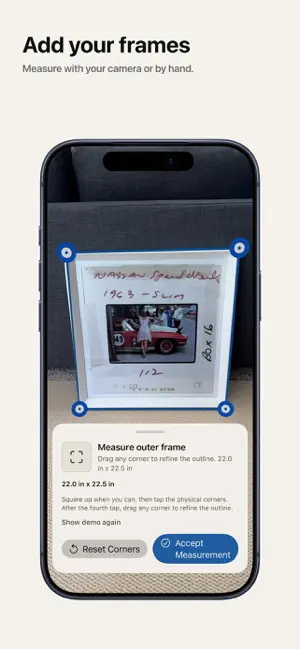
Wall Planner uses augmented reality to help you plan, preview, and hang art with precision. No guessing. No extra holes. Design your gallery wall on your wall — not a mock room. See your layout before you hang anything. Scan your wall to capture real dimensions, then place your frames in your space. Try different layouts instantly and find the one that fits perfectly. KEY FEATURES Scan your wall •Capture accurate wall dimensions using AR so everything fits your space exactly. Preview frames in your space •See your frames on your real wall — not a template or AI-generated room. Try layouts instantly •Switch between layouts and arrangements in seconds to find what looks best. Get recommended layouts •Wall Planner automatically recommends the best layout based on your wall size, number of frames, and frame sizes. Get exact measurements •Know precisely where each frame and nail should go, with distances from wall edges and the floor. Follow a simple hang plan •Turn your layout into step-by-step instructions so you can hang everything with confidence. Stop guessing. Stop re-measuring. Stop putting extra holes in your wall. Wall Planner helps you get it right the first time. Whether you're hanging a single frame or designing a full gallery wall, Wall Planner makes the process simple, accurate, and stress-free. Terms of Use: https://www.wallplannerar.com/terms/ Apple Standard EULA: https://www.apple.com/legal/internet-services/itunes/dev/stdeula/ Privacy Policy: https://www.wallplannerar.com/privacy/
What’s new
Version 2.0 · Updated September 9, 2026
Introducing Plan Anywhere Mode! Now you can take your planning with you on the go. Plan using a diagram on your device with all the same instant layout and measurement benefits of AR mode. Then switch to AR Preview when you want to see it on the wall. Plan Anywhere also enables app use for devices that do not have LiDAR support. Wall Planner AR now works for all users! Additional bug fixes and general performance improvements are included.
App privacy
The developer, NICHOLAS PAUL HAUAN, reported these privacy practices to Apple.
Data Not Linked to You
The following data, which may be collected but is not linked to your identity, may be used for the following purposes:
- Identifiers: User ID
- Usage Data: Product Interaction
- Diagnostics: Crash Data, Performance Data, Other Diagnostic Data
- Surroundings: Environment Scanning
Used for: Analytics, Product Personalization, App Functionality, Other Purposes
Alternatives to Wall Planner AR
Looking for apps like Wall Planner AR? Here are 6 similar apps on the App Store. The highest rated is Resumate App (5.0/5), and all 6 are free to download.
-
 StitchMuse: Cross Stitch
-
 Piercing Preview - Live Try On
-
 nicoPlace
-
 Plan & Sow
-
 The Woodmont Experience
-
 Resumate App
5.0
| App | Rating | Price | Last updated | Compare |
|---|---|---|---|---|
| Wall Planner AR | 5.0 / 5 (2 ratings) | Free | September 9, 2026 | |
| StitchMuse: Cross Stitch | – | Free | Oct 30, 2026 | Compare |
| Piercing Preview - Live Try On | – | Free | Sep 15, 2026 | Compare |
| nicoPlace | – | Free | Oct 20, 2026 | Compare |
| Plan & Sow | – | Free | Feb 27, 2026 | Compare |
| The Woodmont Experience | – | Free | Oct 17, 2026 | Compare |
| Resumate App | 5.0 / 5 (5) | Free | May 1, 2026 | Compare |
Compare Wall Planner AR with the top alternatives: ratings, updates, ASO score and keyword gaps →