

ReceiptBin
NATHANIEL ALLEN FREDERICKS Finance iPhoneiPadiPod touch
ReceiptBin is a free Finance app for iPhone and iPad by NATHANIEL ALLEN FREDERICKS. Requires iOS 26.0. Updated August 3, 2026.
- Price
- Free
- on the App Store
- Size
- 14 MB
- Age 4+
- Updated
- Aug 3
- 2026 · v1.2
Screenshots


About ReceiptBin
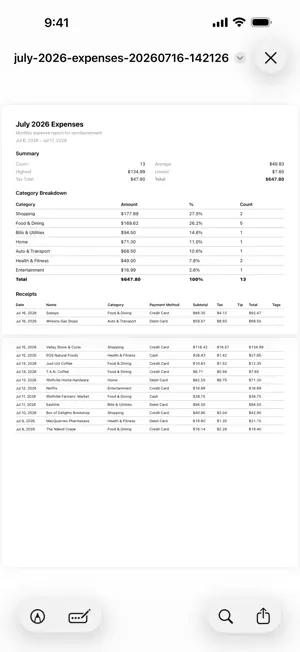
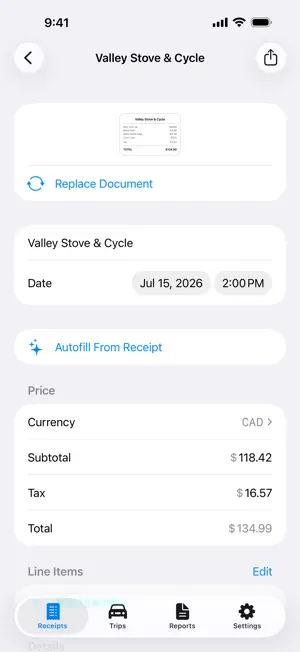
Your receipts, organized effortlessly. Just scan a receipt with your camera and ReceiptBin fills in the details for you—merchant, date, total, tax, and line items. You can also track mileage, organize with categories and tags, and export whenever you need. FEATURES Autofill: Just point your camera at a receipt. Merchant, date, total, tax, tip, currency, and line items fill in automatically. Everything works right on your device. Mileage Tracking: Record your drive and ReceiptBin measures the distance using GPS. You can even watch your trip from your Lock Screen with Live Activity. Set up your vehicles and rates, or log trips manually. Your mileage appears in your reports along with your receipts. Categories and Tags: Create your own categories, tags, and payment methods. Organize by project, client, deduction type, or whatever works best for you. Full-Text Search: Every word on your receipts is indexed. Search for a product name, amount, or even "warranty" and find it fast. You can also filter by category, tag, date range, or payment method. Reports: Export your data as PDF or CSV. Filter by date, category, or tag. You can include receipt images either embedded or as a separate ZIP file. Email Import: Get your own forwarding address. Just send email receipts there and they’ll appear in the app, already filled in. YNAB Integration: Connect your YNAB account and link receipts to your transactions. The receipt link appears in the transaction memo, so proof of purchase is just one tap away from your budget. AND ALSO • iCloud Sync across all your devices • Multi-page scanning for long receipts and invoices • Spotlight search from your home screen • Siri Shortcuts support • Share extension to save receipts from other apps • Home screen widgets • Recently deleted folder (30 days) • Archive for receipts you want to keep but tuck away PRIVACY Autofill works entirely on your device. Your trips and routes stay on your device and in your iCloud. Your location is never sent to our servers. No account needed. PRICING ReceiptBin is free. Autofill, categories, tags, manual mileage logging, YNAB, and iCloud sync are all included. Upgrade to ReceiptBin Plus to unlock cloud autofill, email import, reports, and GPS trip recording. LEGAL Terms of Use (EULA): ↑ https://www.apple.com/legal/internet-services/itunes/dev/stdeula/ Privacy Policy: https://receiptbin.app/privacy-policy
What’s new
Version 1.2 · Updated August 3, 2026
• Mileage tracking is now available. You can record your drives with GPS to see distance and reimbursement amounts update instantly, or enter trips manually. • When you record a trip, you’ll see a Live Activity on your Lock Screen with options to pause or resume. • You can now add vehicles in settings, each with its own per-kilometre or per-mile rate. • Trips can be added to your reports and exported to PDF or CSV files along with your receipts. • Trips now support routes on a map, searchable addresses, attachments, an archive, and a recently deleted folder. • You can use Siri Shortcuts to start or stop trip recording and open trips. • YNAB integration is now available. You can link receipts to YNAB transactions and open them from either side. The receipt link appears in the transaction memo. • Cloud autofill is now selected automatically when you subscribe to Plus. • We’ve also made many other improvements and fixes behind the scenes.
App privacy
The developer, NATHANIEL ALLEN FREDERICKS, reported these privacy practices to Apple.
Data Linked to You
The following data, which may be collected and linked to your identity, may be used for the following purposes:
- Identifiers: User ID, Device ID
- Usage Data: Product Interaction
- Diagnostics: Other Diagnostic Data
- Other Data: Other Data Types
- Location: Precise Location
Used for: Analytics, App Functionality
Alternatives to ReceiptBin
Looking for apps like ReceiptBin? Here are 6 similar apps on the App Store. The highest rated is Snapstub: Receipt Scanner (5.0/5), and all 6 are free to download.
-
 ReceiptCap
-
 Expense Tracker: Receipt Scan
-
 Snapstub: Receipt Scanner
5.0
Snapstub: Receipt Scanner
5.0
-
 Recu: OnDevice Receipt Scanner
-
 ReceiptFox: Expense Scanner
-
 Receipt Scanner: DocuFlexPro
5.0
Receipt Scanner: DocuFlexPro
5.0
| App | Rating | Price | Last updated | Compare |
|---|---|---|---|---|
| ReceiptBin | – | Free | August 3, 2026 | |
| ReceiptCap | – | Free | Apr 6, 2026 | Compare |
| Expense Tracker: Receipt Scan | – | Free | Oct 12, 2026 | Compare |
| Snapstub: Receipt Scanner | 5.0 / 5 (3) | Free | Oct 14, 2026 | Compare |
| Recu: OnDevice Receipt Scanner | – | Free | Sep 23, 2026 | Compare |
| ReceiptFox: Expense Scanner | – | Free | Sep 15, 2026 | Compare |
| Receipt Scanner: DocuFlexPro | 5.0 / 5 (4) | Free | Sep 22, 2026 | Compare |
Compare ReceiptBin with the top alternatives: ratings, updates, ASO score and keyword gaps →