

Clean Kit – Storage Cleaner
Arshad Shaikh Photo & Video iPhoneiPadiPod touch
Clean Kit – Storage Cleaner is a free Photo & Video app for iPhone and iPad by Arshad Shaikh. Requires iOS 18.6. Updated October 28, 2026.
- Price
- Free
- on the App Store
- Size
- 10 MB
- Age 4+
- Updated
- Oct 28
- 2026 · v2.1.0
Screenshots



About Clean Kit – Storage Cleaner
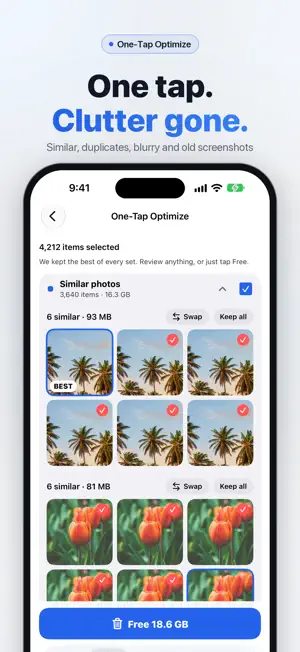
100% On-Device AI — Nothing Leaves Your Phone and works Offline. Your iPhone says storage is full — but you don't want to delete your memories. The problem isn't your photos. It's the hundreds of duplicates, blurry shots, forgotten screenshots, and oversized videos hiding behind them. Clean Kit finds the junk and keeps the memories — entirely on your device. No cloud. No uploads. No account required. Everything runs offline. How It Works Tap Scan. The app analyzes your entire photo library on-device in seconds to find: • Exact and near-duplicate photos • Blurry and out-of-focus shots • Old screenshots you forgot about • Oversized videos that can be compressed • Live Photos with hidden video eating space • WhatsApp media cluttering your library For every duplicate group, on-device AI picks the best photo — based on sharpness, resolution, exposure, and face quality — so you always keep the right one. No photo ever leaves your phone during this process. One-Tap Optimize — Reclaim Storage Instantly Don't want to review everything? One-Tap Optimize bundles similar photos, duplicates, blurry shots and screenshots older than 30 days into one cleanup. The best shot in every set is kept for you. Swap it or keep them all, then clean with one tap. Deleted items go to Recently Deleted first, so nothing is lost permanently. Swipe Review Go through your photos month by month: swipe left to delete, right to keep. Videos are sorted biggest first. Undo any swipe, then review your picks before anything is deleted. Duplicate Photo Finder Find exact and near-duplicate photos across your entire library. Review them side by side, see why the app picked the best shot, and remove the rest. Groups are sorted by space savings so you tackle the biggest wins first. Blurry Photo Detection Automatically surfaces out-of-focus and blurry photos hiding in your camera roll. Review them in a grid and remove the ones you'll never use. AI Photo Categories Photos are automatically sorted into smart categories — People, Travel, Food, Pets, Nature, Architecture, Documents, Transport, and more — all classified on-device so you can browse and clean up by topic. Video Compression Compress large videos without losing them. Three quality levels: • Optimal — HEVC encoding, minimal quality loss, up to 4K • Medium — capped at 1080p for balanced savings • Maximum — capped at 720p for the most space recovered Compression happens locally on your device. Delete the original after to free storage instantly. Screenshot Cleanup Screenshots pile up fast. They're grouped by age — last 7 days, 30 days, and older — so you can select and delete old ones in bulk. Live Photo Conversion Convert Live Photos to still images to remove the hidden video component eating extra space. Original creation date, location, and metadata are preserved. WhatsApp Media Cleaner Find and remove photos and videos auto-saved from WhatsApp that are quietly filling your storage. Storage Dashboard & Widgets See total, used, and available storage at a glance. A visual breakdown shows how much space photos, videos, screenshots, and Live Photos are using. Add widgets to your Home Screen or Lock Screen to monitor space without opening the app. Siri Shortcuts Ask Siri to check your storage, scan for duplicates, or start a cleanup — completely hands-free. Works with the Shortcuts app for custom automations. Why Choose Clean Kit? • Works completely offline — no internet required • Zero data collection — no analytics, no tracking • No account or sign-up needed • All AI runs on Apple's on-device frameworks • Photos never leave your device — ever • Works on iPhone and iPad Terms of Use (EULA): https://www.apple.com/legal/internet-services/itunes/dev/stdeula/ Privacy Policy: https://cleankit.arshtechpro.workers.dev/privacy
What’s new
Version 2.1.0 · Updated October 28, 2026
Clean Kit 2.0 is our biggest update yet. • Swipe Review: keep or delete photos with a swipe, month by month. Videos are sorted biggest first. Undo anytime. • One-Tap Optimize: clear similar photos, duplicates, blurry shots and old screenshots in one go. We keep the best shot in every set, and you can swap it or keep them all. • Faster, more accurate similar-photo detection • A fresh, clean look in light and dark mode • See how much space you can free right after your first scan Enjoying Clean Kit? A quick rating helps others find it.
App privacy
The developer, Arshad Shaikh, reported these privacy practices to Apple.
Data Not Collected
The developer does not collect any data from this app.
Alternatives to Clean Kit – Storage Cleaner
Looking for apps like Clean Kit – Storage Cleaner? Here are 6 similar apps on the App Store.
-
 Turnr: Rotate & Clean Photos
-
 Katharo: Photo Cleaner
-
 SnapClean - Gallery Cleaner
-
 Yolo Photos: Manager & Sandbox
-
 EditLay
-
 Photo Sweep: Duplicate Cleaner
| App | Rating | Price | Last updated | Compare |
|---|---|---|---|---|
| Clean Kit – Storage Cleaner | – | Free | October 28, 2026 | |
| Turnr: Rotate & Clean Photos | – | Free | Feb 23, 2026 | Compare |
| Katharo: Photo Cleaner | – | Free | Oct 1, 2026 | Compare |
| SnapClean - Gallery Cleaner | – | Free | Oct 19, 2025 | Compare |
| Yolo Photos: Manager & Sandbox | – | Free | Oct 22, 2026 | Compare |
| EditLay | – | Free | Sep 28, 2026 | Compare |
| Photo Sweep: Duplicate Cleaner | – | Free | Aug 25, 2026 | Compare |