

Wakora: Mission Alarm Clock
Necati Dogrul Lifestyle iPhoneiPadiPod touch
Wakora: Mission Alarm Clock is a free Lifestyle app for iPhone and iPad by Necati Dogrul. Requires iOS 16.0. Updated October 22, 2026.
- Price
- Free
- on the App Store
- Size
- 47 MB
- Age 4+
- Updated
- Oct 22
- 2026 · v1.1.15
Screenshots


About Wakora: Mission Alarm Clock
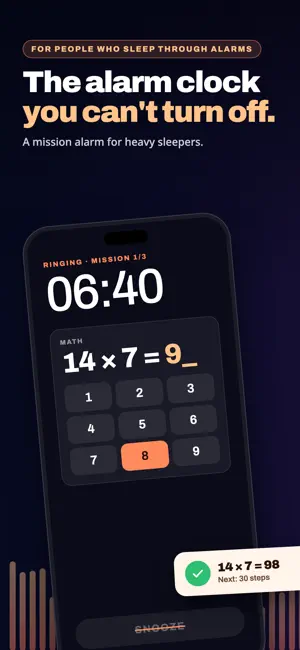
Wakora has one job: actually waking you up. Most alarms are easy to silence half-asleep. Wakora isn't. To dismiss the alarm, you complete a real wake-up challenge — no shortcut, no cheating. — HOW IT WORKS — 1. Set an alarm and pick a wake-up challenge. 2. When it rings, complete the challenge to dismiss it. That's the only way to stop it. Silence it without the challenge and it rings again two minutes later (Mission lock, switchable in Settings). 3. Premium unlocks a small number of free snoozes per morning, if you genuinely need a few more minutes — no cost, no catch, just a cap so it doesn't turn into an hour of dozing. — 14 WAKE-UP CHALLENGES — Free forever: Math and Steps. Premium unlocks 12 more: ▸ Brain: Memory, Anagram, Mini Sudoku, Stroop, Typing ▸ Body: Move (shake or jump), Squats ▸ Prove you are out of bed: Push-ups counted by the camera, QR Scan, Photo Match ▸ Mind: Voice Vow, Morning Note (one thank-you, one intention) — STREAKS & STATS — Every on-time morning grows your streak. Hit milestones at 3, 7, 30 and 100 days, see your weekly wake pattern. Share milestone cards when you are proud of them. — PREMIUM — ▸ All 14 wake-up challenges ▸ A handful of free snoozes per morning, capped so you do not oversleep ▸ Sleep Sounds library: rain, ocean, forest, fireplace, white/pink/brown noise with sleep timer ▸ Wake-Up Check: verifies you are still awake two minutes after dismissing ▸ Backup Alarm: a second safety-net alarm ▸ Extra Loud Mode: volume ramps up if you do not respond ▸ Spoken alarm labels — RELIABILITY — On iOS 26 and later, Wakora rings as a system alarm: full screen on the Lock Screen, at full volume even in Silent mode or a Focus, with the app closed. On older iOS, or without alarm permission, it rings as a repeating notification instead: it still comes through a Focus, but Silent mode mutes it — and the app tells you which way your phone will ring. — FAIR & SIMPLE — ▸ No ads. No dark patterns. ▸ The full wake-up flow works for free, forever: completing a challenge always dismisses the alarm at no cost. ▸ The free tier is challenge-only, on purpose — that is what makes it work. Most alarm apps try to shout you awake. Wakora makes waking up unavoidable. Wake up as the person you decided to be last night. — LEGAL — Terms of Use (EULA): https://www.apple.com/legal/internet-services/itunes/dev/stdeula/ Privacy Policy: https://wakora.app/privacy.html
What’s new
Version 1.1.15 · Updated October 22, 2026
A new design: calmer screens and easier-to-read text. Setup is down to 7 steps, and camera or motion access is now asked for only when you pick a mission that needs it. Delete an alarm with a swipe or from the edit screen, and get a warning before setting a second alarm for the same time. Better support for large text sizes and VoiceOver.
App privacy
The developer, Necati Dogrul, reported these privacy practices to Apple.
Data Not Linked to You
The following data, which may be collected but is not linked to your identity, may be used for the following purposes:
- Purchases: Purchase History
Used for: App Functionality
Alternatives to Wakora: Mission Alarm Clock
Looking for apps like Wakora: Mission Alarm Clock? Here are 6 similar apps on the App Store. The highest rated is WAKEFORCE: Alarm Clock & Sleep (4.0/5), and all 6 are free to download.
-
 WAKEFORCE: Alarm Clock & Sleep
4.0
WAKEFORCE: Alarm Clock & Sleep
4.0
-
 Wakekin: Loud Alarm Clock
4.0
Wakekin: Loud Alarm Clock
4.0
-
 Wakea – Wake Up Alarm Clock
-
 Outbed: Mission Alarm Clock
-
 Morning Mission Alarm Clock
-
 Timey: Loud Shareable Alarms
4.0
Timey: Loud Shareable Alarms
4.0
| App | Rating | Price | Last updated | Compare |
|---|---|---|---|---|
| Wakora: Mission Alarm Clock | – | Free | October 22, 2026 | |
| WAKEFORCE: Alarm Clock & Sleep | 4.0 / 5 (2) | Free | Oct 3, 2026 | Compare |
| Wakekin: Loud Alarm Clock | 4.0 / 5 (5) | Free | Sep 3, 2026 | Compare |
| Wakea – Wake Up Alarm Clock | – | Free | Oct 10, 2026 | Compare |
| Outbed: Mission Alarm Clock | – | Free | Oct 12, 2026 | Compare |
| Morning Mission Alarm Clock | – | Free | Aug 16, 2026 | Compare |
| Timey: Loud Shareable Alarms | 4.0 / 5 (3) | Free | Oct 6, 2026 | Compare |