

Offloadr
Daniel Kainz Utilities iPhoneiPadiPod touchMac
Offloadr is a paid Utilities app for iPhone and iPad by Daniel Kainz. Requires iOS 26.0. Updated October 5, 2026.
- Price
- 3.99 USD
- on the App Store
- Size
- 3 MB
- Age 12+
- Updated
- Oct 5
- 2026 · v3.0.2
Screenshots



About Offloadr
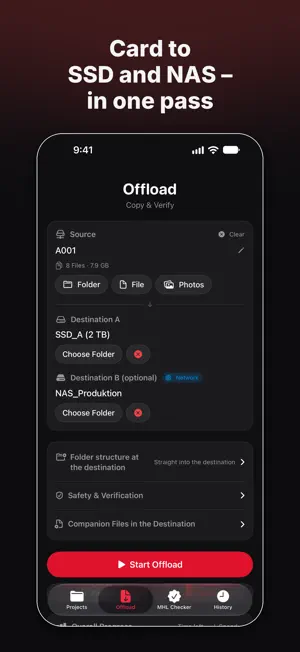
Back up camera cards right on your iPhone and iPad: to SSD and NAS, every file verified and documented. No laptop, no subscription, no cloud. Offloadr was built by a working focus puller for real shoot days. It only confirms a backup once every single file has been read back from every destination and matched by checksum. SAFE MEANS SAFE • Every file is copied, read back and verified with xxHash or SHA-256 • The drive must flush its write cache before verification, so data is read from the disk itself • A clear result: green when everything checks out, red with the error count and a full log • Two destinations in one pass, e.g. SSD and NAS, each verified on its own NOTHING GETS OVERWRITTEN • Before it starts, Offloadr checks the destination and asks before replacing existing files • Warns if a card was already backed up or its last offload was incomplete • Warns if Destination A and Destination B are on the same drive • Clear error messages, e.g. for a full drive, the FAT32 file size limit or a loose cable DOCUMENTATION FOR PRODUCTION AND POST • ASC MHL v2 with chain file, readable by common DIT and post software • PDF report with thumbnails, metadata CSV and log • Sidecar files neatly organized in an _Offloadr folder PROJECTS: SET UP ONCE, USE ALL SHOOT • Destinations, options and shooting day are saved • The shooting day counts up automatically • Folder structure: project / day / card • Choose the folder name at the destination; cards with the same label, like “Untitled”, count up (A001, A002 …) • History by project, combined PDF with one tap SPEED • Over 1 GB/s with NVMe SSDs via USB-C, more with Thunderbolt on iPad Pro. Your hardware sets the limit. • Live speed graph • Keeps running in the background when you switch apps; iOS shows the progress CARDS AND FORMATS • Anything your iPhone or iPad can read: SD, CFexpress, USB-C card readers, your Photos library • NAS via SMB: Synology, QNAP, TrueNAS, Windows shares • Video (MOV, MP4, MXF), RAW video (R3D, ARRIRAW, Blackmagic RAW), photos (DNG, CR3, NEF, ARW, RAF, RW2, HEIC, JPEG and more) PRIVATE No account, no tracking, no cloud. Your footage never leaves your drives. Buy once, no subscription. Runs on iPhone, iPad and Mac. Questions and feedback: [email protected]
What’s new
Version 3.0.2 · Updated October 5, 2026
3.0.2 – More reliable backups • Copies only get their final name once they're completely written. Faulty copies are removed and copied again on the next run. • If a drive rejects a read, Offloadr retries automatically: more slowly, and once more at the end of the run. • Report, log and metadata now live in each card's folder. • The MHL check verifies every card of a shoot day. • Real start timecode in CSV and JSON, drive names instead of IDs, and many small fixes. • (after device test) Offloads keep running in the background on iOS 26.
App privacy
The developer, Daniel Kainz, reported these privacy practices to Apple.
Data Not Collected
The developer does not collect any data from this app.
Alternatives to Offloadr
Looking for apps like Offloadr? Here are 6 similar apps on the App Store. The highest rated is Strikodo (5.0/5), and 2 of the 6 are free to download.
-
 FolderSure: Verify SD Backups
-
 Strikodo
5.0
-
 Only Markdown
-
 Photo Cleaner: Rapid Swipe
-
 Timecode Gen
4.5
-
 Jazz Disk Bench Pro
4.5
| App | Rating | Price | Last updated | Compare |
|---|---|---|---|---|
| Offloadr | – | 3.99 USD | October 5, 2026 | |
| FolderSure: Verify SD Backups | – | 4.99 USD | Jul 29, 2026 | Compare |
| Strikodo | 5.0 / 5 (4) | 1.99 USD | Oct 17, 2026 | Compare |
| Only Markdown | – | Free | Nov 14, 2023 | Compare |
| Photo Cleaner: Rapid Swipe | – | Free | Jul 2, 2025 | Compare |
| Timecode Gen | 4.5 / 5 (4) | 4.99 USD | Oct 28, 2024 | Compare |
| Jazz Disk Bench Pro | 4.5 / 5 (30) | 2.99 USD | Oct 23, 2026 | Compare |
Compare Offloadr with the top alternatives: ratings, updates, ASO score and keyword gaps →