

LearnVault
红晓 赵 Productivity iPhoneiPadiPod touch
LearnVault is a free Productivity app for iPhone and iPad by 红晓 赵. Requires iOS 17.6. Updated April 2, 2026.
- Price
- Free
- on the App Store
- Size
- 7 MB
- Age 4+
- Updated
- Apr 2
- 2026 · v1.0.1
Screenshots
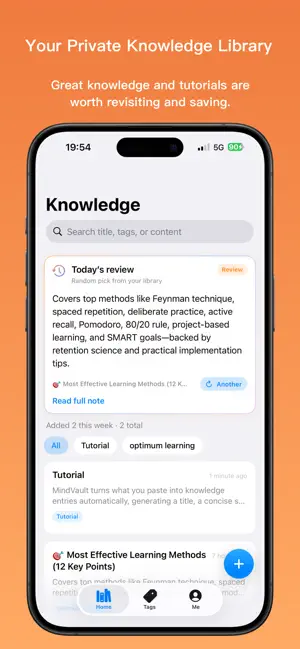
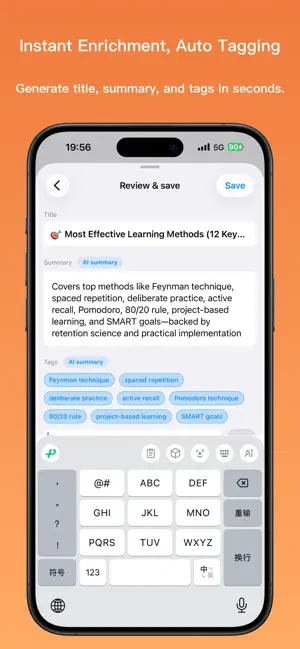
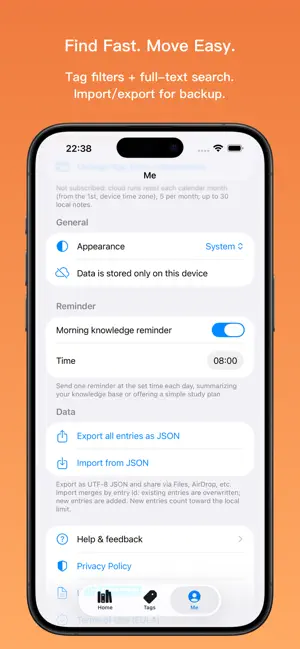
About LearnVault
LearnVault is a note-taking app for knowledge organization and review. It helps you quickly turn useful content from your study or reading into reviewable knowledge entries, so you can revisit them anytime. Key Features Paste to save, generate entries fast Paste copied content directly into the app, and it will generate a title, summary, and tags for easier search and review later. Optional cloud LLM enrichment (subscription-based) When enabled, cloud LLMs generate more context-aware summaries and tags. If a request fails or quota is exhausted, the app automatically falls back to on-device processing to ensure availability. On-device processing with quota tiers The app offers different experiences for free and subscription tiers: the free tier includes on-device processing and limited cloud runs, while subscription tiers provide higher quotas and richer usage. Tag filtering, search, and detail view Filter by tags on the home screen, search titles/summaries/full text, and quickly find the knowledge you need. JSON export/import for backup Export all entries as JSON and import from JSON for easy backup and migration. Who It’s For People who prefer to “capture first, review later” while learning People who want to turn fragmented content into structured knowledge People who want AI-assisted organization with control and backup options 【LearnVault Auto-Renewable Subscription Service Statement】 Subscription overview: After subscribing, you can get higher cloud AI enrichment quota and a higher (or unlimited) local note limit. Specific benefits are subject to what is shown in the app. Subscription service: LearnVault Membership (auto-renewable subscription) Subscription periods: Monthly / Yearly Subscription pricing: Shown on the App Store purchase page (prices may vary by region). Membership benefits: Increased available cloud AI enrichment quota Higher local note limit (or unlimited) Other membership benefits (subject to in-app display) Auto-renewal rules: Payment: Payment is charged to your Apple ID account upon purchase confirmation. Renewal: Within 24 hours before the end of the current period, Apple will automatically charge your Apple ID account and extend the subscription period. Cancellation: To cancel auto-renewal, turn it off in iTunes/Apple ID settings at least 24 hours before the current period ends. Management: You can manage or cancel subscriptions in Settings → Apple ID → Subscriptions. Terms of Use (EULA): https://www.apple.com/legal/internet-services/itunes/dev/stdeula/ Privacy Policy: https://github.com/MrNative/AIKnowledges/blob/main/PrivacyPolicy User Agreement: https://github.com/MrNative/AIKnowledges/blob/main/ServiceAgreement
What’s new
Version 1.0.1 · Updated April 2, 2026
Cleaner navigation and faster content discovery
App privacy
The developer, 红晓 赵, reported these privacy practices to Apple.
Data Not Collected
The developer does not collect any data from this app.
Alternatives to LearnVault
Looking for apps like LearnVault? Here are 6 similar apps on the App Store. The highest rated is Jotbook: Bullet Journal & Bujo (5.0/5), and all 6 are free to download.
-
 Local Memo: Offline Notes
-
 tasks-todo
-
 Flash Notes-Idea Cards & Memo
-
 一人公司
-
 Note it - AI Note Taker
4.8
-
 Jotbook: Bullet Journal & Bujo
5.0
| App | Rating | Price | Last updated | Compare |
|---|---|---|---|---|
| LearnVault | – | Free | April 2, 2026 | |
| Local Memo: Offline Notes | – | Free | Oct 12, 2026 | Compare |
| tasks-todo | – | Free | Nov 7, 2025 | Compare |
| Flash Notes-Idea Cards & Memo | – | Free | Oct 23, 2026 | Compare |
| 一人公司 | – | Free | May 31, 2026 | Compare |
| Note it - AI Note Taker | 4.8 / 5 (20) | Free | Sep 28, 2026 | Compare |
| Jotbook: Bullet Journal & Bujo | 5.0 / 5 (1) | Free | Oct 23, 2026 | Compare |
Compare LearnVault with the top alternatives: ratings, updates, ASO score and keyword gaps →