

Form - for Google Forms
Velto Rise LLC Productivity iPhoneiPadiPod touch
Form - for Google Forms is a free Productivity app for iPhone and iPad by Velto Rise LLC. Rated 1.0/5 from 2 ratings. Requires iOS 16.4.
- Rating
- 1.0
- 2 ratings
- Price
- Free
- on the App Store
- Size
- 5 MB
- Age 4+
- Updated
- Jul 6
- 2026 · v1.2.1
Screenshots
About Form - for Google Forms
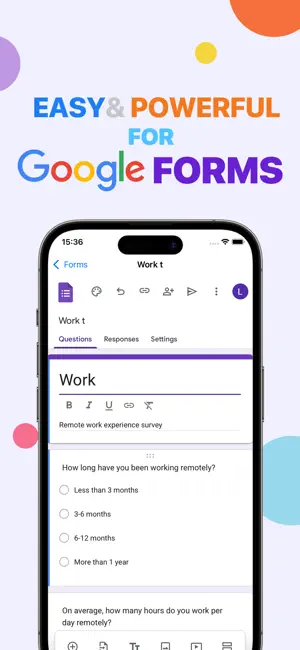
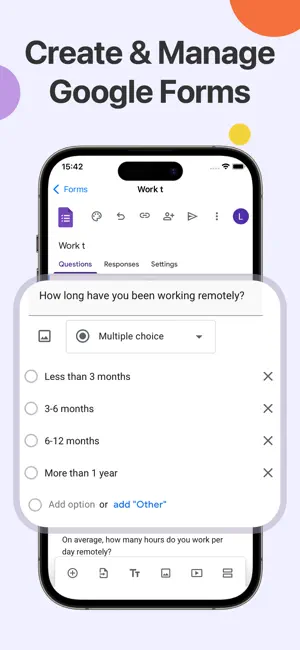
Use form tools on your Mac in a more efficient and focused way. This app delivers a smooth, near-native experience, allowing you to create, edit, and manage your online forms without relying on a browser. By signing in with your Google account, you can instantly access your existing form data. All content stays fully synchronized in real time, ensuring your work remains consistent and up to date across your Mac and other devices, without interruption. The app features a highly familiar, native-style interface with clear and intuitive interactions. You can quickly create surveys, questionnaires, registration forms, or quizzes—just like using a form tool you already know. Whether for personal use or team collaboration, it’s easy to get started. For better organization, the app supports folder-based management, allowing you to categorize and structure your forms efficiently. The clean layout makes it simple to find and manage your content. In addition, you can publish and share forms directly within the app. Generate shareable links instantly to collect responses or conduct research, significantly improving your workflow efficiency. Whether you’re running user research, collecting feedback, or organizing information, this app provides a stable, streamlined, and productive experience. Key Features: • Sign in to directly access and manage your form data • Native-style interface with smooth and intuitive interactions • Real-time synchronization across devices • Quickly create and edit various forms and surveys • One-click publishing and sharing with easy link distribution • Folder-based organization for clear and structured management Disclaimer • This app is a third-party tool designed to improve form creation and management efficiency. • This app is not affiliated with, endorsed by, or officially associated with Google. • All form data is accessed based on user authorization, and data handling complies with applicable privacy policies. • The app does not collect or store user data without explicit user consent. About Your Subscription: • Payment will be charged to your iTunes account right after you confirm purchase. • Unless you turn off auto-renewal at least 24 hours before your current period ends, your subscription will continue automatically. • You'll be charged for renewal 24 hours before your subscription expires-we'll always show you the price first. • If you're in a free trial, upgrading to a paid subscription will cancel any unused trial time. • Want to make changes? You can update or cancel auto-renewal anytime in your iTunes Account Settings. Terms and Service - https://veltorise.com/terms.html Privacy Policy - https://veltorise.com/privacy.html
What’s new
Version 1.2.1 · Updated July 6, 2026
Bug fixes and performance improvements.
App privacy
The developer, Velto Rise LLC, reported these privacy practices to Apple.
Data Not Collected
The developer does not collect any data from this app.
Alternatives to Form - for Google Forms
Looking for apps like Form - for Google Forms? Here are 6 similar apps on the App Store. The highest rated is EasyReviews - Google Reviews (5.0/5), and all 6 are free to download.
-
 Search Console Tool
4.6
Search Console Tool
4.6
-
 EasyReviews - Google Reviews
5.0
EasyReviews - Google Reviews
5.0
-
 Search App for Google Search ®
-
 AI Blocker for Google
2.3
AI Blocker for Google
2.3
-
 Forms – for Google Forms
4.0
Forms – for Google Forms
4.0
-
 Forms
3.8
Forms
3.8
| App | Rating | Price | Last updated | Compare |
|---|---|---|---|---|
| Form - for Google Forms | 1.0 / 5 (2 ratings) | Free | July 6, 2026 | |
| Search Console Tool | 4.6 / 5 (9) | Free | May 7, 2026 | Compare |
| EasyReviews - Google Reviews | 5.0 / 5 (1) | Free | Oct 16, 2026 | Compare |
| Search App for Google Search ® | – | Free | Jul 15, 2026 | Compare |
| AI Blocker for Google | 2.3 / 5 (3) | Free | Sep 15, 2026 | Compare |
| Forms – for Google Forms | 4.0 / 5 (68) | Free | Feb 26, 2024 | Compare |
| Forms | 3.8 / 5 (11) | Free | Nov 22, 2025 | Compare |