

Times Up: Screen Time Blocker
MATHEW JAMES GRADWELL Productivity iPhoneiPadiPod touch
Times Up: Screen Time Blocker is a free Productivity app for iPhone and iPad by MATHEW JAMES GRADWELL. Rated 3.5/5 from 2 ratings. Requires iOS 26.0.
- Rating
- 3.5
- 2 ratings
- Price
- Free
- on the App Store
- Size
- 12 MB
- Age 4+
- Updated
- Sep 7
- 2026 · v1.2
Screenshots


About Times Up: Screen Time Blocker
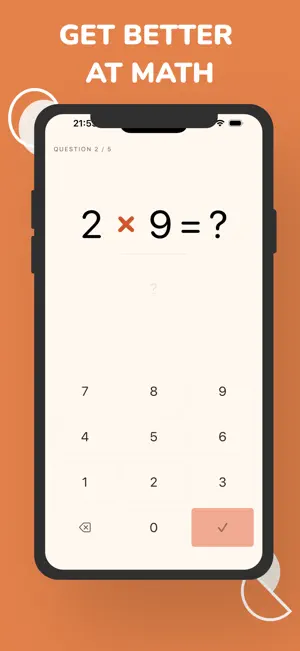
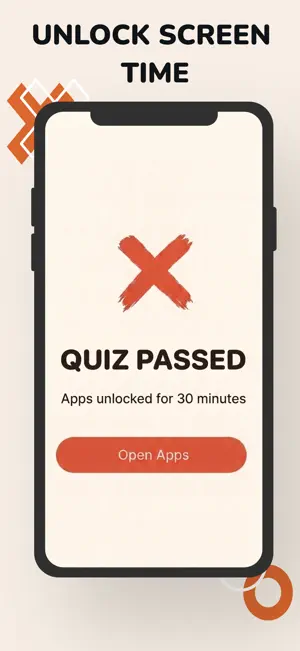
Your apps stay locked until you can do the math. Times Up blocks the apps you open without thinking (social, video, games) and unlocks them only when you answer a quick math quiz. Each quiz buys a set window. When the timer runs out, everything locks again. WHY A MATH GATE BEATS A TIMER A "5 more minutes" button takes half a second and no thought, which is why you always tap it. A math quiz takes fifteen seconds and real attention, and that is long enough to notice you never meant to open the app. A lot of sessions end right there, before the unlock. IT GETS SHARPER AS YOU DO Times Up scores every problem you see and weights the next quiz toward what you keep missing. The facts you are slow on come back more often. The ones you have nailed return on a spacing schedule so they stay sharp. Everything runs on the device, so questions are instant. TEN TIERS PER OPERATION Addition, subtraction, multiplication, division, and missing-number puzzles ("? x 8 = 56"). Ten tiers each, climbing as your accuracy holds. Mental arithmetic is a real skill that most of us quietly lost to calculators, and this rebuilds it in the gaps you were going to waste anyway. YOU SET THE RULES Choose which apps to block, right down to whole categories. Set quiz length from 3 to 10 questions and pick how long each unlock lasts. A 4-digit PIN protects your settings from your own weaker moments. WHAT YOU SEE Overall accuracy and 7-day trend, tier badges for each operation, a Needs Work list of the problems you keep dropping, and a daily log of every quiz. PRIVACY BY DESIGN Every answer and score stays on your device. No cloud, no accounts, no advertising IDs, no ads. REQUIRES iOS 17 or later. Apple Family Controls permission, granted on first launch. SUBSCRIPTION Times Up Premium unlocks the full app, including app blocking, the adaptive quiz engine, and your stats. There is no free version. Premium is offered as a weekly or yearly auto-renewing subscription, and current pricing is shown in the App Store before you purchase. Payment is charged to your Apple ID at confirmation of purchase. Subscriptions auto-renew unless turned off at least 24 hours before the end of the current period. Manage or cancel any time in Settings, Apple ID, Subscriptions. Privacy Policy: https://www.timesupapp.com/privacy-policy Terms of Service: https://www.timesupapp.com/terms-of-service Contact: [email protected]
What’s new
Version 1.2 · Updated September 7, 2026
We've had a rebrand! Lighter, funkier, but still your favourite math screen blocker :)
App privacy
The developer, MATHEW JAMES GRADWELL, reported these privacy practices to Apple.
Data Not Linked to You
The following data, which may be collected but is not linked to your identity, may be used for the following purposes:
- Identifiers: Device ID, User ID
- Usage Data: Product Interaction
- Purchases: Purchase History
- Diagnostics: Performance Data, Other Diagnostic Data
Used for: Developer’s Advertising or Marketing, Analytics, App Functionality
Alternatives to Times Up: Screen Time Blocker
Looking for apps like Times Up: Screen Time Blocker? Here are 6 similar apps on the App Store. The highest rated is MathBlocker: Stop Scrolling (5.0/5), and all 6 are free to download.
-
 CalcGate | App Lock with Math
-
 NumLock: Math Screen Lock
-
 MathBlocker: Stop Scrolling
5.0
MathBlocker: Stop Scrolling
5.0
-
 MindGate: Focus App Blocker
5.0
MindGate: Focus App Blocker
5.0
-
 Hourally
5.0
Hourally
5.0
-
 Kids: Lock & Learn
| App | Rating | Price | Last updated | Compare |
|---|---|---|---|---|
| Times Up: Screen Time Blocker | 3.5 / 5 (2 ratings) | Free | September 7, 2026 | |
| CalcGate | App Lock with Math | – | Free | Jun 2, 2026 | Compare |
| NumLock: Math Screen Lock | – | Free | Apr 14, 2026 | Compare |
| MathBlocker: Stop Scrolling | 5.0 / 5 (3) | Free | Apr 15, 2026 | Compare |
| MindGate: Focus App Blocker | 5.0 / 5 (1) | Free | Sep 24, 2026 | Compare |
| Hourally | 5.0 / 5 (5) | Free | Oct 21, 2026 | Compare |
| Kids: Lock & Learn | – | Free | Sep 24, 2025 | Compare |