

Safini: Parental Control
Ramil Salikhar Lifestyle iPhoneiPadiPod touch
Safini: Parental Control is a free Lifestyle app for iPhone and iPad by Ramil Salikhar. Requires iOS 17.4. Updated October 23, 2026.
- Price
- Free
- on the App Store
- Size
- 46 MB
- Age 4+
- Updated
- Oct 23
- 2026 · v1.1.4
Screenshots
About Safini: Parental Control
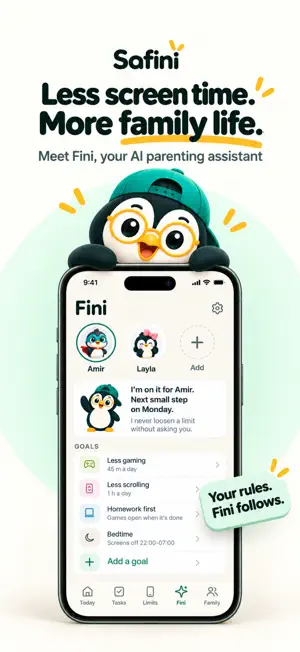
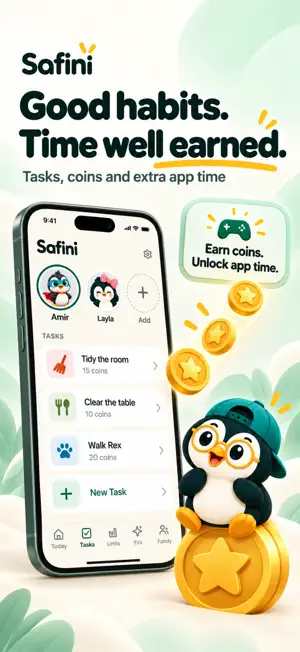
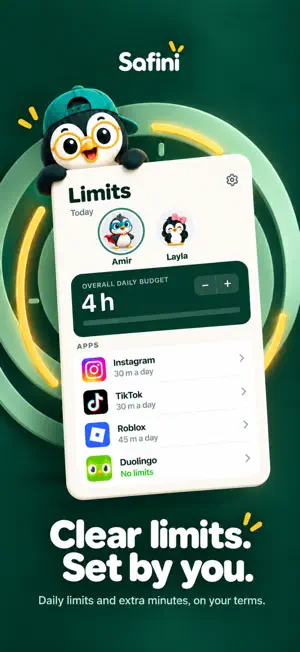
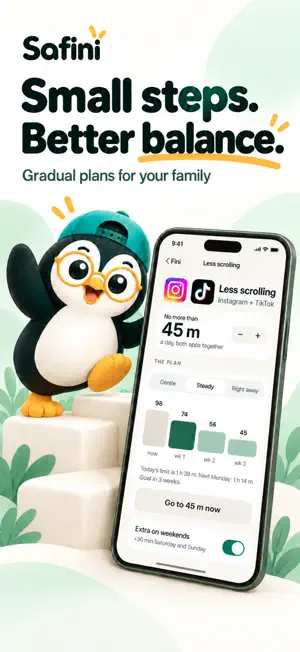
Turn everyday effort into screen-time rewards. Safini helps parents set clear limits, build family routines and give children a way to earn extra app time. MEET FINI, YOUR AI PARENTING ASSISTANT Choose a goal, such as less gaming, less scrolling, homework first or a calmer bedtime. Fini helps you manage the plan within the rules you choose. Review suggestions, choose what Fini may do on its own, pause it when needed and see its activity. TASKS THAT LEAD TO REWARDS Create tasks for reading, homework, movement or helping at home. Set a Time Coin reward and review completed tasks. Children can spend earned coins on extra time in selected apps or save toward family rewards. Time Coins are virtual rewards, not money. CLEAR LIMITS, SET BY YOU Set daily app limits and choose the cost of extra minutes. Connect your child's device and manage your family from your own phone. HELP WITH TASK REVIEWS Enable Fini checking on the tasks you choose. It can review available app-use evidence or photo proof and approve clear completions. You can review its activity and undo eligible approvals for up to 24 hours. PARENTS KEEP CONTROL Decide which actions need your approval and which Fini can handle. Children can ask for extra time; you decide how to respond. Keep tasks, limits and rewards understandable for the whole family. GET STARTED TOGETHER Install Safini on your iPhone and on your child's phone, connect them and choose your first task or goal. English, Russian, Uzbek, Kyrgyz and Kazakh are available in the app. Safini has no advertising. FREE AND PRO Start with the free plan. Safini Pro unlocks continued Fini access and expanded family limits. An introductory free trial may be available to eligible subscribers, as shown on the purchase screen. The current price, trial eligibility and renewal terms are shown before purchase. Existing rules remain in place when Pro access ends. DEVICE SUPPORT Use Safini on iPhone as a parent, or set up kid mode on your child's iPhone (beta). Kids complete tasks, earn Time Coins and spend them on extra app time, and parents set daily app limits. Some features, such as usage reports, are coming soon to iPhone kid mode. Features depend on the child's device and permissions. Support: [email protected] Website: https://safini.fun/?lang=en Privacy: https://safini.fun/privacy-policy Terms: https://safini.fun/terms-of-service Safini Pro subscriptions purchased in the app renew automatically unless cancelled at least 24 hours before the current period ends. Manage or cancel your subscription in your Apple account settings. Terms of Use (EULA): https://www.apple.com/legal/internet-services/itunes/dev/stdeula/
What’s new
Version 1.1.4 · Updated October 23, 2026
В версии 1.1.4: • Safini теперь на турецком, испанском, португальском, немецком, французском, индонезийском и арабском. Язык выбирается по языку телефона. • Исправления и улучшения.
App privacy
The developer, Ramil Salikhar, reported these privacy practices to Apple.
Data Not Collected
The developer does not collect any data from this app.
Alternatives to Safini: Parental Control
Looking for apps like Safini: Parental Control? Here are 6 similar apps on the App Store. The highest rated is Триллионер (5.0/5), and all 6 are free to download.


| App | Rating | Price | Last updated | Compare |
|---|---|---|---|---|
| Safini: Parental Control | – | Free | October 23, 2026 | |
| Gratitude Note | – | Free | Mar 17, 2026 | Compare |
| Pocket Money – Allowance | – | Free | Oct 12, 2026 | Compare |
| ololo.city | – | Free | Oct 17, 2026 | Compare |
| Qalb | – | Free | Jul 5, 2026 | Compare |
| Триллионер | 5.0 / 5 (1) | Free | Sep 17, 2026 | Compare |
| Aylex Business | – | Free | Feb 26, 2025 | Compare |