

Unfried App Blocker & Focus
Steven Freville Productivity iPhoneiPadiPod touch
Unfried App Blocker & Focus is a free Productivity app for iPhone and iPad by Steven Freville. Rated 2.0/5 from 1 ratings. Requires iOS 16.0.
- Rating
- 2.0
- 1 ratings
- Price
- Free
- on the App Store
- Size
- 73 MB
- Age 4+
- Updated
- Oct 21
- 2026 · v9.5.11
Screenshots
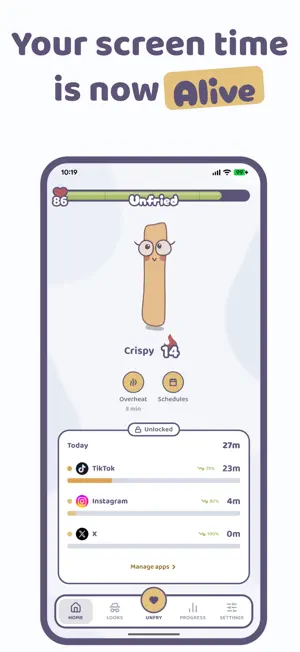


About Unfried App Blocker & Focus
Unfried is a screen time app and an app blocker that gives you a reason to keep it switched on. Block the apps that eat your day, set a daily screen time limit, and keep a fry alive with the hours you win back. Every minute on the apps you track (TikTok, Instagram, YouTube, Reddit, X) drains your fry's health. Put the phone down, do something you love, and its health comes back. The bar refills every morning, so one bad day never follows you into the next. Let the bar hit zero and your fry collapses. Your tracked apps block themselves and stay blocked until you step away. It cannot die for good, but a collapse wipes the streak you built. So you heal it before then. Doomscrolling fries your brain. Keep your fry unfried and you keep yourself unfried too. ONE TAP TO BLOCK APPS AND FOCUS There is no list to pick from and nothing to configure. Tap Unfry and a focus session starts right away. Your apps stay blocked the whole time, so being present is the deal, not a suggestion. The longer you stay off, the more health your fry gets back. THREE WAYS TO BLOCK APPS Your apps are open by default. You block them on your terms: - Unfry. One tap blocks your distracting apps while you go do something you love. - Schedules. Block apps on a set window, like bedtime, work hours or focus hours. - Overheat. Your fry steps in on its own and blocks apps for a short cool-down when you have been scrolling non stop. A blocked app has no escape on its own screen. You ease a block from inside Unfried, never from the block screen. You pick your daily screen time limit when you set up, from a strict 30 minutes to a relaxed 2 hours. The tighter the limit, the faster the bar drains. WHY THIS APP BLOCKER WORKS WHEN OTHERS FAIL Most app blockers are one tap to ignore. Unfried gives you something to lose: a fry with a name, an age, and a streak that took real days to build. You arm the guardrails yourself, and turning one off is never instant. That pause between the impulse and the app is the whole point. Friction beats willpower. YOUR SCREEN TIME IN PLAIN NUMBERS See today's minutes on every app you track. Then open Progress for the question you installed this for: is my screen time actually going down. This week's daily average against last week's, a 14 day chart with your goal line on it, and the longest break you have taken. The receipts, never a shame report. A HAT FOR EVERY DAY YOU KEEP IT ALIVE Open the app on any day your fry is alive and claim a box. The better boxes land later in the week, so a week you finish is worth more than a week you start. Skip a day and that day's box is gone. Hats come out of those boxes across five rarity tiers, each with its own personality and dialogue. Your fry keeps its hat even through a collapse. PRIVATE BY DESIGN Everything stays on your phone. No accounts. No cloud. No tracking. Your screen time data never leaves your device. WHAT IT COSTS Unfried has no ads, no accounts and nothing to sell, because none of your data ever reaches us. So the app is paid for by the people who use it. Your first days are free: 7 days on the yearly plan. After that it is 39.99 USD a year or 2.99 USD a week, and you can cancel anytime. If you decide not to subscribe, you can unblock your apps right from the subscribe screen, so Unfried never keeps your phone locked. Your fry, your streak and your setup are all kept if you come back. Payment is charged to your Apple ID account at confirmation of purchase. The subscription renews automatically unless it is cancelled at least 24 hours before the end of the current period. Manage or cancel anytime in your App Store settings. Privacy Policy: https://unfried.app/privacy.html Terms of Use (EULA): https://www.apple.com/legal/internet-services/itunes/dev/stdeula/ Less scrolling. More living. Keep your fry alive.
What’s new
Version 9.5.11 · Updated October 21, 2026
- Small bugs fixed
App privacy
The developer, Steven Freville, reported these privacy practices to Apple.
Data Used to Track You
The following data may be used to track you across apps and websites owned by other companies:
- Purchases: Purchase History
- Identifiers: Device ID
- Usage Data: Product Interaction, Advertising Data
Data Linked to You
The following data, which may be collected and linked to your identity, may be used for the following purposes:
- Purchases: Purchase History
- Identifiers: Device ID
- Usage Data: Product Interaction, Advertising Data
Used for: Third-Party Advertising
Data Not Linked to You
The following data, which may be collected but is not linked to your identity, may be used for the following purposes:
- Identifiers: User ID
- Diagnostics: Performance Data
Used for: Analytics, App Functionality
Alternatives to Unfried App Blocker & Focus
Looking for apps like Unfried App Blocker & Focus? Here are 6 similar apps on the App Store. The highest rated is Tino: Stop Brainrot Be Present (5.0/5), and all 6 are free to download.
-
 Hearless: Voice to Text
-
 Tino: Stop Brainrot Be Present
5.0
-
 one hour - screen time budget
4.6
-
 ZeroPamine - Focus Timer
5.0
-
 App Blocker - Bloko
4.2
-
 daily reflections : Reset
5.0
| App | Rating | Price | Last updated | Compare |
|---|---|---|---|---|
| Unfried App Blocker & Focus | 2.0 / 5 (1 rating) | Free | October 21, 2026 | |
| Hearless: Voice to Text | – | Free | Sep 16, 2026 | Compare |
| Tino: Stop Brainrot Be Present | 5.0 / 5 (3) | Free | Sep 19, 2026 | Compare |
| one hour - screen time budget | 4.6 / 5 (13) | Free | Oct 17, 2026 | Compare |
| ZeroPamine - Focus Timer | 5.0 / 5 (1) | Free | May 28, 2026 | Compare |
| App Blocker - Bloko | 4.3 / 5 (4) | Free | Sep 29, 2026 | Compare |
| daily reflections : Reset | 5.0 / 5 (9) | Free | Aug 14, 2026 | Compare |