

Pluvia - Rain Sounds for Sleep
Yuns Yang Health & Fitness iPhoneiPadiPod touch
Pluvia - Rain Sounds for Sleep is a free Health & Fitness app for iPhone and iPad by Yuns Yang. Requires iOS 13.0. Updated October 25, 2026.
- Price
- Free
- on the App Store
- Size
- 73 MB
- Age 4+
- Updated
- Oct 25
- 2026 · v1.3.0
Screenshots

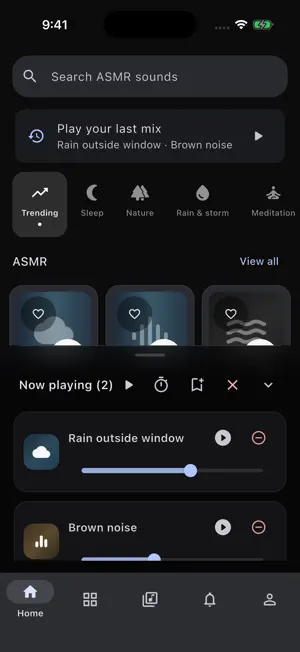

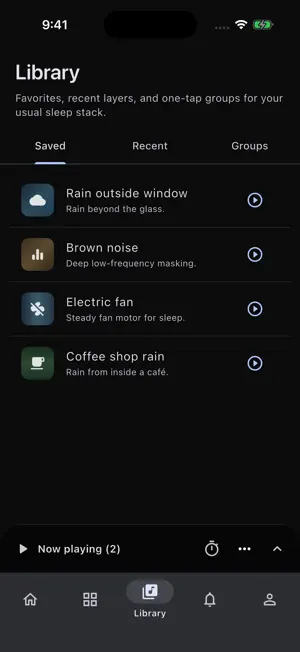
About Pluvia - Rain Sounds for Sleep
Make room for a quieter moment with Pluvia. Mix rain, nature sounds, steady noise and ASMR textures for bedtime, focused work or a relaxing break. YOUR OWN SOUND MIX Choose from 92 bundled sounds and blend up to 8 layers. Adjust each sound separately, save your favorite combinations and find sounds across the full library. Start with a curated sleep, focus or city-break mix, then make it your own. READY FOR EVERYDAY LISTENING • Rain, thunder, ocean waves, birds, fans, white noise, brown noise and ASMR textures • Offline playback of the bundled sound library • Background audio with pause and resume from the lock screen and Control Center • A sleep timer with optional fade-out • Playback controls across the main tabs PICK UP WHERE YOU LEFT OFF Replay your last mix from Home or by holding the app icon and choosing the last-mix shortcut. An ordinary app launch restores your mix paused, so sound starts when you choose. KEEP YOUR FAVORITES Save favorites, saved mixes and your last mix to a backup file. Open a backup to preview and add its contents while keeping your existing library. Backup files contain mix settings, not audio recordings. MAKE IT COMFORTABLE Choose a theme and use Pluvia in English, Korean, Japanese, Spanish, French or Simplified Chinese. No account or microphone recording is required. The sound library works offline. Ads and consent services may require an internet connection. Privacy choices are available in the app settings.
What’s new
Version 1.3.0 · Updated October 25, 2026
• Replay your last mix from Home or an app-icon shortcut. • Back up favorites and mixes to a file, then import them while keeping your existing library. • Search the full sound library and start curated mixes in one tap. • Control playback across the main tabs. • Improved sleep-timer fades, lock-screen pause and resume, and audio interruption handling. • Reduced unnecessary animation and storage work, with clearer controls and accessibility labels.
App privacy
The developer, Yuns Yang, reported these privacy practices to Apple.
Data Used to Track You
The following data may be used to track you across apps and websites owned by other companies:
- Identifiers: Device ID
Data Linked to You
The following data, which may be collected and linked to your identity, may be used for the following purposes:
- Location: Coarse Location
- Usage Data: Product Interaction, Advertising Data
- Identifiers: Device ID
Used for: Third-Party Advertising, Developer’s Advertising or Marketing, Analytics
Data Not Linked to You
The following data, which may be collected but is not linked to your identity, may be used for the following purposes:
- Identifiers: Device ID
- Usage Data: Advertising Data
- Diagnostics: Performance Data, Other Diagnostic Data, Crash Data
Used for: Third-Party Advertising, Developer’s Advertising or Marketing, Analytics
Alternatives to Pluvia - Rain Sounds for Sleep
Looking for apps like Pluvia - Rain Sounds for Sleep? Here are 6 similar apps on the App Store. The highest rated is DreamNoise - Sleep Sounds (5.0/5), and all 6 are free to download.
-
 La-Lo-Ka: Rain Sleep Mixer
-
 PetLog: Pet Health Log
-
 Soundscape by SummitSight
-
 DreamNoise - Sleep Sounds
5.0
-
 Hush: Focus & Sleep Sounds
-
 Evermur: Sleep & Rain Sounds
| App | Rating | Price | Last updated | Compare |
|---|---|---|---|---|
| Pluvia - Rain Sounds for Sleep | – | Free | October 25, 2026 | |
| La-Lo-Ka: Rain Sleep Mixer | – | Free | Oct 20, 2026 | Compare |
| PetLog: Pet Health Log | – | Free | Oct 23, 2026 | Compare |
| Soundscape by SummitSight | – | Free | Feb 26, 2026 | Compare |
| DreamNoise - Sleep Sounds | 5.0 / 5 (4) | Free | Apr 29, 2026 | Compare |
| Hush: Focus & Sleep Sounds | – | Free | Mar 11, 2026 | Compare |
| Evermur: Sleep & Rain Sounds | – | Free | Sep 26, 2026 | Compare |