

Daily Bible-Bible Chat & Study
Sengle Tech Lifestyle iPhoneiPadiPod touch
Daily Bible-Bible Chat & Study is a free Lifestyle app for iPhone and iPad by Sengle Tech. Requires iOS 17.6. Updated May 27, 2026.
- Price
- Free
- on the App Store
- Size
- 153 MB
- Age 17+
- Updated
- May 27
- 2026 · v1.7.2
Screenshots



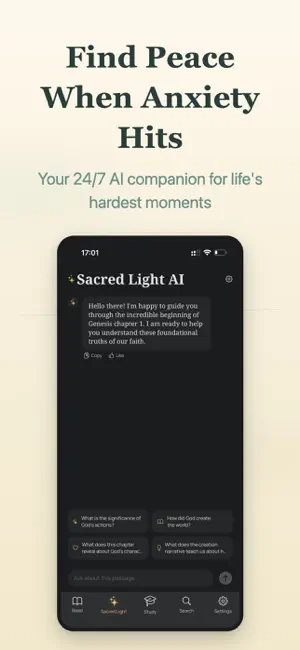
About Daily Bible-Bible Chat & Study
Read the Bible anytime, anywhere with DailyBible - your personal Bible study companion. DailyBible offers a clean, distraction-free reading experience with multiple Bible translations including KJV, CEV, and GNT. Whether you're a new reader or a lifelong student of the Word, DailyBible helps you build a consistent reading habit. SACRED LIGHT AI - NEW! • On-device AI Bible guide — scripture wisdom at your fingertips • Ask questions while reading: historical context, interpretation, life application • Multi-turn conversations to explore scripture meaning in depth • Sermon mode: AI generates background, interpretation, and reflection questions • Thinking Mode: see the AI's reasoning process for deeper understanding • 100% offline — your data never leaves your device, complete privacy • No internet required, no sign-up needed, available anytime BIBLE READING • Read multiple Bible translations (KJV, CEV, GNT, CUV, CUVT, OCCB & more) • 15 translations across English, Chinese (Simplified & Traditional), and Spanish • Customize font size (4 levels) and switch between day/night mode • Navigate easily through books, chapters, and verses • Download translations for offline reading DAILY VERSE & SHARING - NEW • Receive a daily featured verse with push notification • Generate beautiful verse image cards with custom templates and backgrounds • Share verse cards to social media, Messages, and more • Share specific verse locations via deep links (dailybible://gen/1/1) SHAREPLAY - NEW • Read the same chapter together with friends in real time via FaceTime • Stay connected in faith with group reading sessions HOME SCREEN WIDGETS - NEW • Daily Verse widget (small, medium, and large) • Study Plan progress widget • Reading Plan progress widget • Glanceable inspiration right on your Home Screen AUDIO BIBLE & READ ALOUD - NEW • Listen to professionally narrated audio Bible (Chinese & English) • Text-to-Speech for any verse using system voice • Playback controls: play/pause, previous/next chapter, speed (0.5x-2.0x) • Sleep timer: auto-stop after 15 min, 30 min, or 1 hour • Download audio for offline listening (subscribers) • Background playback with Lock Screen controls • CarPlay support - listen while you drive STUDY & GROW • 13 study plans: 7-day topical courses (Psalms, Teachings of Jesus, Journey of Faith, Chapters of Love, Bible Basics, Fruit of Spirit), 15-day deep dives (Gospel, Wisdom Literature), and full reading plans (30, 60, 90, 180, 365 days) • Course detail page: preview daily lessons and reading chapters before starting • Relearn completed courses to review and deepen understanding • Create custom study plans - choose your own books and pace • Daily check-in to track your progress and build streaks • Earn a beautiful completion certificate when you finish • Save and share your certificate with friends PERSONAL NOTES • Bookmark your favorite verses • Highlight text in 5 colors • Write personal study notes (up to 5,000 characters) SMART SEARCH • Search across all verses with keyword highlighting • Subscribers can search across multiple translations CLOUD SYNC • Sync bookmarks, highlights, and notes via iCloud • Seamlessly switch between your Apple devices PRIVACY FIRST • No account registration required • No third-party ads or tracking • All data stored locally and in your personal iCloud • Payments handled exclusively through Apple LINKS • Support: https://lightingroom.xyz/bible/support.html • Privacy Policy: https://lightingroom.xyz/bible/privacy.html • Terms of Use: https://lightingroom.xyz/bible/terms.html
What’s new
Version 1.7.2 · Updated May 27, 2026
New: Swipe gesture guide after reader Coach Mark — helps new users discover scrolling to read. • New: Chapter navigation Coach Mark — when scrolling to the bottom for the first time, highlights the prev/next chapter buttons. • New: AI Tab Coach Mark now adapts to model status — shows download progress tip or chat invitation based on current state. • Fixed: First-launch splash screen could hang indefinitely waiting for network authorization — now uses foreground-only 10s timeout.
App privacy
The developer, Sengle Tech, reported these privacy practices to Apple.
Data Used to Track You
The following data may be used to track you across apps and websites owned by other companies:
- Usage Data: Advertising Data
Data Linked to You
The following data, which may be collected and linked to your identity, may be used for the following purposes:
- Usage Data: Advertising Data
Used for: Third-Party Advertising, Developer’s Advertising or Marketing, Analytics
Data Not Linked to You
The following data, which may be collected but is not linked to your identity, may be used for the following purposes:
- Usage Data: Product Interaction
- Diagnostics: Crash Data, Performance Data, Other Diagnostic Data
Used for: Analytics, Product Personalization, App Functionality