

QuickSketch - Draw & Coloring
Nguyen Nghiem Graphics & Design iPhoneiPadiPod touch
QuickSketch - Draw & Coloring is a free Graphics & Design app for iPhone and iPad by Nguyen Nghiem. Requires iOS 17.0. Updated May 28, 2026.
- Price
- Free
- on the App Store
- Size
- 26 MB
- Age 4+
- Updated
- May 28
- 2026 · v3.1
Screenshots

About QuickSketch - Draw & Coloring
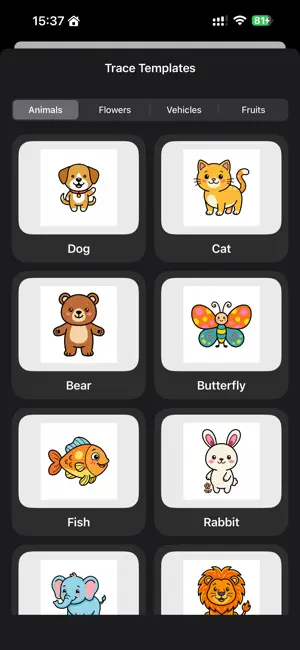
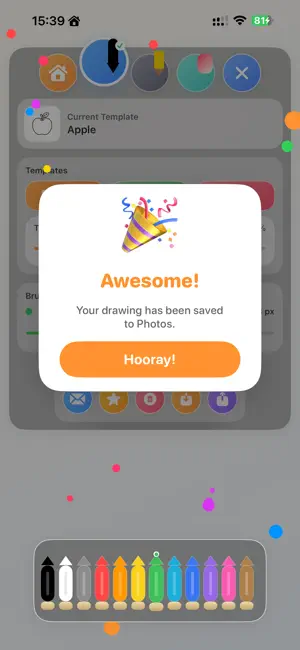
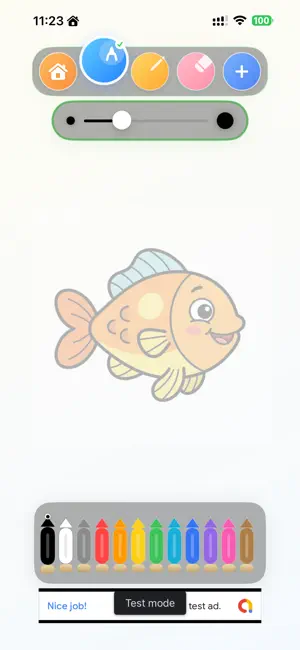
QuickSketch is a fun and easy drawing app designed for creativity and relaxation. WHAT’S NEW: - New natural-inspired interface - Smoother drawing experience - More creative tools - Improved performance FEATURES: - Smooth drawing tools: pen, pencil, eraser - Neon glow brush effects - Coloring templates - Trace mode for learning drawing - Save and share your artwork Simple, enjoyable, and perfect for everyone. Start sketching and bring your ideas to life!
What’s new
Version 3.1 · Updated May 28, 2026
Welcome to QuickSketch 3.1! This major update brings a complete visual redesign and powerful productivity features: Adorable 3D Claymorphic UI: All buttons, brush tools, and control panels have been replaced with premium 3D clay-style assets, complete with micro-animations and warm pastel color themes. Frosted Glass Gallery & View Modes: View your sketches in a premium frosted glassmorphism style. Choose between Grid, Compact, or List views with handy badges showing your last-used drawing tool. Smart Folders & Batch Operations: Organize your artwork into folders. Use Multi-Select mode to duplicate, share, or delete multiple projects in one tap. Recycle Bin (Soft-Delete): Deleted drawings are safely moved to the Recycle Bin first, allowing you to restore them or delete them permanently later. Direct Image Import: Import photos directly from your library to use as overlay tracing templates. Bug Fixes & Enhancements: Fixed the annoying stroke misalignment (jumping coordinates) when lifting your finger on the first stroke. Re-enabled and optimized 2-finger zoom (up to 5x) with smooth canvas panning. Optimized advertisement frequencies to ensure a less intrusive experience. Love drawing with us? Please leave a 5-star rating on the App Store!
App privacy
The developer, Nguyen Nghiem, reported these privacy practices to Apple.
Data Not Linked to You
The following data, which may be collected but is not linked to your identity, may be used for the following purposes:
- Identifiers: Device ID
- Usage Data: Product Interaction, Advertising Data
Used for: Third-Party Advertising, Analytics
Alternatives to QuickSketch - Draw & Coloring
Looking for apps like QuickSketch - Draw & Coloring? Here are 6 similar apps on the App Store. The highest rated is Wallartee: Art Presentation (4.8/5), and all 6 are free to download.
-
 Wallartee: Art Presentation
4.8
Wallartee: Art Presentation
4.8
-
 T-Shirt Designer - TeeCraft
4.8
T-Shirt Designer - TeeCraft
4.8
-
 Rezona: Make. Play. Earn.
4.5
Rezona: Make. Play. Earn.
4.5
-
 Archi: Interior AI Home Design
4.3
Archi: Interior AI Home Design
4.3
-
 Boon: AI Logo Maker & Design
4.7
Boon: AI Logo Maker & Design
4.7
-
 AI Logo Maker, Generator: Pixy
4.6
AI Logo Maker, Generator: Pixy
4.6
| App | Rating | Price | Last updated | Compare |
|---|---|---|---|---|
| QuickSketch - Draw & Coloring | – | Free | May 28, 2026 | |
| Wallartee: Art Presentation | 4.8 / 5 (149) | Free | Oct 28, 2026 | Compare |
| T-Shirt Designer - TeeCraft | 4.8 / 5 (395) | Free | May 29, 2026 | Compare |
| Rezona: Make. Play. Earn. | 4.5 / 5 (127) | Free | Oct 28, 2026 | Compare |
| Archi: Interior AI Home Design | 4.3 / 5 (54) | Free | Aug 26, 2026 | Compare |
| Boon: AI Logo Maker & Design | 4.7 / 5 (81,989) | Free | Oct 20, 2026 | Compare |
| AI Logo Maker, Generator: Pixy | 4.6 / 5 (2,390) | Free | Sep 30, 2026 | Compare |