

MBTA Widgets
PUNEET RAMINI Travel iPhoneiPadiPod touch
MBTA Widgets is a free Travel app for iPhone and iPad by PUNEET RAMINI. Rated 4.5/5 from 10 ratings. Requires iOS 18.6. Updated August 11, 2026.
- Rating
- 4.5
- 10 ratings
- Price
- Free
- on the App Store
- Size
- 26 MB
- Age 4+
- Updated
- Aug 11
- 2026 · v3.2
Screenshots

About MBTA Widgets
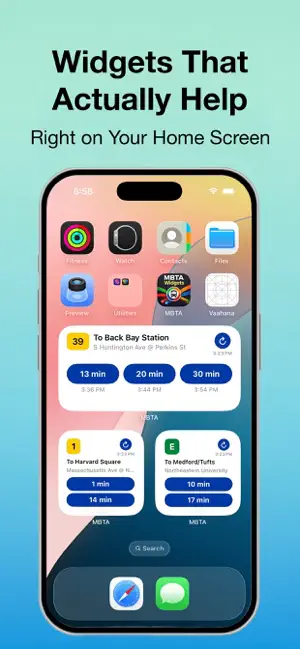
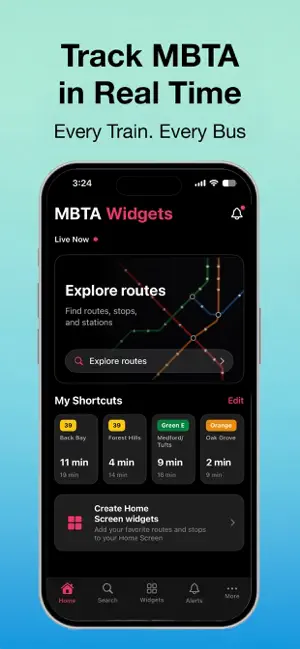
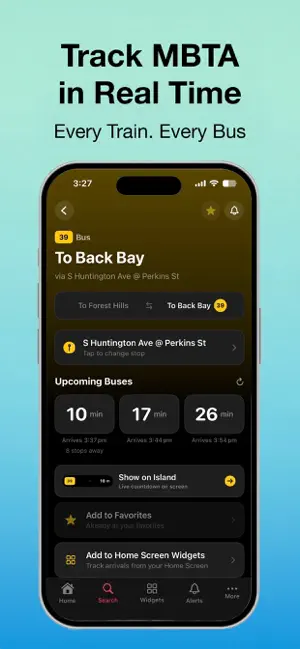
See your next MBTA arrival without opening an app. MBTA Widgets puts live bus, subway and Commuter Rail times right on your Home Screen. Free. No ads, no account, no location access. Time-Based Widgets: One widget that changes with your day. Set your route to work for 7–10 AM and your route home for 4–7 PM, and it switches automatically. Same square on your Home Screen, right route at the right time. Live Countdown: Start a countdown before you leave and track it on the Dynamic Island and Lock Screen the whole walk to your stop. It clears itself once your ride arrives. Service Alerts Built In: Suspensions and delays appear right alongside your arrival times, so an empty screen never leaves you guessing whether your line is down. All Three Modes: Bus, Subway and Commuter Rail. Commuter Rail shows both live-tracked and scheduled departures for the rest of the day, each clearly labelled. Always Know How Fresh It Is: Every widget shows when it last updated, with a refresh button for instant new data without opening the app. Ask Siri for your next arrival (Shortcuts). Save your regular stops as favourites. Up to three widgets, in small and medium sizes. This app is not affiliated with, endorsed by, or sponsored by the Massachusetts Bay Transportation Authority (MBTA). Data is provided via the official MBTA public API.
Ratings & reviews
4.5
10 ratings
What’s new
Version 3.2 · Updated August 11, 2026
- Commuter Rail now shows departures, with all remaining trains for the day - Service alerts appear inline instead of an empty screen - Fixed widgets with clear and tinted icon themes - Fixed time-based widgets not switching - Bug fixes and improvements - New app icon
App privacy
The developer, PUNEET RAMINI, reported these privacy practices to Apple.
Data Not Linked to You
The following data, which may be collected but is not linked to your identity, may be used for the following purposes:
- Search History: Search History
- Identifiers: Device ID
- Usage Data: Product Interaction
- Diagnostics: Performance Data
Used for: Analytics, App Functionality
Alternatives to MBTA Widgets
Looking for apps like MBTA Widgets? Here are 6 similar apps on the App Store. The highest rated is MBTA Train & Bus Tracker (5.0/5), and all 6 are free to download.
-
 MBTA Train & Bus Tracker
5.0
MBTA Train & Bus Tracker
5.0
-
 Next MBTA
-
 NextTransit
5.0
NextTransit
5.0
-
 Live MBTA
4.6
Live MBTA
4.6
-
 MBTA See Say
4.6
MBTA See Say
4.6
-
 Toad - Parking Alerts
3.7
Toad - Parking Alerts
3.7
| App | Rating | Price | Last updated | Compare |
|---|---|---|---|---|
| MBTA Widgets | 4.5 / 5 (10 ratings) | Free | August 11, 2026 | |
| MBTA Train & Bus Tracker | 5.0 / 5 (2) | Free | Dec 3, 2025 | Compare |
| Next MBTA | – | Free | Sep 28, 2026 | Compare |
| NextTransit | 5.0 / 5 (5) | Free | Jun 11, 2026 | Compare |
| Live MBTA | 4.6 / 5 (150) | Free | Jan 17, 2025 | Compare |
| MBTA See Say | 4.6 / 5 (494) | Free | Jul 29, 2024 | Compare |
| Toad - Parking Alerts | 3.7 / 5 (3) | Free | Sep 26, 2026 | Compare |
Compare MBTA Widgets with the top alternatives: ratings, updates, ASO score and keyword gaps →