

GarageLab: AI Car Designer
Ahmet Hakan Eroglu Photo & Video iPhoneiPadiPod touch
GarageLab: AI Car Designer is a free Photo & Video app for iPhone and iPad by Ahmet Hakan Eroglu. Rated 4.7/5 from 9 ratings. Requires iOS 15.1.
- Rating
- 4.7
- 9 ratings
- Price
- Free
- on the App Store
- Size
- 120 MB
- Age 4+
- Updated
- Oct 8
- 2026 · v1.3.8
Screenshots


About GarageLab: AI Car Designer
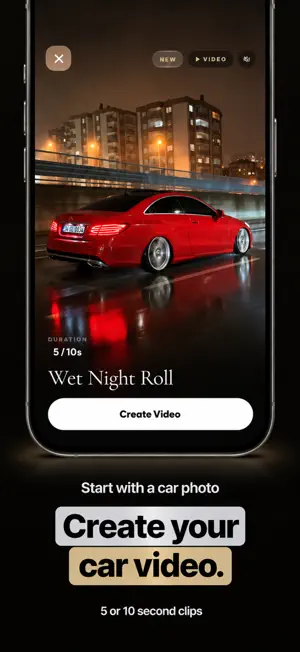
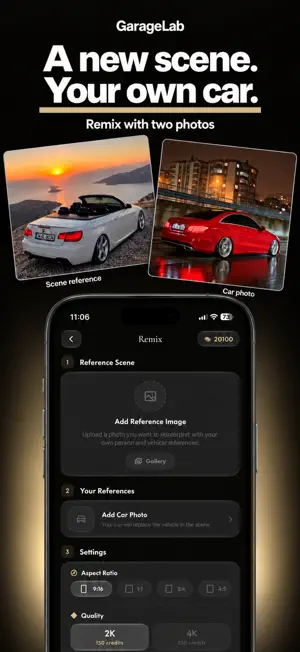
Turn any car photo into cinematic AI visuals and videos. GarageLab is an AI car studio built for enthusiasts, creators, dealerships, and automotive social media. CREATE AI CAR PHOTOS • Transform your own car into polished automotive shots • Explore cinematic presets, locations, weather, lighting, and styles • Create with your car alone or place yourself in the scene • Export high-quality 2K and 4K images REMIX ANY SCENE Upload an inspiration image and recreate its composition with your own car and character. Change the setting, outfit, atmosphere, or creative direction with additional instructions. ANIMATE YOUR RIDE Turn a still car photo into a cinematic video. Choose a scene, time of day, duration, and generation mode, or start with a ready-made video template. QUICK CREATE Choose your car, colour, scene, weather, time, location, and aspect ratio. GarageLab handles the composition and generates a share-ready result. BUILT FOR AUTOMOTIVE CREATORS Create social posts, wallpapers, listing visuals, concept shots, fan scenes, and cinematic car content without organising a traditional photo shoot. Some creation features require credits. Subscriptions and one-time credit packs are available as in-app purchases. AI-generated results may vary depending on the reference images and selected settings. Privacy Policy: https://garagelab.app/privacy GarageLab Terms of Use: https://garagelab.app/terms Terms of Use (EULA): https://www.apple.com/legal/internet-services/itunes/dev/stdeula/
Ratings & reviews
4.7
9 ratings
What’s new
Version 1.3.8 · Updated October 8, 2026
• Improved overall performance and stability. • Fixed minor issues for a smoother creation process.
App privacy
The developer, Ahmet Hakan Eroglu, reported these privacy practices to Apple.
Data Used to Track You
The following data may be used to track you across apps and websites owned by other companies:
- Identifiers: Device ID
- Usage Data: Product Interaction
Data Linked to You
The following data, which may be collected and linked to your identity, may be used for the following purposes:
- Identifiers: Device ID, User ID
- Usage Data: Product Interaction
- Purchases: Purchase History
- User Content: Photos or Videos, Other User Content
Used for: Developer’s Advertising or Marketing, Analytics, App Functionality
Data Not Linked to You
The following data, which may be collected but is not linked to your identity, may be used for the following purposes:
- Diagnostics: Performance Data
Used for: App Functionality
Alternatives to GarageLab: AI Car Designer
Looking for apps like GarageLab: AI Car Designer? Here are 6 similar apps on the App Store. The highest rated is Tunery: AI Car Designer (5.0/5), and all 6 are free to download.
-
 Tunery: AI Car Designer
5.0
-
 Carzie: AI Car Photo & Video
5.0
-
 Crediva: AI Car Video Maker
-
 Posely: AI Car Photo & Video
4.6
-
 CarVerse: AI Car Video & Photo
3.0
-
 CS: AI Car Editor
5.0
| App | Rating | Price | Last updated | Compare |
|---|---|---|---|---|
| GarageLab: AI Car Designer | 4.7 / 5 (9 ratings) | Free | October 8, 2026 | |
| Tunery: AI Car Designer | 5.0 / 5 (1) | Free | Oct 20, 2026 | Compare |
| Carzie: AI Car Photo & Video | 5.0 / 5 (1) | Free | Sep 15, 2026 | Compare |
| Crediva: AI Car Video Maker | – | Free | Apr 24, 2026 | Compare |
| Posely: AI Car Photo & Video | 4.6 / 5 (959) | Free | Sep 7, 2026 | Compare |
| CarVerse: AI Car Video & Photo | 3.0 / 5 (2) | Free | Jun 25, 2025 | Compare |
| CS: AI Car Editor | 5.0 / 5 (1) | Free | Oct 23, 2026 | Compare |