

Jamf Device Checker
JAMF Software Business iPhoneiPadiPod touch
Jamf Device Checker is a free Business app for iPhone and iPad by JAMF Software. Requires iOS 18.6. Updated November 5, 2026.
- Price
- Free
- on the App Store
- Size
- 13 MB
- Age 4+
- Updated
- Nov 5
- 2026 · v1.2.7
Screenshots



About Jamf Device Checker
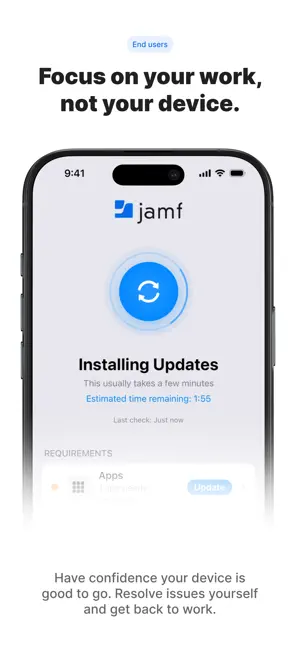
Keep Your Device Ready for Work Jamf Device Checker helps you verify your device is ready to be productive. Get instant visibility into your device health with an easy-to-understand dashboard that shows exactly what's working and what needs attention. STAY READY WITH EASE Check your device status anytime with a simple, visual interface. Green tiles mean you're good to go. Yellow or red tiles show what needs attention. No technical expertise required. MONITOR WHAT MATTERS • Operating System Status Check if your iOS version is up to date and see upcoming deadlines for updates • Required Apps Verify that all required work apps are installed and up to date • Battery Health Monitor battery level and overall battery health status • Storage Space See available storage and get alerts when space is running low • Power Status Check current battery percentage with warning thresholds • Network Connectivity Confirm WiFi, Ethernet, and cellular connections with internet reachability testing • Network Speed Testing Measure download/upload speeds and latency to diagnose connectivity issues • Device Temperature Monitor thermal state to understand when heat may impact performance • Performance Monitoring Track memory usage and CPU activity to identify slowdowns • Device Health View hardware component health status including camera, display, Face ID, and more (iOS 27+) • Quick Access Links Access your organization's support portals, help desks, and resources directly from the app TAKE ACTION QUICKLY When your device needs attention, Jamf Device Checker makes it clear what to do. Each status tile provides detailed information and guidance to help you resolve issues quickly and get back to work. Run network speed tests to diagnose slow connections, or access support links configured by your organization for immediate help. SETUP STATUS TRACKING If your organization uses Jamf Setup, see your on-duty or off-duty status right at the top of the app. Know at a glance whether your device is configured for work or personal use. DESIGNED FOR MANAGED DEVICES Jamf Device Checker is designed for devices managed by your organization through Jamf Pro. The app automatically configures itself when deployed by your IT team—no manual setup required. Your IT team can customize which health checks are enabled, configure thresholds and deadlines, and provide quick access links to support resources. REQUIREMENTS • Device must be enrolled in your organization's Jamf Platform • iOS 18.6 or later • Internet connectivity for status updates Note: This app requires your device to be managed by Jamf Pro. If you're not sure whether your organization uses Jamf Pro, contact your IT department.
What’s new
Version 1.2.7 · Updated November 5, 2026
NEW: EXACT OS VERSION MATCH Set device-checker-os-exact-version to YES and device-checker-os-min-version becomes the one approved OS version. Older versions follow the usual deadline rules. A newer OS shows Not Ready right away, with no Update button, since it can't be downgraded. Missing version parts count as 0 (17.5 means 17.5.0). NEW: EXACT APP VERSION MATCH Set device-checker-apps-exact-version to YES to make each app's version in device-checker-apps-list the exact approved version. A newer installed version needs updating just like an older one: it follows the app's deadline and stays in the Self Service Update list. NEW: JAMF SETUP TOGGLE With the Jamf Setup EA enabled and device-checker-jamf-setup-ea-toggle-enabled set to YES, a "Tap to change to …" button appears under the Setup Status line so users can switch between on duty and off duty. Users confirm the change first. It applies right away and is reverted if the server update fails. The linked app's API role needs the Update Mobile Devices privilege, and the EA must be an editable text field. While off duty, the overall status title shows the off-duty EA value. NEW: CONFIGURATION PROFILES AND CERTIFICATES Two optional Device Status rows show how many configuration profiles and certificates are installed. Tap a row for the full list. The Certificates row turns orange when a certificate expires within 30 days and red when one has expired. Both are off by default: set device-checker-configuration-profiles-enabled and device-checker-certificates-enabled to YES. No extra privileges are needed, and the rows don't change the overall status. IMPROVED: APP CONFIG BUILDER The builder now checks your configuration before saving and keeps Save disabled until issues are fixed. Loading a different app record no longer carries over values from the previous one. New toggles cover the new 1.2.7 settings, plus a spinner style picker (Default or Aviation). IMPROVED: LIVE BATTERY REQUIREMENT The overall status updates as soon as the battery charge crosses the minimum set by device-checker-battery-min-level. IMPROVED: CLEARER CONNECTION MESSAGES When a check fails, the banner and Unknown status now say why: offline, sign-in problem, device not found, server error or unreadable response. IMPROVED: ACCESSIBILITY Better VoiceOver labels, higher-contrast status icons, and improved layouts at the largest text sizes. BUG FIXES Fixed the app staying on the login screen when App Config arrived after the first launch. Fixed the status getting stuck on Installing Updates after the app was closed during an update. Fixed deadlines showing the wrong number of days on non-Gregorian calendars or time zones behind UTC. Turning off the OS or Apps check no longer leaves the status at Not Ready. Fixed app versions with more than three parts or letters being compared incorrectly. Fixed the internet connectivity test, which now uses https and detects captive portals. Fixed sign-in recovery when a session token can't be refreshed. Fixed the network speed test reporting results from failed requests. It now measures over a fixed 5-second window, can be cancelled, and uses up to about 15 MB of data.
App privacy
The developer, JAMF Software, reported these privacy practices to Apple.
Data Not Linked to You
The following data, which may be collected but is not linked to your identity, may be used for the following purposes:
- Identifiers: User ID
- Usage Data: Product Interaction
- Diagnostics: Crash Data
Used for: Analytics, App Functionality
Alternatives to Jamf Device Checker
Looking for apps like Jamf Device Checker? Here are 6 similar apps on the App Store. The highest rated is Extron Control (4.5/5), and all 6 are free to download.
-
 Kiosk Pro Lite
2.3
-
 Envoy Visitors Kiosk
4.0
-
 Extron Control
4.5
-
 BeyondTrust Rep Console
1.8
-
 OptiSigns Digital Signage
4.2
-
 Cisco Security Connector
2.9
| App | Rating | Price | Last updated | Compare |
|---|---|---|---|---|
| Jamf Device Checker | – | Free | November 5, 2026 | |
| Kiosk Pro Lite | 2.3 / 5 (18) | Free | Aug 19, 2026 | Compare |
| Envoy Visitors Kiosk | 4.0 / 5 (28) | Free | Oct 27, 2026 | Compare |
| Extron Control | 4.5 / 5 (11) | Free | May 4, 2026 | Compare |
| BeyondTrust Rep Console | 1.8 / 5 (107) | Free | Jul 30, 2026 | Compare |
| OptiSigns Digital Signage | 4.3 / 5 (4) | Free | Apr 22, 2026 | Compare |
| Cisco Security Connector | 2.9 / 5 (31) | Free | Sep 10, 2026 | Compare |