

Device Kit: Phone Temperature
Shuyang Fan Ziyang Software Development Studio (Individually Owned Business) Utilities iPhoneiPadiPod touch
Device Kit: Phone Temperature is a free Utilities app for iPhone and iPad by Shuyang Fan Ziyang Software Development Studio (Individually Owned Business).
- Rating
- 4.9
- 93 ratings
- Price
- Free
- on the App Store
- Size
- 36 MB
- Age 4+
- Updated
- Oct 23
- 2026 · v2.1.3
Screenshots


About Device Kit: Phone Temperature
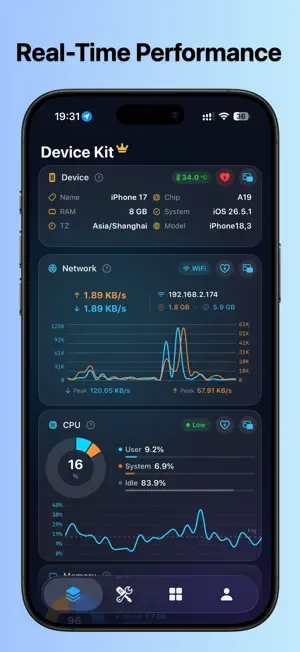
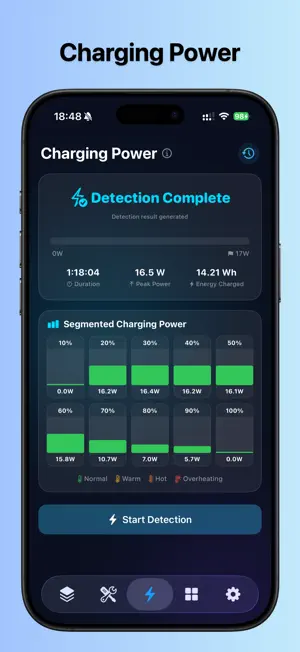
Device Kit — Your iPhone's All-in-One Health Checker, Take Full Control of Your Device in Real Time! Ever wonder how hot your phone really is? How fast is it charging? Is your CPU about to max out? Is your network being throttled? Device Kit gives you the most intuitive, real-time, and comprehensive answers. ▸▸ Core Monitoring at a Glance ◂◂ CPU Temperature — Real-time device temperature with smart estimates for battery and body temperature. 6-level thermal warning system alerts you before your phone overheats. CPU Usage — Real-time CPU utilization monitoring with user/system/idle breakdowns, plus historical trend charts to track load changes. Network Speed — Real-time speed for both Wi-Fi and cellular networks. Monitor upload/download speeds, peak speeds, and daily data usage stats. Battery Status — Charge level, charging state, low-power mode, thermal status — full battery health insights. Memory & Storage — Used/total capacity with breakdowns, storage usage percentage — say goodbye to storage anxiety. ▸▸ Dynamic Island & Floating Widgets — Desktop Monitoring ◂◂ Dynamic Island Live Monitor — No need to open the app. While your phone is locked or you're using other apps, the Dynamic Island shows real-time CPU temperature, network speed, and CPU usage with live updates. Picture-in-Picture Floating Widget — A persistent floating window on your home screen monitors network speed, temperature, and CPU. Drag it anywhere, use it while doing other tasks — true desktop-level monitoring experience. Motion Tracker on Dynamic Island — While recording motion trajectory, the Dynamic Island displays real-time distance, duration, and speed. ▸▸ Charging Power Detection ◂◂ Real-time Power Estimation — Detects charging power (W) in real time, telling you whether it's slow charging, standard charging, or fast charging. Charging Speed Rating — Slow / Standard / Fast / Ultra — clear at a glance. Charging Statistics — Duration, peak power, and total energy charged — a complete charging report. History Log — Every charging session is automatically saved for later review and comparison. ▸▸ 18 Practical Tools ◂◂ 【System Tools】 Flashlight (9 blink modes with brightness adjustment), Haptic Feedback, Multi-Touch Test, Motion Tracker 【Network Tools】 Ping, Telnet, SSH (Pro) 【Utility Tools】 QR Code Generator, Decibel Meter, Password Generator 【Sensor Tools】 Compass, GPS, Gyroscope, Magnetometer, Barometer, Altimeter, Proximity Sensor 【Display Tools】 Color & Brightness Adjustment 【Environment Tools】 Weather (Pro) ▸▸ Home Screen Widgets ◂◂ Home Screen Widgets — Uptime, Weather, CPU, Temperature, Memory, Storage, Clock, Device Info, Quick Actions. Available in Small, Medium, and Large sizes. Lock Screen Widgets — Weather, Storage, Uptime — check key info without unlocking. 【Auto-Renewable Subscription Terms】 Pro membership is an auto-renewing subscription billed monthly or yearly. Payment will be charged to your Apple ID account upon confirmation of purchase. The subscription will automatically renew within 24 hours prior to the end of the current period unless auto-renew is turned off at least 24 hours before the end of the current period. To cancel, please turn off auto-renewal in Settings > Apple ID > Subscriptions at least 24 hours before the current period ends. You can manage or cancel your subscription anytime after purchase in your account settings. Any unused portion of a free trial period (if offered) will be forfeited when you purchase a subscription. 【Privacy Policy & Terms of Service】 Privacy Policy: https://device-kit.pages.dev/private Terms of Service: https://www.apple.com/legal/internet-services/itunes/dev/stdeula/ Download Device Kit and keep your device under your complete control!
Ratings & reviews
4.9
93 ratings
What’s new
Version 2.1.3 · Updated October 23, 2026
· New comparison tool: compare any two iPhone models · Start Dynamic Island instantly with Siri or Shortcuts
App privacy
The developer, Shuyang Fan Ziyang Software Development Studio (Individually Owned Business), reported these privacy practices to Apple.
Data Not Linked to You
The following data, which may be collected but is not linked to your identity, may be used for the following purposes:
- Purchases: Purchase History
- Identifiers: User ID, Device ID
- Usage Data: Product Interaction
Used for: App Functionality
Alternatives to Device Kit: Phone Temperature
Looking for apps like Device Kit: Phone Temperature? Here are 6 similar apps on the App Store. The highest rated is Temp Mail : Burner Email (5.0/5), and 5 of the 6 are free to download.
-
 Temp Mail : Burner Email
5.0
Temp Mail : Burner Email
5.0
-
 FileXip
4.2
FileXip
4.2
-
 Neko Dash - Just a Dashboard
4.8
Neko Dash - Just a Dashboard
4.8
-
 Device Status⁺ CPU x Monitor z
4.8
Device Status⁺ CPU x Monitor z
4.8
-
 Network Usage Monitor
4.7
Network Usage Monitor
4.7
-
 Smart Home Manager - Itemia
4.9
Smart Home Manager - Itemia
4.9
| App | Rating | Price | Last updated | Compare |
|---|---|---|---|---|
| Device Kit: Phone Temperature | 4.9 / 5 (93 ratings) | Free | October 23, 2026 | |
| Temp Mail : Burner Email | 5.0 / 5 (22) | Free | Sep 25, 2026 | Compare |
| FileXip | 4.3 / 5 (16) | 5.99 USD | Oct 16, 2026 | Compare |
| Neko Dash - Just a Dashboard | 4.8 / 5 (8) | Free | Sep 24, 2026 | Compare |
| Device Status⁺ CPU x Monitor z | 4.8 / 5 (188) | Free | Oct 30, 2026 | Compare |
| Network Usage Monitor | 4.7 / 5 (152) | Free | Sep 24, 2026 | Compare |
| Smart Home Manager - Itemia | 4.9 / 5 (7) | Free | Oct 13, 2026 | Compare |